10 Cheapest Professional TikTok Analytics Tools for 2026 You Need to Know

Are you looking for the Cheapest Professional TikTok Analytics Tool in 2026? TikTok analytics tools have changed a lot since 2020. At first, these tools only showed simple stats. Now, you can see more details and track how videos do. Prices are higher now because tools have more features. Look at this table to see TikTok analytics prices in 2026:
Plan Type | Price Range |
|---|---|
Basic Plan | $49 to $82 per month |
Comprehensive Tool | Starts at $299 per month |
Custom Solutions | Exceeding $10,000 annually |
Many TikTok analytics tools have great features. But it can be hard to find one that fits your budget. Think about what you want to do on TikTok, like influencer marketing or making better content, before you pick a tool. You want to get good value, so compare the features and prices.
Key Takeaways
Begin with TikTok Native Analytics. It is free and gives you simple stats like views and engagement. - Look at the features and prices of different tools. This helps you pick the best one for your TikTok goals and how much you want to spend. - Check analytics often to learn what your audience likes. This will help you make your content better.
Quick List of the Cheapest TikTok Analytics Tools
Tool Names, Prices, and Key Features
You want to find TikTok analytics tools that cost less. These tools can help you grow your account. Let’s check out some cheap choices for 2026. Some tools are free. Others have low prices, so you can try them easily.
Tip: If you have a Business or Creator account, use TikTok Native Analytics first. It gives you basic stats for free.
Here is a quick list of popular tools and their prices:
TikTok Native Analytics (Free): You get important numbers like views, followers, and engagement. This tool is good for people who are new.
Social Blade (Free / $3.99+): You can see how your account grows and compare it to others. It shows old data but does not give private analytics.
InfluenceFlow (Free forever): This tool helps you handle campaigns and keep track of payments. It is best for creators who want to work with brands.
Hootsuite ($49-$249/month): You can manage TikTok and other social apps in one place. It has strong reports but is better for companies.
Brandwatch (Custom enterprise): You get deep analytics and smart insights from AI. The price is high, so it is for big brands.
Here is a table to help you compare features and prices:
Tool Name | Best For | Pros | Cons | Price (2026 est.) |
|---|---|---|---|---|
TikTok Native | Beginners, quick stats | Free, simple to use | Not many advanced analytics | Free |
Social Blade | Growth tracking | Free, shows old data | Basic engagement info | Free / $3.99+ |
InfluenceFlow | Creator-brand deals | Free, tracks payments | Not full analytics | Free forever |
Hootsuite | Businesses, reporting | Works with many apps, strong stats | Costs more money | $49-$249/month |
Brandwatch | Brands, trend spotting | Deep insights, AI analysis | Hard to use, expensive | Custom enterprise |
You can see prices start at free and go up to custom plans. Pick the tools that fit your TikTok goals and your budget.
What Are TikTok Analytics Tools?
Core Functions of TikTok Analytics Tools
You might ask what tiktok analytics tools do. These tools help you see how your videos are doing. They show who is watching your videos. You can check views, likes, comments, and shares. You can also see if your follower number goes up or down. If you want to know which posts are most popular, these tools tell you. They also give you facts about your audience, like their age, where they live, and what they like.
Here’s what most tiktok analytics tools can do:
Track views, likes, comments, shares, and follower growth
Show which videos get the most attention
Tell you about your audience’s age and location
Measure how your posts do over time
Some analytics tools only look at tiktok data. Other tools, called all-in-one platforms, work with many social apps. But they might not give as much detail. Look at this table to see how they are different:
Feature Type | Dedicated Analytics Tools | All-in-One Social Media Management Platforms |
|---|---|---|
Focus | Only tiktok analytics | Analytics plus scheduling and publishing |
Insights | Deep and detailed | Basic analytics for many platforms |
Customization | Advanced reports | May pay for features you don’t use |
Why TikTok Analytics Matter
You want your tiktok videos to be noticed. Analytics help you figure out what works best. When you look at your analytics, you learn what people like. Many top creators in 2025 checked their tiktok analytics every week. They learned which videos their fans liked most. Then they made more videos like those.
Checking your tiktok analytics often helps you see patterns. Maybe your fans like funny videos or quick tips. Analytics help you find these trends. You can try new ideas and see if they get more likes. Brands and creators use analytics to make smart choices and grow faster.
Tip: Use analytics to learn about your audience and make better videos. The more you know, the better your tiktok can do.
Cheapest Professional TikTok Analytics Tool Comparison
Features and Pricing Overview
If you want a cheap professional tiktok analytics tool, you need to know what you get. Prices have changed a lot in the past few years. Some tools now give you more features. You can track how your videos do and get better reports. Look at this table to see how prices compare:
Tool Name | Monthly Price | Annual Price | Core Features | Unique Selling Point | Best For |
|---|---|---|---|---|---|
Loomly | $42 | $32 | Scheduling, analytics, reporting | Simple interface | Small brands, creators |
Sprout Social | $249 | N/A | Multi-platform analytics, reports | Advanced analytics | Agencies, big brands |
Influencity | $198 | N/A | Influencer analytics, campaign tools | Influencer focus | Influencer marketers |
Hypeauditor | N/A | $2999 | Audience insights, fraud detection | Deep influencer analysis | Agencies, brands |
GRIN | $10,000+ | N/A | E-commerce, influencer management | Full influencer suite | Large e-commerce brands |
You can see the price differences in this chart:
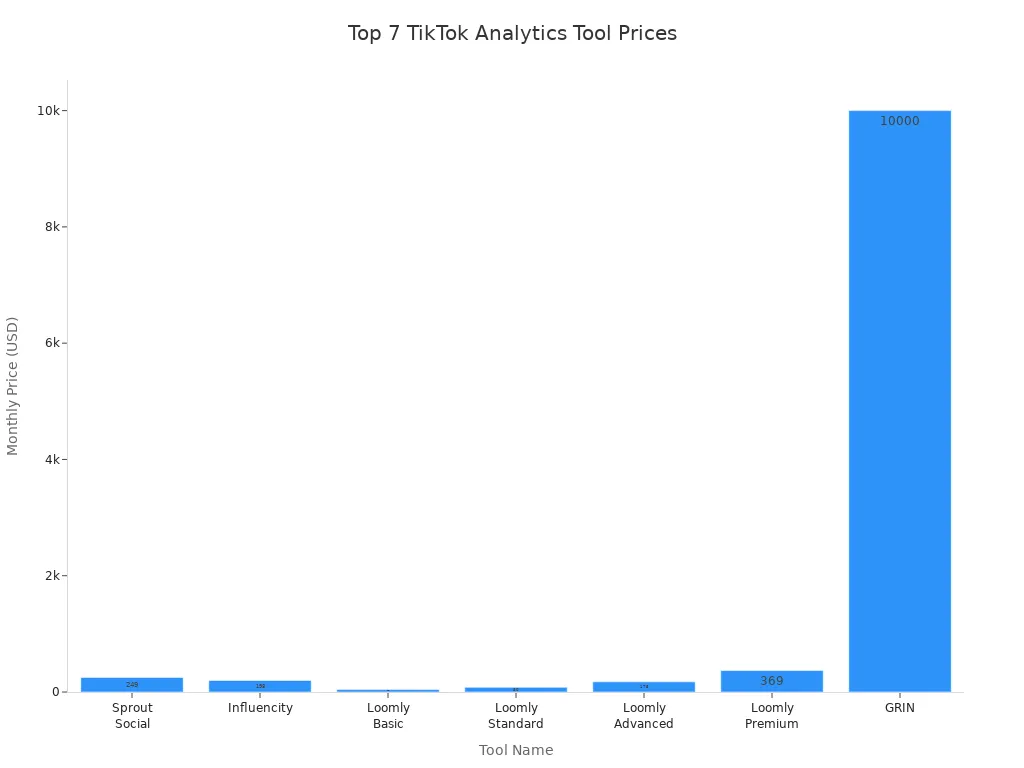
Loomly is the cheapest tool for small brands and creators. Sprout Social and Influencity are better for agencies or influencer marketers. They have more advanced analytics. Loomly has added new features but kept prices low. Big tools like GRIN cost more but give extra features for e-commerce brands.
Tip: Check if a tool has a free trial. You can try the analytics and see if the price works for you before you pay.
Detailed Reviews of Top TikTok Analytics Tools
Brand24: Social Listening and Analytics
Brand24 lets you hear what people say about you on tiktok. You can follow mentions, keywords, and hashtags. This tool helps you find trends and see your brand grow. You get alerts when someone talks about you. That way, you never miss important feedback.
Brand24 has different prices. The price depends on how much you track. In 2026, new AI features help you find insights faster. If you pay for a year, you save 20%. This makes it cheaper for long-term use.
Tracks tiktok mentions and hashtags right away
AI-powered insights for better analytics
Flexible pricing for your needs
Annual billing saves money
Brand24 is best for brands and agencies. They want to watch their reputation and spot trends early.
Pentos: TikTok-Specific Insights
Pentos is special because it only looks at tiktok analytics. You get deep insights into your account, hashtags, and songs. Pentos helps you track your content’s performance. You can see what works best.
Here’s what Pentos tracks:
Metric | Description |
|---|---|
Performance Tracking | Tracks tiktok songs' performance across platforms |
Detailed Data | Gives data for profiles, hashtags, songs, and posts |
Engagement Metrics | Shows views, hearts, comments, and engagement rates |
Content Strategy | Helps you understand what works on tiktok |
Pentos has different prices in 2026:
Plan Type | Monthly Price | Features Included |
|---|---|---|
Basic Plan | $29 | Essential trend monitoring |
Trends Pro | $99 | Basic trend tracking |
Account Performance | $299 | Advanced analytics and performance metrics |
Full Roster Tracking | $999 | Tracks all accounts |
Custom Proposals | N/A | Tailored solutions for special needs |
You also get features like competitive analysis and trend tracking. AI-driven trend prediction is included. Pentos is great for creators and brands. They want to focus on tiktok growth and content strategy.
Exolyt: In-Depth Account and Video Analytics
Exolyt gives you a full view of your tiktok account. You can see who watches your videos and how they react. You learn what makes your content popular. Exolyt uses AI to check comments and find out how people feel.
Check out these advanced analytics features:
Feature | Description |
|---|---|
Audience demographics | See your audience’s age, gender, and location |
Sentiment analysis | AI checks comments to show how people feel about your content |
Social listening | Monitors trends and conversations about your brand or industry |
Performance monitoring | Tracks engagement and shows how your content does over time |
Influencer collaboration insights | Analyzes influencer campaigns to help you get better results |
Real-time data & trends | Shows current tiktok trends and hashtags for more engagement |
Exolyt’s price in 2026 starts at $49 per month. You get influencer discovery and engagement benchmarks. Public account tracking is included. This tool is perfect for creators, brands, and agencies. They want to dig deep into tiktok analytics and improve performance.
Iconosquare: Multi-Platform Analytics
Iconosquare lets you manage tiktok and other social media in one place. You get a dashboard that tracks follower trends and profile views. It also tracks video views, likes, and engagement rates. You can compare your account to competitors. You can schedule posts too.
Here’s what you get with Iconosquare:
TikTok analytics dashboard for key stats
Competitor tracking to see how you compare
Content scheduling and cross-posting to other platforms
Comment management for all your social media in one inbox
Reports and exports in PDF or CSV
Multi-profile management for agencies or big teams
Iconosquare’s prices in 2026 are:
Plan Type | Monthly Cost | Users Supported | Data Retention |
|---|---|---|---|
Single | $59 | 1 | 12 months |
Teams | $99 | 10 | 24 months |
Custom | Contact | Unlimited | Unlimited |
Iconosquare is best for agencies, brands, or anyone who manages more than one tiktok account. It gives detailed analytics.
Keyhole: Trend and Hashtag Tracking
Keyhole helps you track tiktok trends and hashtags in real time. You can see which hashtags get the most attention. You learn how they help your videos perform. Keyhole gives you deeper insights into hashtag performance. This helps you pick the best hashtags for your content. You can spot new trends before others do.
Keyhole is smart for creators and brands. They want to boost their reach and stay ahead of tiktok trends. The price is competitive. You get real-time analytics that focus on your content’s performance.
Dashboardly: TikTok Shop Seller Analytics
If you sell on tiktok shop, Dashboardly gives you the analytics you need. You can track profit and manage inventory. You see which products perform best. Dashboardly connects to tiktok shop and tiktok ads. You get accurate data.
Here’s what Dashboardly offers:
Feature | Description |
|---|---|
Profit Tracking | See net profit after fees, shipping, refunds, ads, and cost of goods sold |
Inventory Management | Forecast demand, set reorder points, and get low-stock alerts |
Performance Insights | Analyze profit and loss, ROI, and customer data to improve sales |
Customer Segmentation | Group customers into VIP, Regular, and New for better targeting |
Expense Tracking | Log marketing costs, shipping fees, and manual adjustments |
Dashboardly stands out because it shows verified profit per product, creator, and campaign. It matches your data with actual tiktok shop payouts. You always know your real profit. Other tools don’t offer this level of integration with tiktok shop and ads APIs. Dashboardly is ideal for tiktok shop sellers. They want clear, actionable analytics.
Metricool: Overview and Features
Metricool gives you a simple way to track tiktok analytics. You can start for free with one profile. This is great if you’re just starting. Paid plans start at $22 per month. You get more features like advanced reporting and multi-account management.
Metricool helps you schedule posts and track engagement. You see how your content performs over time. You can compare your tiktok stats with other social platforms. This tool is best for small businesses and solo creators. It is good for anyone who wants affordable analytics without a steep learning curve.
Popsters: Overview and Features
Popsters is a budget-friendly analytics tool. It starts at $9.99 per month for one social account. You can analyze your tiktok posts and compare engagement. You find out which content gets the best results. Popsters makes it easy to spot trends and improve your posting strategy.
You get simple reports and visual charts. They help you understand your tiktok performance at a glance. Popsters is a good choice for creators and small brands. They want to keep costs low and still get useful analytics.
Sociality.io: Overview and Features
Sociality.io offers a full suite of analytics for tiktok and other social platforms. You can track engagement and monitor competitors. You generate detailed reports. The tool lets you manage comments and schedule posts. It is a good all-in-one solution.
Sociality.io’s price is competitive. Plans start around $39 per month. You get analytics, reporting, and social listening features. This tool works well for agencies and brands. They want to manage multiple accounts and need strong analytics without spending too much.
Analisa.io: Overview and Features
Analisa.io gives you deep analytics for tiktok profiles and hashtags. You can see follower growth and engagement rates. You check content performance. Analisa.io helps you find influencers and track their campaigns.
The price is flexible. You get free basic analytics and paid plans for more features. Analisa.io is perfect for marketers, brands, and creators. They want to dig into tiktok data and improve their content strategy.
How to Choose the Right TikTok Analytics Tool
Key Factors: Budget, Features, Ease of Use
Picking the right tiktok analytics tool can feel tricky. You want something that fits your budget and gives you the features you need. Start by looking at pricing. Some tools offer free plans, but most professional options start at $22 and can go up to $299 per month. If you run a small tiktok account, you might not need all the bells and whistles. Look for a tool with clear pricing and no hidden fees.
Ease of use matters a lot. You don’t want to spend hours learning a new dashboard. Try out free trials when you can. Many users say they switched tools because the interface felt confusing or the pricing changed without warning. One creator shared that they started with a free tool, but as their tiktok grew, they needed better analytics and switched to a paid plan with more features.
Here’s a quick checklist to help you:
Check the pricing page for hidden costs.
Test the dashboard for easy navigation.
Compare features like hashtag tracking, audience insights, and reporting.
Tip: Always read recent user reviews. People often mention if pricing changes or if the tool adds new features.
Matching Tools to Your TikTok Goals
Think about what you want from tiktok. If you want to grow your followers, focus on tools with strong engagement tracking. For brands, look for analytics that show ROI and campaign results. Sellers on tiktok shop need tools that track profit and inventory.
A 2025 survey showed that 68% of creators switched tools when pricing increased or features changed. Your needs may change as your tiktok grows. Don’t be afraid to try new tools if your current one doesn’t fit anymore.
Goal | Best Tool Type | Why It Works |
|---|---|---|
Grow followers | Engagement analytics | Tracks what fans like |
Sell products | Shop analytics | Shows profit and sales trends |
Brand campaigns | Deep reporting tools | Measures campaign success |
Stay flexible. Your perfect tiktok analytics tool today might not be the best choice next year.
Picking the best TikTok analytics tool lets you save money and get good features. You need to look at different tools and test free trials. When you check your results, you can make better decisions and watch your account grow.
Watching important numbers shows what is working
Using analytics helps you plan and get better over time
Brands that use data can see their TikTok grow
Want to make your TikTok better? Start looking at tools now!
FAQ
What is the cheapest TikTok analytics tool in 2026?
You can start with TikTok Native Analytics for free. Metricool and Popsters offer paid plans starting at $9.99 and $22 per month.
Can I use these tools if I am new to TikTok?
Yes! Many tools, like Social Blade and InfluenceFlow, work well for beginners. You get simple dashboards and easy-to-read reports.
Do free TikTok analytics tools show all my data?
Free tools give you basic stats like views and followers. For deeper insights, you need a paid plan. Over 70% of creators upgrade as their accounts grow.
See Also
Discover Top Free Tools for TikTok Analytics
The Complete Resource for TikTok Analytics Tools
Essential Tools for Analyzing TikTok Performance
