How to set up and succeed with TikTok Shop as a seller


Imagine you’re scrolling through TikTok, watching creators turn simple products into viral hits. You wonder if you could do the same. Starting a TikTok Shop for seller 2025 feels overwhelming at first. You see over 15 million active sellers and average monthly earnings of $2,400. The platform gives you direct access to shoppers, lets you ride viral trends, and removes the headache of complicated websites.
Metric | Value |
|---|---|
Active sellers | Over 15 million |
Average monthly earnings | $2,400 |
Conversion rates | 5% to 8% |
TikTok Shop lets you sell right in the app.
You reach new customers with less ad spend.
You skip the hassle of building a website.
With the right approach, you can turn your TikTok dreams into real sales.
Key Takeaways
Begin your TikTok Shop by making a Seller Center account. Connect it to your TikTok profile.
Use TikTok's tools to help with inventory, shipping, and sales tracking. These tools make your work easier.
Make fun videos and do live streams to get more people to see your shop. This can help you sell more.
Keep learning about TikTok's rules and new trends. Change your plan when needed to keep your shop popular.
Check your shop's analytics to see what is working. Make changes if you need to do better.
TikTok Shop for Seller 2025: Requirements and Basics
What is TikTok Shop?
TikTok Shop for seller 2025 lets you sell things inside TikTok. You can show products in your videos. You can talk to buyers during live streams. You do not need to leave the app to manage your shop. This helps you reach people who use TikTok a lot. You get tools to list products, handle orders, and see your shop’s stats. The best part is you can join viral trends and reach many people. The hardest part is keeping up with TikTok’s fast changes and strict rules.
Seller Eligibility and Account Types
You need to check if you can join. TikTok Shop for seller 2025 lets people and businesses sign up. You must be 18 or older and live in a supported country. There are two main account types:
Account Type | Description | Benefits |
|---|---|---|
Creator Account | For influencers who promote products | Boosts visibility and engagement |
Business Account | For individuals or companies selling products | Offers marketing tools and sales options |
You must pass a face or ID check to join. Creators need a certain number of followers. Product sellers do not need followers. You must list at least one real product to open your shop.
Business and Product Requirements
To set up your TikTok Shop for seller 2025, you need to meet some rules. You need a TikTok Business Account, a working phone, and an email. You must give your government ID, tax papers, and bank info. Businesses need more papers like EIN, company registration, and credit reports. Here is a quick look:
Requirement | Individual Seller | Business Seller |
|---|---|---|
Age | 18+ | 18+ |
Documents | Government ID, proof of residency | EIN, registration, tax forms, credit report |
Bank Account | Must match registered name | Must match business name |
Product Listing | At least one physical product | At least one physical product |
TikTok checks your business, tax info, and bank details. You pick one main business contact. You must share if someone owns 25% or more. Common reasons for rejection are blurry photos, missing info, or wrong labels. If you follow the TikTok Shop rules, you can succeed.
How to Start a TikTok Shop: Step-by-Step Setup
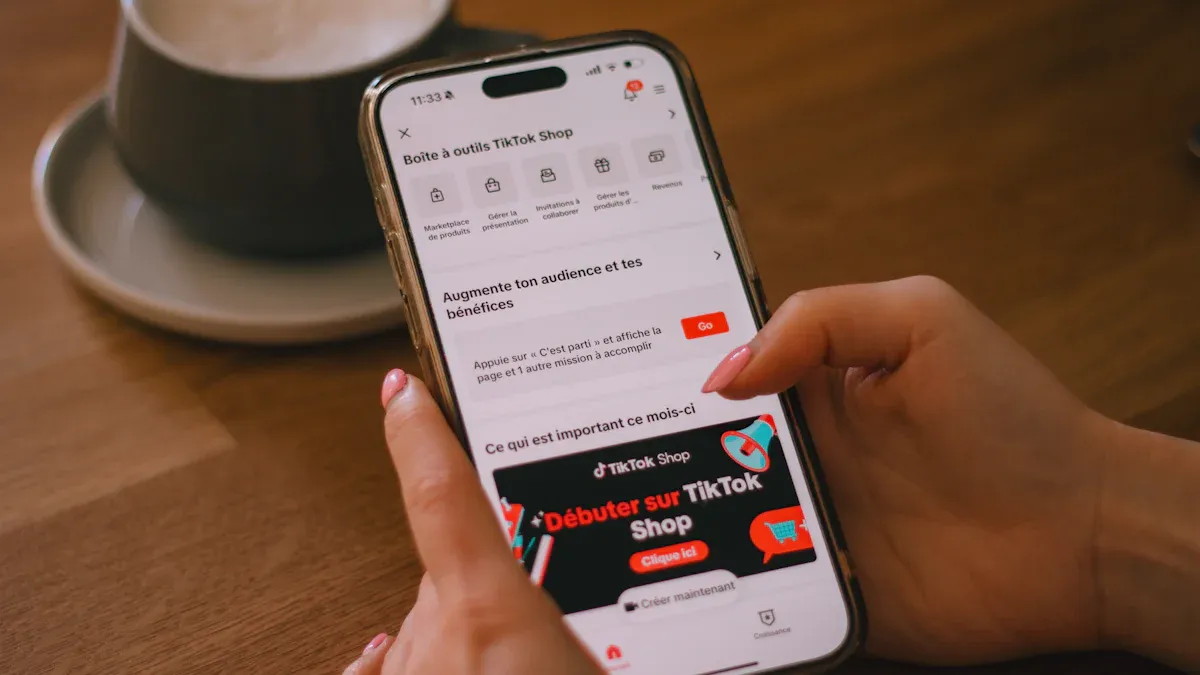
Create a Seller Center Account
You want to know how to start a TikTok Shop. The first step is to create your Seller Center account. This is where you manage everything for your shop. The interface is simple and guides you through each step. Here’s what you do:
Pick if you’re signing up as an individual or a registered business.
Upload your verification documents. You’ll need a personal ID if you’re an individual, or business registration papers if you’re a company.
Link your bank account for payouts.
Wait for TikTok to approve your shop. This usually takes a few days.
Once approved, upload a product to TikTok Shop. Add clear images, a short description, and your price.
Sync your shop with your TikTok account so you can connect products to your videos.
You’ll see prompts for each step. The dashboard shows your progress and lets you know if you missed anything. If you get stuck, TikTok’s help center has guides and FAQs.
Complete Verification and Bind Bank Account
Verification is a key part of how to start a TikTok Shop. TikTok wants to make sure you’re a real seller. You need to provide accurate documents and link your bank account. Here’s how you do it:
Make sure your business registration documents are current and official.
Match your business name exactly across all documents. This helps avoid delays.
Use a dedicated business banking account. This makes verification smoother.
Follow these steps in the TikTok app:
Tap ‘Settings and Privacy’ and choose ‘Payment Setup.’
Add your payment method and follow the prompts.
Go back to ‘Payment Setup’ and add your bank account. Enter all details carefully.
TikTok may send a small test deposit to confirm your account. Check your bank and enter the amount to finish verification.
Once you complete this, TikTok will review your info. You’ll get a notification when your account is verified. If something doesn’t match, TikTok will ask you to fix it.
Set Up Shop Profile and Add Products
Your shop profile is the first thing buyers see. You want it to stand out. Here’s how to start a TikTok Shop that attracts customers:
Pick a profile picture and banner that show your brand. Use bright colors and a clean layout.
Write a short, clear bio. Tell people what your shop is about. Use keywords that match your products.
Keep your contact info and product categories up to date.
Link your official website or storefront if you have one.
Use TikTok’s analytics tools to track your shop’s performance. Look at what works and adjust your strategy.
When you add products, use high-quality images and short, catchy descriptions. Make sure your prices are clear. You can upload a product to TikTok Shop right from the Seller Center. The platform lets you organize products by category and tag them for easy search.
Tip: A clutter-free profile with a strong brand image helps you build trust and get more sales.
Integration with Shopify and Printful
If you already sell online, you might want to connect your TikTok Shop to Shopify or Printful. This makes managing products and orders much easier.
Shopify Integration
You can use connectors like Silk Commerce, ShoppeDance, Aftership Feed, or SKU IQ. These tools pull product info from Shopify to TikTok Shop, sync orders, and update inventory in real time. Here’s a quick comparison:
Connector Name | Key Features | Price |
|---|---|---|
Silk Commerce | Syncs products and orders between Shopify and TikTok Shop | Free for up to 100 orders; $35/month for up to 500 orders |
ShoppeDance | Real-time inventory updates, SKU sync | Starts at $18/month for up to 100 orders |
Aftership Feed | Bulk product sync, revenue protection | Free for up to 10 TikTok orders; $18/month for up to 100 orders |
SKU IQ | Fulfills orders even with inventory mismatches | N/A |
Connecting Shopify boosts sales and increases revenue. You get a smoother customer experience because orders and inventory stay up to date.
Printful Integration
Printful lets you create and sell custom products without handling inventory. You focus on marketing and design, while Printful handles fulfillment and shipping. Here’s what you get:
Feature | Benefit |
|---|---|
Seamless product creation | Make and sell custom items with no inventory hassle |
Fast, reliable shipping | Orders ship from local centers for quick delivery |
Customizable product range | Tailor products to fit your brand |
White-label integration | Keep your brand identity on every product |
Risk-free testing | Try new designs with no upfront costs |
You can build your brand and test new ideas without risk. Printful provides reliable shipping info to your customers, which helps build trust.
Note: Integrating with Shopify or Printful saves you time and helps you scale your TikTok Shop faster. You spend less time on manual tasks and more time growing your business.
If you want to start a TikTok Shop, these integrations make your workflow smoother. You can manage products, track orders, and keep your shop running with less effort.
Selling on TikTok Shop: Shop Management
Manage Orders and Inventory
Handling orders and inventory on TikTok shop can be hard at first. When you get more sales, it can feel stressful. You want to make sure you do not sell more than you have. Happy customers are important. The Seller Center dashboard helps you see every order. You can update your inventory right away. You can also link your TikTok shop to Shopify or WooCommerce. This makes things easier for you. Many sellers use automation tools to save time. These tools help you make fewer mistakes.
Here are some ways to manage your TikTok shop well:
Use the Seller Center to check and track your orders.
Connect with Shopify or other platforms to sync your inventory.
Set up automatic updates so you do not oversell.
Talk clearly with buyers about shipping and delivery.
Feature | Description |
|---|---|
Helps with shipping and lets you print many labels at once. | |
Inventory Control | Changes your TikTok shop inventory on all platforms automatically. |
3rd Party Fulfillment | Lets you ship orders yourself or use a partner without doing extra work. |
Connect Shop to TikTok Content
You want your TikTok shop to get noticed. Linking your shop to your TikTok videos helps you reach more people. Use fun effects and filters to make your videos stand out. Add hashtags that match your products so people can find you. Go live on TikTok to talk to your viewers and answer questions right away. Tell stories about your products to help people trust you. Always add a strong call-to-action like “Shop now” or “Check out the link.” Good content and working with influencers can help your brand grow.
Understand Fees and Payouts
Before you sell on TikTok shop, you should know about fees and payouts. Tiktok charges different fees for what you sell and how you send orders. Here is a quick look:
Fee Type | Details |
|---|---|
Commission Fees | Up to 4.32% for things like electronics and fashion |
Transaction Fees | 3.78% per order for payment processing |
Referral Fees | 6% per order (goes up to 8% by July 1, 2024) |
Fulfillment Fees | Starts at $3.58 per item for Fulfilled by TikTok program |
Tiktok shop has less competition and more flexible fees than other sites. You get paid straight to your bank account. This usually happens a few days after the order is done. Always check your dashboard for the newest payout times and fee changes.
Tip: Stay organized and use TikTok shop’s tools to help your business run well.
Start a TikTok Shop: Growth Strategies

Shoppable Videos and LIVE Shopping
You want your TikTok shop to be special. Shoppable videos and LIVE shopping help you find more buyers. Make fun videos that catch attention right away. Use bright colors and clear pictures to show your products. Add popular songs and styles to get noticed. Tell a story about how your product fits into daily life. Always tell viewers what to do next with clear steps.
Show what your product does and how it helps.
Use stickers to point out product links.
Give discounts to make people want to buy.
To add products, make or upload your video, tap 'Add Link,' pick the shopping choice, and put in your product link. Check your video before you post it. Watch your likes, comments, shares, and clicks to see how you are doing. Shoppable videos on TikTok shop get 2% to 8% sales. Top sellers in beauty and gadgets can get over 10%. LIVE shopping can reach 55% engagement and 18% click rates.
Affiliate and Creator Marketing
Affiliate and creator marketing can help your TikTok shop grow fast. Make fun videos that show off affiliate products and send people to your links. Use hashtags to get more views. Paid ads help you reach even more people. Work with creators who really use your products. Being real is important. Do not use words that sound fake or forced.
Pick your affiliate products and set how much you pay.
Tell people about your affiliate program.
Team up with creators.
Put affiliate links in your video description, first comment, and profile. Use link shorteners to see how many people click and buy. This helps you learn how to promote your TikTok shop and get better results.
Product Rotation and Trend Spotting
Keep your shop fresh by changing products and finding trends. Use tools like Trendtrack and TikTok's Creative Center for ideas. Watch hashtags and popular sounds to spot new products. Check how many videos and mentions a trend has. Make playlists for your shoppable videos so people can find things easily. Show new products in LIVE shopping. Work with creators to reach more buyers. TikTok users are 1.7 times more likely to watch a brand’s LIVE to buy. They are twice as likely to trust LIVE shopping.
Making playlists by product type, like eye makeup or lip makeup, helps shoppers find what they want and buy more.
Launch Tips: Refundable Samples & Sales Benchmarks
Refundable samples help your TikTok shop launch go well. Brands work with creators, get seen more, and set clear refund goals. Here’s a quick look:
Benefit | Description |
|---|---|
Increased Collaboration | Brands and creators work together more easily with open deals. |
Enhanced Visibility | Refundable samples make creators share your products on TikTok. |
Structured Incentives | Brands set refund goals so creators use your product more. |
Check your progress with these sales goals:
Metric | What it Measures | Benchmark Targets |
|---|---|---|
Repeat Purchase Rate | How many customers buy again in 90 days | 25-35% for consumables, 15-25% for durables |
New-to-Brand Percentage | Sales from first-time customers | 60-70% new customers, 30-40% returning |
Gross Merchandise Value (GMV) | Total sales before returns and cancellations | 100%+ YoY growth for growing brands |
Conversion Rate by Traffic Source | How many buy from each way they find you | Short videos: 2-4%, LIVE: 8-12%, Shop Tab: 1.5-3% |
Return on Ad Spend (ROAS) | Money earned for each dollar spent on ads | New brands: 3:1, Established: 4-6:1, Mature: 6:1+ |
Average Order Value (AOV) | Average amount spent per order | Higher AOV means better profits |
Customer Acquisition Cost (CAC) | Cost to get each new customer | Organic: $5-15, Paid: $20-40, Influencer: $15-35 |
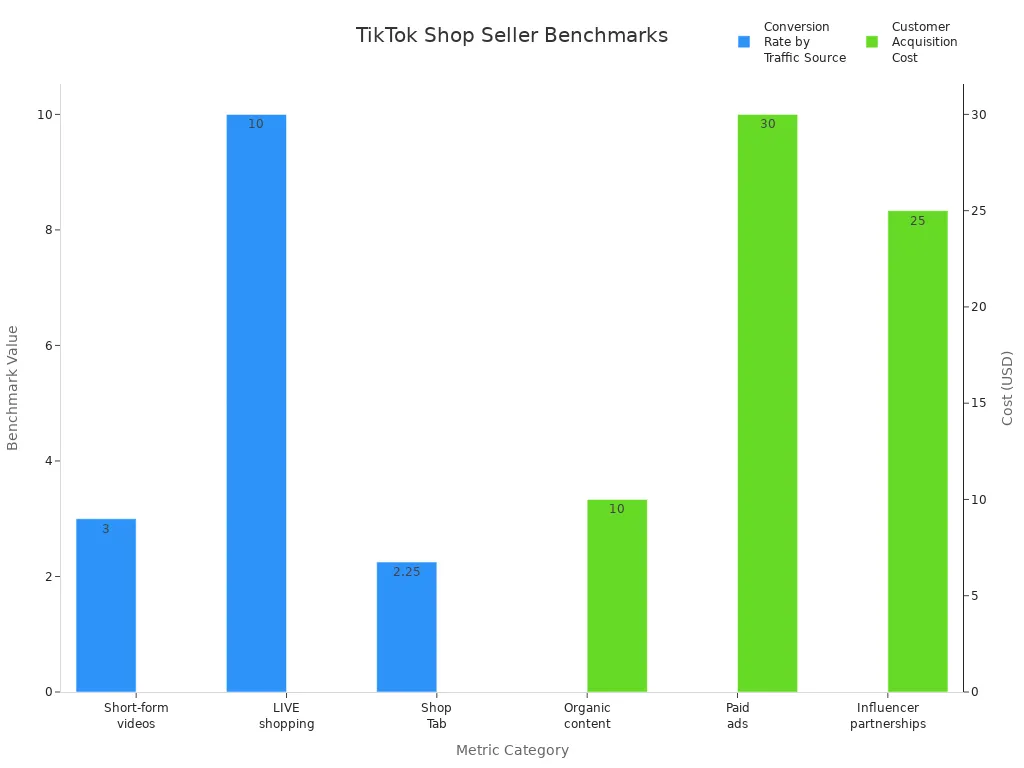
You can use these tips to grow your TikTok shop, make fun content, and get better at marketing. Focus on what works and keep trying new things.
You now know how to set up and run a successful TikTok shop in 2025. Start by opening your TikTok business account, submit your tax info, and learn about seller fees. Use TikTok’s built-in tools for inventory, shipping, and analytics. Focus on creative videos and live streams to boost engagement. Keep your TikTok shop updated and watch your data to spot trends. Stay flexible as TikTok changes. Here are key takeaways:
Key Takeaway | Description |
|---|---|
Engagement over Ad Spend | TikTok rewards shops with high engagement, not just big budgets. |
Built-in Tools | TikTok shop gives you inventory, shipping, and analytics tools. |
Content Strategy | Creative videos help your TikTok shop get seen and drive sales. |
Open your TikTok shop and connect it to your TikTok profile.
Test new products and track what works.
Use TikTok’s search and live shopping features.
Watch your customer service and shipping speed.
Most TikTok users find new brands on the app, so your TikTok shop can reach more buyers. Keep learning and adapting to stay ahead.
FAQ
How do you open a TikTok shop?
You start by signing up in the Seller Center. You upload your documents and link your bank account. After approval, you add products and connect your TikTok shop to your TikTok profile. The process is simple and guides you step by step.
Can you sell any product on TikTok shop?
You can sell many products, but TikTok shop has rules. You must follow TikTok’s guidelines for safety and quality. Some items, like weapons or fake goods, are not allowed. Always check the TikTok shop policy before you list anything.
How do payouts work on TikTok shop?
When you make a sale, TikTok shop sends money to your bank account. You see your earnings in the Seller Center. Payouts usually take a few days. You can track every payment and fee in your TikTok shop dashboard.
What are the main fees for TikTok shop sellers?
You pay commission, transaction, and referral fees on TikTok shop. The rates depend on your product type. Tiktok updates fees often, so you should check your Seller Center for the latest numbers. You see all charges before you get paid.
How do you connect your TikTok shop to videos and LIVE?
You link products to your TikTok videos and LIVE streams in the Seller Center. You add product links when you post. This lets viewers shop directly from your TikTok content. Using shoppable videos helps your TikTok shop reach more buyers.
See Also
Simple Steps To Launch Your TikTok Shop Business
EchoTik |Managing Orders Effectively In TikTok Shop
Determining The Right Prices For TikTok Shop Products
Beginner's Guide To Selecting Products For TikTok
EchoTik |Three Effective Ways To Locate TikTok E-Commerce Accounts
