How to Use Free TikTok Analytics Tools to Grow Your Account in 2025


Yes, you can grow your tiktok account in 2025 using free tools. If you want to unlock analytics, switch your tiktok profile to a Business or Creator account. This step gives you access to real numbers and trends about your tiktok videos. With the right Free TikTok Analytics Tool, you see what works and what does not. You get to know your audience better and make smarter choices. When you understand your tiktok stats, you can create better content. Tiktok analytics help you reach more people and boost your results.
Key Takeaways
Change to a Business or Creator account to see TikTok analytics. This lets you learn more about your videos and your audience.
Look at your TikTok analytics every week to find trends. Checking often helps you make better content and get more likes and comments.
Use analytics to learn the best times to post. If you know when your audience is online, you can reach more people.
Try both TikTok's analytics and other tools. Using both helps you understand your account better.
Make clear goals that you can measure with analytics. This helps you stay on track and see how much you grow.
Why TikTok Analytics Matter
Growth Benefits
If you want your tiktok account to get bigger, you should look at tiktok analytics. These tools help you see what is working and what is not. When you check your analytics, you find out which videos get the most likes and views. You can notice patterns and learn what your viewers like. Tiktok analytics help you make better choices for your next video.
Take a look at this table. It shows how tiktok analytics help you grow:
Evidence Description | Key Insights |
|---|---|
Audience Engagement | Tiktok analytics tell you how people react to your videos. |
Performance Metrics | You can see video views and engagement rates to make your content better. |
Tailored Content | Analytics show you who follows you, so you can make content they enjoy. |
If you use tiktok analytics a lot, your account will start to grow. You can try new ideas and see which ones work best. Tiktok analytics help you change your plan and reach more people.
Tip: Look at your tiktok analytics every week. You will see trends sooner and make better choices.
Audience Insights
Tiktok analytics do more than just show numbers. They help you learn about your audience. You can see who watches your videos and when they are online the most. The Followers section in tiktok analytics gives you facts like gender, age, and top places. You also see the best times to post, so more people watch.
Here is what you can learn from tiktok analytics about your audience:
Age and gender of your followers
Where your viewers live
What your audience likes
When your followers are online
Tiktok analytics help you make content that your audience likes. You can use this information to plan your posts and even find other tiktok creators to work with. If you want a strong tiktok marketing plan, you need to use analytics. You will reach the right people and grow your account faster.
How to Use TikTok Analytics
Access on Business or Creator Account
If you want to unlock the full power of tiktok analytics, you need to switch to a Business or Creator account. This step is easy and only takes a few minutes. Here’s how to do it on your phone:
Open the tiktok app and log in.
Tap your profile icon at the bottom right.
Tap the three lines at the top right to open the menu.
Select ‘Manage Account.’
Tap ‘Switch to Business Account.’
Pick a category that fits you best, then tap ‘Next.’
Fill in your profile details, like your photo and bio.
Now you can use the tiktok analytics dashboard to see how your videos perform. If you use tiktok on a computer, go to the tiktok website, log in, and click your profile icon. You’ll see your stats right on your profile page.
To check your analytics, go to your profile, tap the three dots, and select ‘Creator tools.’ Then tap ‘Analytics.’ You’ll see your tiktok performance, including likes, comments, and shares. This is where you start understanding tiktok and how your content works.
Key Metrics Overview
When you open the tiktok analytics dashboard, you’ll see several sections. Each one helps you understand tiktok and your audience better. Here’s a quick look:
Section | What You See |
|---|---|
Overview | Total video views, profile views, likes, comments, and followers. |
Content | How each video performs, including views and engagement. |
Followers | Follower count, audience demographics, and growth over time. |
Live | Stats for live videos, like viewers and engagement. |
You should check your tiktok analytics every week. This helps you spot trends and see which videos do well. Regular review of your analytics lets you adjust your strategy and improve your tiktok performance. Don’t just look at high view counts. Check engagement too. Sometimes a video gets lots of views but not many likes or comments. That means it might not connect with your audience.
Understanding tiktok means looking at all your tiktok metrics, not just one. Use the tiktok analytics dashboard to find what works and what doesn’t. This way, you can keep growing and make better content every time.
Free TikTok Analytics Tool Setup
TikTok’s Built-In Tools
When you switch to a Business or Creator account, you can use TikTok’s built-in analytics tool. This free tiktok analytics tool shows you simple stats about your videos and followers. You see how many people watch, like, and share your posts. You also learn when your followers are online the most. If you want to use tiktok analytics for business, this tool helps you see your growth and spot patterns.
Here’s a table that compares TikTok’s built-in analytics tool with free third-party tools:
Feature | Built-In TikTok Analytics Tool | Free Third-Party Analytics Tool |
|---|---|---|
Access level | Free for Business/Creator | Free trials, some paid options |
Data depth | Basic metrics | In-depth insights |
Competitor analysis | Not available | Available in most tools |
Trend monitoring | Limited | Advanced tracking |
Content scheduling | Not available | Often included |
Custom reports | Basic | Advanced and customizable |
Real-time alerts | Not supported | Offered in some tools |
Team collaboration | Not available | Included in many tools |
TikTok’s analytics tool gives you good engagement numbers and audience details. But you do not get competitor comparisons or strong trend tracking. If you want your account to grow faster, you may need more features.
Third-Party Tools (Countik, Exolyt)
Free tiktok analytics tool choices like Countik and Exolyt give you more details. These analytics tools help you check video results, find trends, and learn about your audience. You can also compare your account with other creators. This helps you see what works for them and change your plan.
Here are some things you can do with these analytics tools:
Track how your videos do and find viral trends
See more details about your audience and how they act
Compare your account with competitors
Find ways to make your content better
TikTok’s engagement rate in the U.S. is almost 18%. Using a free tiktok analytics tool can help you get better results. You learn more than just numbers. These analytics tools show you how to make your videos better and reach more people. If you want to use tiktok analytics for business, third-party tools help you make smart choices and grow your brand.
Tip: Try different free tiktok analytics tool options to see which one works best for you. Some tools have extra features like content scheduling and custom reports.
If you want to do better than others, use both TikTok’s built-in analytics tool and a free tiktok analytics tool like Countik or Exolyt. You get a full view of your account and find new ways to grow.
Growth Strategies with TikTok Analytics
Optimize Posting Times
You want lots of people to see your tiktok videos. The best way is to post at the right time. Tiktok analytics help you know when your followers are online. Go to the 'Followers' tab in analytics to see a chart. This chart shows when your audience is most active. Look for the busiest hours and days.
Here’s how to use tiktok analytics to find the best times to post:
Open tiktok analytics and tap the 'Followers' section.
Look at the chart to see when followers are active.
Find the top hours and days for your audience.
Post your videos during these times to help your account grow.
Many creators get better results when they post at 3 PM or 4 PM. These times are good because people take breaks or relax then.
Posting at 7 AM or 8 AM can also help. You might reach people before they start their Sunday plans.
Check your tiktok analytics often to change your schedule if needed. Make sure you change the times from UTC to your own time zone. This helps you post when your audience is ready to watch.
Content and Hashtag Trends
Tiktok analytics show what content works best for you. You can see which videos get the most views, likes, and shares. This helps you spot trends and make better videos.
Use tiktok’s Creative Center to find trending hashtags and content. Hashtags help your videos reach more people. Here are some steps you can try:
Use tiktok analytics to see which videos get the most likes.
Check the Creative Center for trending hashtags.
Look at top trends to find topics your viewers like.
Use hashtag analytics to learn what your audience enjoys.
Watch engagement patterns to make your content better.
Use hashtag metrics to see how your campaigns do.
When you use hashtags, your videos are easier to find. This means more people will watch and your account can grow. Try different hashtags and see which ones work best.
Audience Engagement
You want your followers to like and share your videos. Tiktok analytics show how well your videos connect with people. Look at numbers like engagement rate, views, and shares. These numbers tell you if your videos are working.
Metric | Description |
|---|---|
Engagement rate | Shows the ratio of views to likes, comments, replies, shares, and saves. |
Views | Counts how many times your video is watched. |
Followers growth | Tracks how many new followers you gain. |
Click-through rate | Measures how many people click on your ads. |
Shares | Shows how often people share your content. |
Audience demographics | Tells you the age, location, and gender of your viewers. |
Trending hashtags | Tracks how often hashtags are used, helping you find popular topics. |
If you see high engagement, your videos are doing well. If your engagement drops, try changing your video style or captions. Reply to comments and messages to build a stronger bond. This helps your account grow and keeps followers coming back.
Tip: Use analytics to help you write replies and captions. Short, catchy captions can help people watch your videos longer and interact more.
Collaboration Opportunities
Tiktok analytics help you find other creators to work with. When you track your account, you see which videos bring more followers. If a collaboration gives you more followers, it is a good match.
Track important numbers to see what your audience likes.
Notice when your account grows after working with someone else.
Work with creators who help your account grow over time.
Use tools like Exolyt to compare your results and find new trends.
Working with others can help you make better videos and grow faster. When you team up with creators who have the same audience, both of you win. Watch your analytics to find the best people to work with.
Here’s a table that shows how different strategies help your account grow:
Metric/Strategy | Impact on Growth |
|---|---|
Data-driven creators | Grow 45% faster due to optimized content |
Branded creators | Grow 60% faster long-term |
Professional video editing | Leads to higher engagement and credibility |
Consistent content | Deepens audience connection |
Engagement metrics (likes, shares) | Indicates audience interaction |
By using tiktok analytics, you can plan your videos, pick the best times to post, and find good creators to work with. This helps your account grow and lets more people see your videos.
Exporting and Tracking Progress
Export Analytics Data
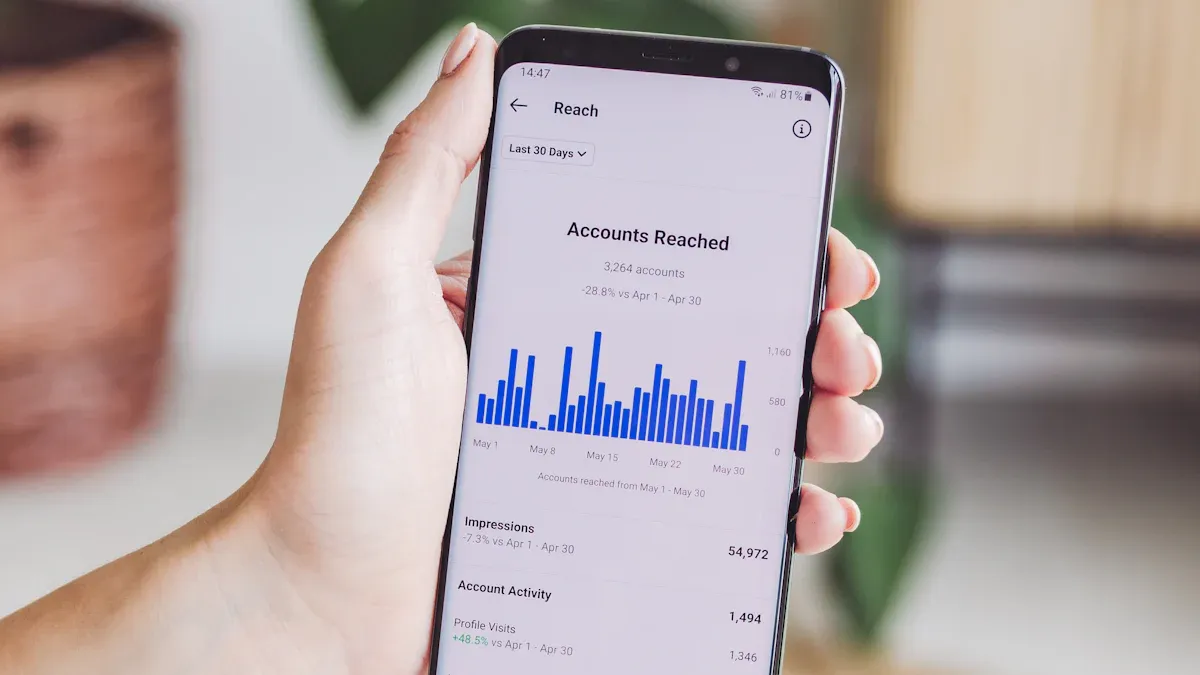
You want to keep track of your tiktok growth. Exporting analytics data helps you see your progress and make smart choices. You can do this on both mobile and desktop. On your phone, open tiktok, tap your profile, and go to "Creator tools." Then tap "Analytics." On desktop, visit TikTok Studio and log in. Go to "Insights" or "Analytics" from your profile.
Here’s how you export your analytics data:
Open the analytics section in TikTok Studio.
Pick the date range you want to review.
Click the "Export" button at the top right.
Download the CSV file with your metrics.
You can use this file with Google Sheets, Excel, or other tools. This makes it easy to look at your insights and share them with your team. Exporting analytics lets you see which videos reach the most people and when your audience is most active. You get a clear view of your account’s performance.
Tip: Export your analytics every month. This helps you spot trends and understand your audience better.
Set and Review Goals
Setting goals helps you grow your tiktok account. Use your analytics and insights to make goals that fit your needs. Make sure your goals are measurable, achievable, relevant, and time-bound. For example, you might aim for 5,000 views per video or post three times a week for 12 weeks.
Here are some best practices for setting goals:
Track your performance with analytics and set milestones.
Make sure your goals are realistic for your schedule.
Align your tiktok goals with your business or personal brand.
Set deadlines to keep yourself on track.
Review your goals often. Look at your analytics and insights to see if you are meeting your targets. If you notice changes in your audience or engagement, adjust your goals. Regular reviews help you stay focused and improve your content.
Check out this table to see how tracking progress with analytics leads to better results:
Key Insights | Description |
|---|---|
Impactful topics | Shows which subjects engage your audience most. |
Content to avoid | Highlights what does not work for your audience. |
Demographic information | Gives you details about your audience’s age, location, and interests. |
Target market’s active times | Tells you when your audience is online and ready to watch. |
Best posting times | Suggests when to post for maximum engagement and reach. |
When you use tiktok analytics and insights, you learn what your audience likes. You find the best times to post and the topics that get the most engagement. This helps you set better goals and grow your account faster.
You can grow your tiktok account by using free analytics tools and checking your stats often. When you track your tiktok numbers, you learn what your audience likes and when they watch. This helps you make better videos and post at the best times. Here’s what works for many tiktok creators:
What It Means for You | |
|---|---|
Data-Driven Approach | Use tiktok analytics to guide posts |
Content Optimization | Focus on stories and trends |
Regular Reviews | Check your tiktok stats each week |
Analytics help you spot what works, boost engagement, and keep your tiktok followers growing.
When you use tiktok data to plan, you build a stronger account and reach more people.
FAQ
How do I navigate the tiktok analytics tool for the first time?
You just tap your profile, go to "Creator tools," and pick "Analytics." The dashboard is simple. You can see your video stats, follower info, and more. If you get lost, use the help section to navigate the tiktok analytics tool.
What is a content analytics tool, and why should I use one?
A content analytics tool helps you track how your videos perform. You see which posts get the most likes, shares, and comments. This tool makes it easy to spot trends and improve your videos. You can grow faster with the right content analytics tool.
Can I use tiktok audience analytics to find my best posting time?
Yes! Tiktok audience analytics show when your followers are most active. You can check the "Followers" tab and see a chart with busy hours. Post during those times to reach more people and boost your views.
What’s the difference between tiktok insights and third-party analytics?
Tiktok insights come from the app’s own analytics. You get basic stats about your videos and followers. Third-party tools give you extra features, like competitor tracking and deeper reports. Both help you navigate the tiktok analytics tool better.
How often should I check my analytics?
Check your analytics at least once a week. This helps you spot what works and what doesn’t. You can use a content analytics tool to track your progress and make changes quickly.
See Also
Discover Free Tools For Analyzing Your TikTok Performance
Steps To Access TikTok Analytics For Your Account
The Complete Handbook For TikTok Analytics Resources
