TikTok seller central 2025

Want to start using tiktok seller central 2025? First, make a tiktok business account. You need this before you use tiktok seller center and start setup. Pick individual or business registration, then upload your documents for fast checking. The setup lets you handle more than one account, so you can grow your tiktok shop easily. New sellers get nice perks like discounts and coupons. The setup is simple, quick, and open to everyone.
Key Takeaways
Make a TikTok business account. Choose the best seller type for your shop. This helps you start your TikTok Shop fast and easy.
Get your documents ready. Upload clear and matching documents. This follows TikTok’s rules and helps your account get approved faster.
Set up your shop profile with good pictures. Write short and catchy descriptions. Keep your products neat and easy to find. This will help bring in buyers.
Try TikTok’s shopping tools like live streams. Use shoppable videos and work with influencers. These things can help you sell more.
Watch your shop’s progress with analytics. Answer buyers quickly. This helps your shop grow and makes people trust you.
Eligibility
Requirements
You must follow some simple rules before selling on tiktok. You have to be 18 years old or older. You also need a tiktok business account. If you only have a personal account, you can change it or make a new one. Your shop must obey local laws and tiktok’s policies. Pick your country when you sign up because rules are different in each place.
Here is a quick list to check if you are ready:
You are at least 18 years old.
You have a tiktok business or creator account.
You can give a real phone number and email.
You have the right business papers for your country.
You agree to follow tiktok’s guidelines and local laws.
You have a bank account to get paid.
Your tiktok account has no rule breaks.
Tip: Check your papers before you upload them. Old or missing files can make approval take longer.
Documents
You must upload some papers when you sign up. The papers you need for tiktok shop depend on if you are an individual or a business. Here is a table to help you understand:
Account Type | |
|---|---|
Individual Seller | Government photo ID (passport or driver’s license), full legal name, birthday, home address, personal bank account, tax info (TIN or SSN) |
Business Seller | Business registration paper, business license or proof of company, company name, EIN, business bank account, government ID of owner or legal rep |
US-based Business Outside US | US representative’s proof of living and ID (if selling in the US) |
Your name must be the same on all your papers and bank accounts. This stops problems or delays. If you are a creator, you might also need a certain number of followers or be a certain age. These rules can be different in each place.
Register on TikTok Seller Central 2025
Ready to get started with tiktok seller central 2025? You’ll find the setup process simple if you follow each step. Here’s how you can register as a merchant and launch your tiktok shop.
Sign Up or Log In
First, make sure you have a tiktok business account. You need this before you can use tiktok seller central 2025. If you already have one, just log in. If not, create a new business account on tiktok. This is your main hub for all shop activities.
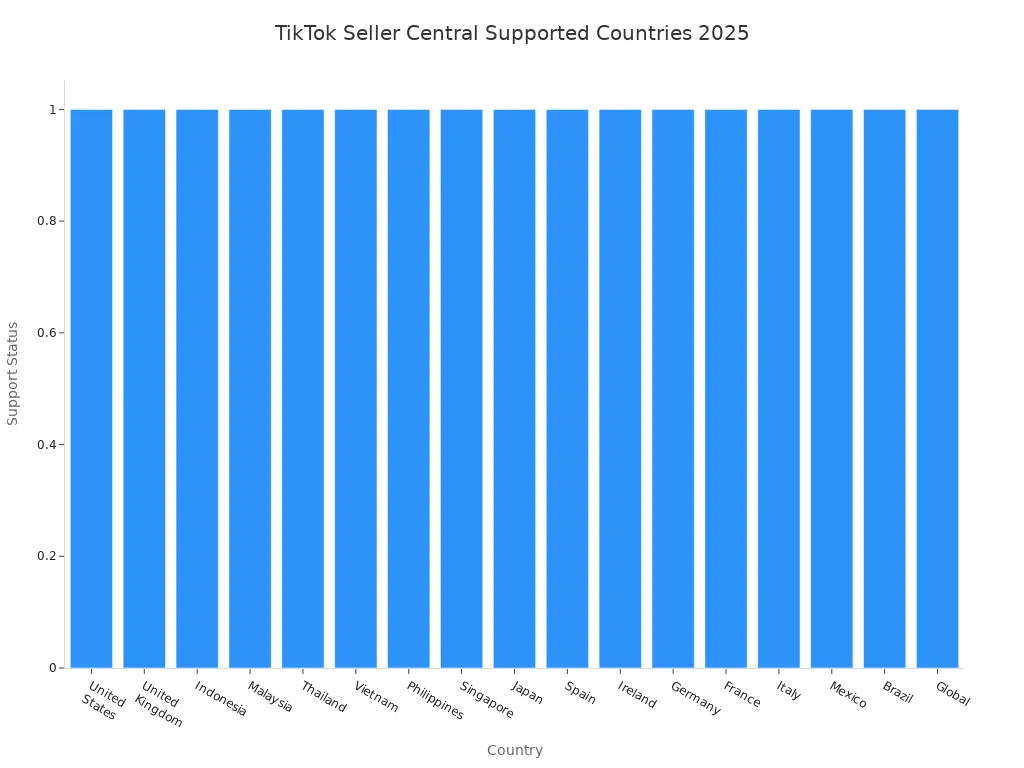
Now, go to the right registration page for your country. Each country has its own link. Here’s a quick table to help you find the right spot
Tip: Pick the link that matches your country. This helps you follow the right rules and get local support.
Select Country and Business Type
After you log in, you’ll choose your country and business type. Tiktok seller central 2025 lets you pick between two main options:
Individual Seller Account: Great if you want to sell as a person. You don’t need a company, but you must show your ID and proof of address.
Business Seller Account: Best for companies and bigger sellers. You need to upload your business registration, EIN, and other company documents. This type gives you more tools, like managing more users and handling higher sales.
Note: Only real businesses with official papers can pick the business seller account. If you’re just starting, the individual option works well.
Upload Documents
Now it’s time to upload your documents. The setup asks for different papers based on your choice:
For individuals: Upload a government photo ID, proof of address, and your tax info.
For businesses: Add your business license, company name, EIN, and the owner’s ID.
Make sure your name matches on all your documents and your bank account. If anything looks off, tiktok shop may delay your approval.
Here’s a quick checklist for the upload step:
Scan or take clear photos of your documents.
Double-check that all info is easy to read.
Make sure your details match your tiktok shop account.
Alert: Blurry or missing documents can slow down your setup. Always check before you hit submit!
Verify Account
After you upload your documents, tiktok shop will check your info. Sometimes, you’ll need to take a selfie with your ID. This helps tiktok seller central 2025 keep your shop safe.
Most accounts get verified in 24 to 48 hours. If you have a business account or if there’s a busy season, it might take up to 2 or 3 weeks. Tiktok gives business accounts a faster review when possible.
Once you pass verification, you’ll link your bank account. Tiktok will send a small test deposit to make sure your bank info is correct. After this, your tiktok shop is ready for the next setup steps.
Pro Tip: Keep an eye on your email. Tiktok will send updates if they need more info or if your account is ready.
Here’s a quick step-by-step guide to the setup process:
Check if you meet the age and policy rules.
Gather your documents.
Go to the right tiktok seller central 2025 link for your country.
Pick your seller type (individual or business).
Upload your documents.
Complete identity checks (like a selfie with your ID).
Wait for approval.
Link your bank account.
Start your tiktok shop setup!
You’re now set to move on and build your shop. The process is smooth, and tiktok shop support is there if you need help.
Set Up TikTok Shop
Setting up your TikTok Shop is the fun part! You get to design your storefront, add your products, and connect your payment. Let’s walk through each step so you can start selling products directly on TikTok.
Shop Profile
Your shop profile is your storefront. This is where shoppers see your brand, logo, and what makes you special. To set up TikTok Shop, go to your TikTok Shop seller dashboard. Add a profile picture, a catchy bio, and your store name. Use your brand colors and upload a banner to make your storefront pop. Organize your products into categories so customers can find what they want fast. Write a short story about your shop to build trust.
Tip: Use high-quality images and videos. Show your products in real life. This helps people see how TikTok shopping features work and makes your shop stand out in the product marketplace.
Add Products
Now it’s time to upload a product. Go to your TikTok Shop dashboard and click “Add Product.” Fill in the product name, description, price, and stock. Use short, creative words. Add trending hashtags to help people find your products. Upload clear photos and videos. Show your products in action. If you want to know how to upload a product to TikTok Shop, just follow the steps on the screen. You can add different sizes or colors to attract more buyers. Make sure your products follow TikTok’s rules and local laws.
List your products one by one or use bulk upload if you have many items.
For special items like electronics or kids’ products, you may need extra documents.
Note: New sellers get cool perks like referral fee discounts and coupons. These help you save money as you set up a TikTok Shop.
Link Payment
You need to link your bank account to get paid. In your TikTok Shop seller dashboard, go to the payment section. Add your bank details or connect PayPal if it’s available in your country. TikTok will send a small test deposit to check your info. After you confirm, you’re ready to start selling products directly from your storefront.
TikTok supports credit cards, debit cards, and PayPal for payments.
Payment options may change based on your country and currency.
Pro Tip: Always double-check your payment info during setup. This keeps your payouts safe and on time.
Once you finish these steps, your TikTok Shop is live! You can now enjoy TikTok shopping features and reach more buyers. If you ever wonder how does TikTok shopping work, just remember: you set up TikTok Shop, add your products, and start selling right from your storefront in the product marketplace.
Optimize and Manage TikTok Shop

Shop Optimization
You want your TikTok Shop storefront to stand out and attract more buyers. Start by using user-generated content. Ask your customers to share videos of your products in action. This builds trust and shows real results. Give them easy filming tips and sample videos, but let them get creative. Always get permission before you use their content in your storefront.
Keep your product listings fresh. Use clear photos, catchy titles, and strong keywords. Add trending hashtags so people can find your products fast. Organize your storefront so shoppers can browse all your products in one place. If you manage more than one account, TikTok Shop lets you switch between storefronts easily. This helps you grow your business or even sell as an affiliate.
Here are some best practices to optimize your TikTok Shop:
Answer buyer questions quickly to build confidence.
Post new content often to boost your TikTok Shop ranking.
Focus on your top products and best-performing videos.
Work with TikTok Shop creators and offer exclusive deals.
Try live shopping events to show off your products in real time.
Promotion Tips
You might wonder how to promote your TikTok Shop and get more sales. Use TikTok shopping features like shoppable videos and live streams. These let you show your products and answer questions live. Offer time-limited promotions or flash sales to create excitement. Partner with influencers who match your brand. Let them show your products in their own style.
Here’s a quick table of top promotion strategies:
Promotion Strategy | What It Does |
|---|---|
Shoppable Videos | Lets buyers shop right from your videos. |
TikTok Live Streaming | Shows products live and offers exclusive deals. |
Influencer Collaboration | Expands your reach and builds trust. |
Time-Sensitive Promotions | Creates urgency with flash sales and discounts. |
User-Generated Content | Builds authenticity and trust with real customer stories. |
TikTok SEO Optimization | Helps more people find your products in search. |
Seamless Shopping | Makes buying easy with direct links in your storefront. |
If you want to promote your shop even more, try TikTok ads or retargeting. Cross-promote your TikTok Shop on other social media. This brings in new buyers and keeps your storefront busy.
Performance Tracking
You need to know what works in your TikTok Shop. Use TikTok’s built-in analytics to track sales, product views, and customer actions. Check which products get the most clicks and which videos drive sales. Tools like M2E TikTok Shop Analytics and Kalodata give you even deeper insights. These tools help you spot trends, track profits, and see what your buyers love.
Try A/B testing with your videos and product listings. Change your calls-to-action or posting times to see what gets better results. Watch your key numbers and adjust your strategy. This keeps your TikTok Shop growing and helps you stay ahead of trends.
If you want to know how to sell products as an affiliate seller or how to become an affiliate seller, TikTok Shop for creators makes it easy. You can promote your shop, join affiliate programs, and even manage multiple storefronts from one account. This gives you more ways to reach buyers and boost your sales.
Troubleshooting
Common Issues
Running a TikTok Shop can feel exciting, but sometimes you hit a few bumps. You might see problems pop up with orders, shipping, or even your account. Here are some of the most common issues sellers face in 2025:
Delayed shipping happens a lot, especially with international orders or busy seasons. Warehouses and couriers can get backed up.
Orders sometimes go missing. This can happen if the address is wrong, the courier makes a mistake, or customs holds up the package.
You might send the wrong item by accident. Packaging errors or mix-ups with drop shippers cause this.
Damaged products often show up when packaging is weak or rushed.
Product descriptions that are not clear or accurate can confuse buyers and lead to returns.
Refunds and returns can be tricky. TikTok has strict return windows and asks for proof, which can slow things down.
Poor communication with buyers can lead to bad reviews. High message volumes or language barriers make it hard to keep up.
New sellers often struggle with returns. Unclear policies and slow replies can cause high return rates and negative feedback.
If you do not respond to return requests within two business days, TikTok may penalize your account.
Not managing reviews or product info well can hurt your shop’s rating. TikTok’s algorithm rewards active sellers with good reviews.
Limited analytics in Seller Center means you might need extra tools to track your shop’s performance.
Viral products can sell out fast. If you do not watch your inventory, you risk stockouts and late shipments.
Tip: Set up clear return policies and use response templates. This helps you answer buyers quickly and keeps your ratings high.
Support
When you run into trouble, you want help fast. TikTok gives you a few ways to get support:
Use the in-app support center. Go to TikTok Shop settings, then tap 'Help Center' or 'Contact Support'.
You can report problems right in the app. Tap Profile > Settings > Report a Problem.
TikTok does not offer live chat or phone support right now.
Many sellers join Facebook groups or Discord channels for extra help. These communities share tips and answer questions when official support is slow.
When you contact support, give clear details about your problem. Use words like "urgent" or "escalate" to get faster help.
If you have trouble with account verification, follow these steps:
Check if messages about your account are real. TikTok will never ask for money or contact you through random users.
Log in to the official TikTok Shop Seller Center to see your account status.
Use the app’s support features to report any issues.
Never send money or personal info to anyone claiming they can fix your account.
Note: Always use official TikTok channels for support. This keeps your shop safe from scams and helps you solve problems faster.
You can set up your TikTok Seller Center account in just a few steps: register, upload your documents, verify your info, and build your shop. TikTok gives you access to over 1.5 billion active users and powerful marketing tools. You can boost your sales with high-quality videos, easy shop management, and seamless in-app shopping.
Next steps for you:
Upload your products and finish your shop profile.
Connect your TikTok Shop to your account.
Try TikTok’s Creator Marketplace to find influencers and grow your reach.
Explore TikTok’s official resources for tips, updates, and support as you start selling!
FAQ
How long does TikTok Seller Central verification take?
Most accounts get verified in 1–2 days. Sometimes, it can take up to 2 weeks if TikTok needs more info. Keep an eye on your email for updates.
Can you sell on TikTok without a business license?
Yes, you can sell as an individual. You only need a government ID and your tax info. If you want to register as a business, you must show your business license.
What should you do if your documents get rejected?
Double-check your documents for clear photos and matching info. Fix any mistakes and upload them again. If you still have trouble, contact TikTok support for help.
Can you manage more than one TikTok Shop account?
Absolutely! TikTok lets you handle multiple shops. You can switch between accounts in Seller Center. This helps you grow your business or try new products. 🚀
See Also
EchoTik Supports Sellers Facing Inventory Challenges After TikTok Closure
Top Trending TikTok Products Currently Popular Across The US
