How to Register TikTok Seller Center in 2025


Ready to register for TikTok Seller Center in 2025? You just need to follow a few simple steps. First, get your TikTok Business Account. Then, pick your seller type and upload your documents for verification. The process feels easy and makes opening a TikTok shop quick. With this step-by-step overview, you can set up a TikTok shop and start selling through TikTok Shop. TikTok and ecommerce go hand in hand now, so registration helps you join the ecommerce boom. Set up TikTok shop and enjoy the excitement of opening a TikTok shop!
Key Takeaways
You can register for TikTok Seller Center as an individual, small business, or corporation by preparing the right documents and having a TikTok Business Account.
Check if your country is supported before registering, and make sure your documents and bank account names match to avoid delays.
Register on the official TikTok Seller Center website, link your TikTok Business Account, select your seller type carefully, and upload clear documents for verification.
Create a strong shop profile with a catchy name and logo, add bright product photos and videos, and link a payment method to start selling.
Promote your shop using TikTok’s tools, post engaging videos often, and consider syncing with ecommerce platforms like Shopify to grow your business.
Eligibility for TikTok Seller Center
Who Can Register
You might wonder if you can become a TikTok shop seller in 2025. The good news is that TikTok welcomes different types of sellers. You can register as an individual, an individually owned business, or a corporation. Each type has its own requirements, but the process stays simple for everyone.
Here’s a quick look at who can join:
Individuals with a valid government-issued ID.
Small business owners with proper business registration.
Corporations with full business documents.
You need a TikTok business account before you start the registration. This account helps TikTok verify your identity and business details. If you already use TikTok for business, you are one step ahead!
Tip: Individual sellers get access to basic shop features, but business and corporate sellers unlock more advanced tools.
Required Documents
Getting your documents ready makes the registration process smooth. TikTok asks for clear and complete paperwork to check your eligibility. The documents you need depend on your seller type.
Here’s what you should prepare:
Seller Type | Required Documents |
|---|---|
Individual | Government-issued ID (passport or driver’s license), personal bank account details |
Business | Business license, tax ID, business registration, business bank account |
Corporation | Corporate registration, EIN, business license, corporate bank account |
Make sure the name on your ID matches your bank account. If the names do not match, TikTok may reject your registration. Always double-check your documents before you upload them.
You also need a valid email address and phone number. TikTok uses these to contact you during the verification process.
Regional Selection
TikTok shop seller eligibility depends on your location. TikTok Seller Center supports many countries, but not all regions can register yet. In 2025, you can join if you operate in places like the United States, United Kingdom, Indonesia, Malaysia, Philippines, Singapore, Thailand, or Vietnam. TikTok Shop is also active in several European countries, such as the United Kingdom, France, Germany, Italy, Spain, and Poland. More countries in Europe will likely join soon.
If you are in the UK, you need a UK-registered business or a valid UK ID for individuals. You also need a UK bank account and must follow VAT rules.
If you are in the EU, you need a registered business in an EU country, a valid VAT ID, and you must follow local tax laws.
Individual sellers can register with a government-issued ID, but business sellers get more features.
Note: TikTok keeps expanding its reach, so check the latest list of supported countries before you start your registration.
Understanding eligibility helps you prepare for a smooth start. Once you gather your documents and check your region, you are ready to register for TikTok Seller Center and join the growing world of TikTok commerce.
Register for TikTok Seller Center
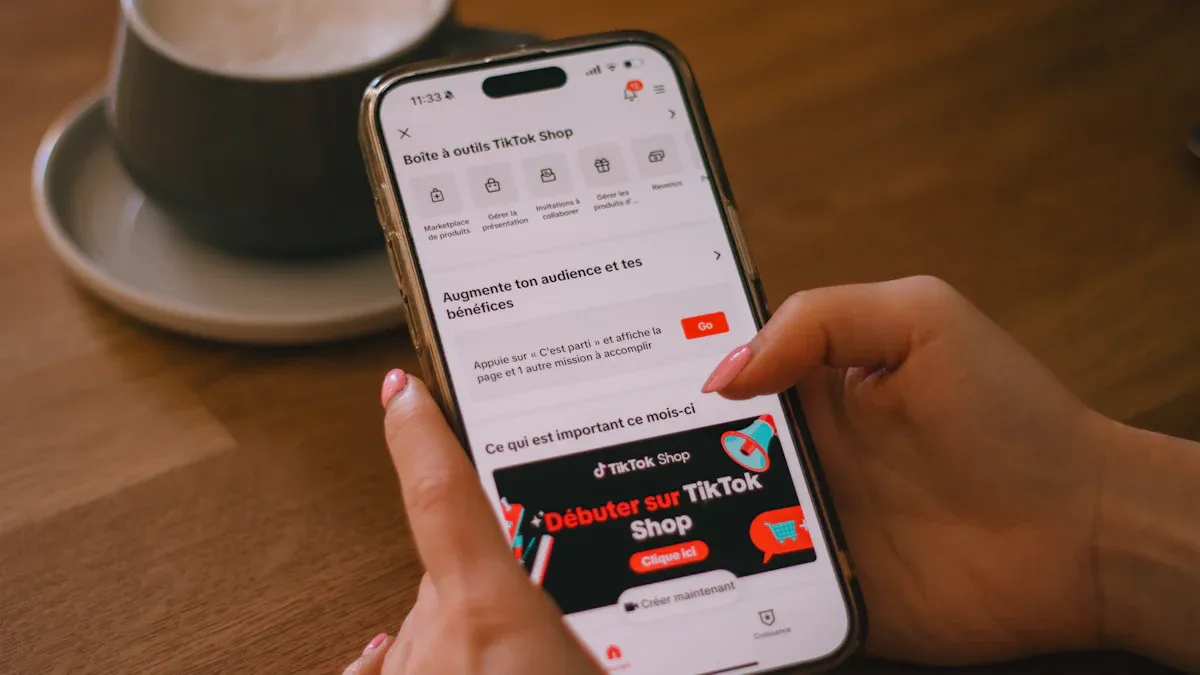
Access the Seller Center
You start your journey by visiting the official TikTok Shop Seller Center website. This is where you begin the specific registration process. The website guides you step by step, so you never feel lost.
Here’s how you access the TikTok Seller Center:
Open your browser and go to the TikTok Shop Seller Center website.
Choose your region or country from the list.
Click the “Register” button to begin.
Tip: Always use the official website to avoid scams or fake pages.
Link TikTok Business Account
Once you land on the registration page, you need to link your TikTok Business Account. This step connects your TikTok profile to your new shop. If you do not have a business account yet, you can create one quickly. TikTok uses this account to check your identity and make sure your account is in good standing.
You cannot skip this step. TikTok wants to keep the platform safe for buyers and sellers. Linking your account also helps you manage your TikTok shop and track your sales.
Select Seller Type
Next, you pick your seller type. TikTok shop seller options include:
Individual
Individually owned business
Corporation
Pick the option that matches your situation. If you sell as a person, choose “Individual.” If you run a small business or a company, select the right business type. This choice affects what documents you need to upload later in the process.
Note: You cannot change your seller type after you finish registration, so choose carefully.
Submit Documents
Now, you upload your documents. The TikTok Seller Center will show you exactly what you need based on your seller type and region. For example, individuals upload a government-issued ID, while businesses need to provide business licenses and tax IDs.
Make sure your documents are clear and easy to read.
Double-check that your name matches across all documents and your bank account.
Upload each file in the format TikTok requests.
After you submit your documents, TikTok starts the verification process. Most people get approved in 24 to 48 hours. Sometimes, it can take up to two or three weeks if your case is more complex or if it’s a busy shopping season. TikTok gives you real-time updates, so you always know where you stand.
Agree to Terms
Before you finish, you must agree to TikTok’s Commercial Terms of Service. Read these terms carefully. They explain your rights and responsibilities as a TikTok shop seller. You cannot open your shop without accepting these rules.
Once you agree, you complete the setup process. TikTok will review your application and let you know when your shop is ready. After approval, you can add products, set prices, and start selling on TikTok shop.
Reminder: The registration process is web-based for sellers. You need a TikTok account in good standing to register. If you want to act as a creator or affiliate, you must apply through the TikTok app instead.
Registering for TikTok Seller Center in 2025 feels simple when you follow these steps. The process helps you set up your TikTok shop quickly and safely. Once you finish, you can join the growing world of TikTok commerce and reach new customers every day.
Set Up a TikTok Shop
Shop Profile
You start by creating your shop profile. This is your shop’s face on TikTok Shop. Add a catchy shop name, a clear logo, and a short description. Make sure your profile matches your brand. A good profile helps buyers trust you. You can also add links to your social media or website if you have them.
TikTok gives you step-by-step guides and videos to help you finish your profile. These tutorials show you how to upload your logo, write your shop bio, and set up your shop banner. If you follow these tips, your shop will look professional and inviting.
Tip: Use a bright, clear logo and a short, friendly shop description. This helps you stand out when people scroll through TikTok Shop.
Add Products
Now you can add products to your TikTok Shop. You upload clear photos, write simple product names, and add short descriptions. Make sure your prices are easy to see. You can also add videos to show how your products work. Videos help buyers see your items in action and can boost your sales.
Here are some of the most popular product categories new sellers add:
Product Category | Example Products | Why They’re Popular |
|---|---|---|
Beauty Products | Floral perfumes, snail essence serums | Trending in TikTok videos, affordable, and loved for skincare and seasonal use |
Fashion Accessories | Charm necklaces, 3D pearly phone cases | Always in style, easy to ship, and often go viral in TikTok Shop videos |
Baby Products | Soft elastic baby carriers | Useful for parents, practical, and get lots of attention in TikTok Shop videos |
Home Organization | Desktop makeup organizers | Great for decluttering, stylish, and popular with beauty fans on TikTok Shop |
You can add as many products as you want. Try to use bright photos and short videos to catch people’s attention. Selling on TikTok Shop works best when you show your products in fun and creative ways.
Link Payment Method
To finish your setup, you need to link a payment method. TikTok Shop supports many options, so you can pick what works best for you. Here are some payment methods you can use:
Visa, Mastercard, American Express, and Discover cards
Apple Pay for iOS users
Google Wallet for Android users
PayPal, including PayPal Pay in 3 for installment payments
Klarna for buy now, pay later
Wise card, which you can also add to Apple Pay or Google Wallet
You can add or change your payment method anytime in the TikTok app under the “Payments” section. TikTok Shop makes it easy to get paid for your sales.
Note: TikTok Shop has guides and videos to help you link your payment method. If you get stuck, you can watch a quick tutorial or check the help center.
When you set up a TikTok Shop, you get access to all these tools and resources. TikTok wants you to succeed, so you will find plenty of help along the way. Now you are ready to start selling on TikTok Shop and reach new customers every day!
After Registration on TikTok Shop
Optimize Shop
Once you finish registration, you want your tiktok shop to stand out. You can do this by making your shop look great and work smoothly. Start by adding high-quality photos and videos for every product. Show your products in action with short, fun videos. These videos help buyers see what makes your items special.
Here are some steps to optimize your tiktok shop:
Create engaging videos that highlight your products’ best features.
Use trending hashtags to help people find your shop.
Write clear product titles and descriptions that match what buyers search for.
Set up fast shipping and easy order handling.
Check your shop’s analytics to see what works best.
Tip: Partner with a tiktok shop creator or influencer to reach more people. They can make videos that show your products to their followers.
When you optimize your tiktok shop, you make it easier for buyers to trust you and buy from you. This is a big part of selling on tiktok shop and growing your ecommerce business.
Promote Products
Promoting your products on tiktok shop helps you reach more shoppers. You can use tiktok’s shopping tools, like product tags, to make your items easy to find. Try making videos that show how your products solve problems or make life better. Use customer reviews or testimonials in your videos to build trust.
Use tiktok shop ads to put your products in front of more people. These ads appear right in the tiktok feed, so shoppers can buy without leaving the app.
Join in on trends, challenges, and viral music to get more attention.
Post when your audience is most active for better results.
Offer deals, bundles, or free shipping to encourage buyers.
Note: Tools like CapCut and Canva help you edit your videos and make them look professional. Good videos can boost your sales and make selling on tiktok shop more fun.
Sync with E-commerce Platforms
You can make your tiktok shop even stronger by connecting it with other ecommerce platforms. Shopify and WooCommerce are two popular choices. When you sync your ecommerce store, your product details, prices, and inventory update automatically. This saves you time and keeps your shop running smoothly.
Shopify lets you manage your tiktok shop and ecommerce store in one place.
WooCommerce also connects with tiktok shop for easy product syncing.
Syncing your shop helps you focus on selling products directly to your customers. You can track orders, update products, and handle payments without extra work. This makes selling on tiktok shop and growing your ecommerce brand much easier.
If you want to use tiktok shop for creators, syncing with ecommerce platforms gives you more ways to reach buyers and show off your products in creative videos.
Troubleshooting Registration
Common Issues
You might run into a few bumps when you try to register for TikTok Seller Center. Don’t worry—most problems have simple fixes. Here are some common issues you could face:
You can’t log in to your TikTok Business Account. This usually happens if you forget your password or use the wrong account type.
The website doesn’t load or shows an error. Try switching browsers or clearing your cache.
You get stuck on the verification step. Sometimes, the system needs more time, or your internet connection drops.
If you see an error message, read it carefully. It often tells you what went wrong and how to fix it.
Document Rejection
Sometimes, TikTok may reject your documents. This can feel frustrating, but you can fix it by checking a few things:
Reason for Rejection | How to Fix It |
|---|---|
Blurry or unclear photos | Take new, clear photos of your ID |
Mismatched names | Make sure your name matches everywhere |
Expired documents | Use a valid, up-to-date document |
Wrong document type | Upload the exact document TikTok asks for |
If your documents get rejected, you can upload new ones. Double-check everything before you try again. This step helps keep the process smooth and safe for everyone.
Support Resources
If you still have trouble, you can get help from TikTok’s support team. Here’s what you can do:
Visit the TikTok Seller Center Help Center for guides and FAQs.
Use the live chat feature if you need quick answers.
Send an email to TikTok support for more complex problems.
Tip: Take screenshots of any error messages. This helps the support team solve your problem faster.
You don’t have to solve every problem alone. TikTok wants you to succeed, so plenty of resources are ready to help you finish your registration.
You can join the tiktok shop community with just a few simple steps. Setting up your tiktok shop is easy and helps you tap into the fast-growing ecommerce world. In 2025, tiktok shop drives huge ecommerce growth, with US social commerce sales expected to reach $85.58 billion. Many sellers see success by following steps like uploading clear documents, linking bank accounts, and using strong product photos. Almost half of tiktok shop users buy every month, so you have a big chance to grow your ecommerce business. Start your tiktok shop today and ride the wave of ecommerce success!
FAQ
How do I make my products stand out in TikTok Shop?
You can use videos to show your products in action. Try different backgrounds and lighting. Add music or text to your videos. Show how your product works. People love seeing real results in videos.
Can I use videos to sell more on TikTok Shop?
Yes! Videos help you connect with buyers. When you post videos, you show your products in fun ways. You can even try shoppable live videos to let people buy while watching. Videos make shopping easy and exciting.
What are shoppable live videos, and how do they work?
Shoppable live videos let you sell products during a live stream. You talk about your items, answer questions, and viewers can buy right away. This makes shopping feel fun and personal.
Do I need special skills for creating shoppable TikTok videos?
No, you don’t need special skills. You can start by recording simple videos with your phone. Try creating shoppable TikTok videos by showing how to use your products. Keep your videos short and clear.
How many videos should I post to get more sales?
Try posting videos often. Some sellers post new videos every day. Use videos to show new products, answer questions, or share tips. The more videos you post, the more people see your shop.
