TikTok business api


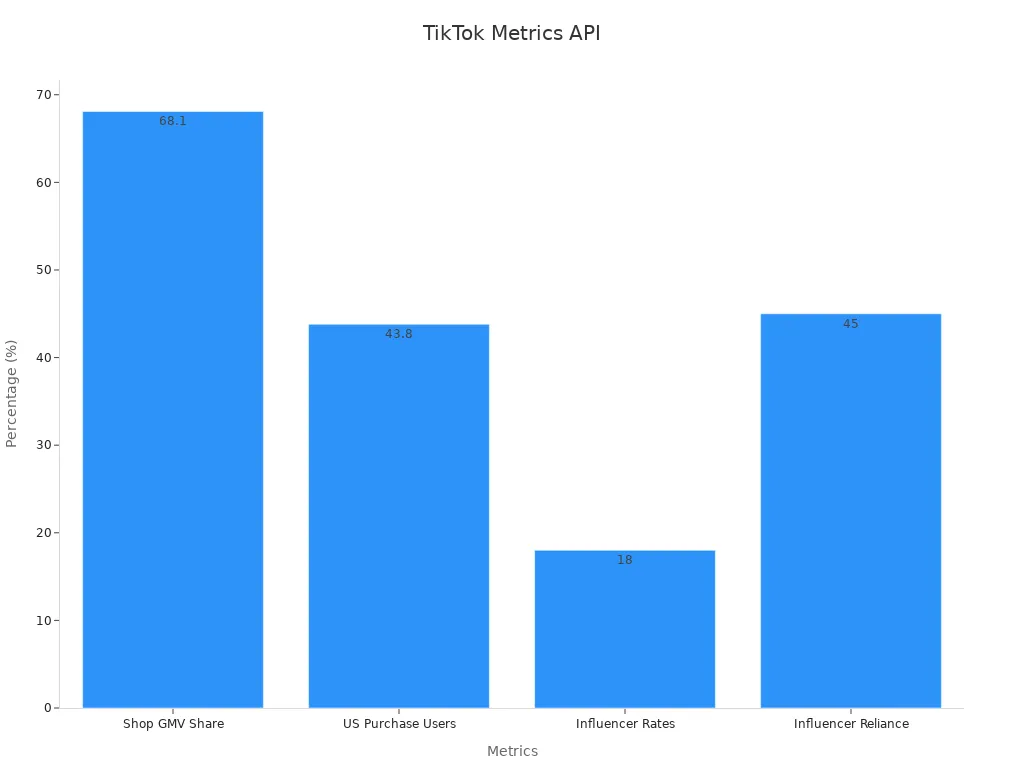
The TikTok business api lets you connect your business or app directly to TikTok’s powerful marketing tools. You can manage campaigns, track analytics, post content, and send server-side events without manual effort. By tapping into this API, you gain access to a massive audience and detailed data to boost your marketing results. For example, TikTok Shop holds 68.1% of social shopping GMV, with over $11 billion in sales in 2023. The platform’s large user base and advanced analytics help you reach more customers and optimize your campaigns.
Metric / Insight | Statistic | Implication / Explanation |
|---|---|---|
TikTok Shop GMV Share | 68.1% of social shopping GMV (Feb 2024) | Shows TikTok Shop's dominant market share in social commerce. |
TikTok Shop GMV in 2023 | $11.09 billion | Indicates substantial shopping activity on TikTok. |
U.S. Users Making Purchases 2024 | 43.8% | Demonstrates a large portion of U.S. users buy on TikTok. |
Key Takeaways
The TikTok Business API helps businesses automate marketing tasks like posting content, managing ads, and tracking results.
You can access detailed analytics and audience data to understand your customers and improve your campaigns.
Many users like marketers, eCommerce stores, and creators use the API to reach more people and save time.
To use the API, you need a TikTok Business Account, a developer account, and approval from TikTok.
The API uses strong security measures like OAuth 2.0 and encrypted data to keep your information safe.
TikTok Business API Overview

Main Features
You can use the TikTok business api to unlock a wide range of tools that help you manage your marketing on TikTok. This API gives you direct access to campaign management, analytics, content posting, and server-side event tracking. These features help you automate tasks and make smarter decisions.
TikTok’s unique storytelling format and high engagement rates make it a top choice for brands. In 2021, TikTok reached 1 billion monthly active users, ranking among the top 10 social networks worldwide. Many businesses use the platform’s ecommerce features, such as clickable product links and livestream shopping, to reach new customers.
Here is a table that highlights the main features of the TikTok business api:
API Name | Main Functionality | Primary Use Cases |
|---|---|---|
Content Posting API | Automates content publishing and scheduling | Marketers and creators automating uploads and scheduling |
Display API | Retrieves public TikTok content and metadata | Embedding TikTok videos on other platforms |
Research API | Provides anonymized data for trend analysis | Researchers analyzing trends and user engagement |
Commercial Content API | Manages ad campaigns and tracks performance | Businesses optimizing ad spend and campaign effectiveness |
You can also access detailed analytics, such as:
Trending videos on the For You page to spot popular themes.
Post analytics, including likes, comments, shares, watch time, and traffic sources.
Follower demographics like gender and location.
Follower activity data to find the best posting times.
Insights into videos and sounds your followers interact with.
These features help you understand your audience and improve your marketing strategy. TikTok’s interactive tools, such as polls and comments, let you gather feedback and adjust your content in real time. Research shows TikTok’s engagement rates are four to fifteen times higher than other platforms, giving you a strong advantage in digital marketing.
Who Uses It
Many types of businesses and professionals use the TikTok business api to reach their goals. You can use this API if you want to automate your marketing, analyze trends, or connect with new customers.
Marketers and advertisers use the API to manage campaigns, track results, and optimize ad spending.
eCommerce businesses sync product catalogs, run ads, and use advanced formats like Spark Ads and Collection Ads.
Content creators and influencers automate posting and analyze audience engagement.
Researchers use anonymized data to study trends and user behavior.
Businesses often segment their markets by analyzing participation in TikTok trends. This helps them target groups that engage with trending content and make better decisions about where to spend their marketing budget.
You can also use the TikTok business api to access demographic data, such as age, location, and gender. This information helps you create buyer personas and tailor your marketing to specific groups. Marketers across many industries use these insights to reduce advertising costs and increase customer engagement.
You can access demographic data through TikTok’s Audience API.
This data helps you understand your audience and create targeted content.
Marketers use these insights to improve campaign results and reach the right people.
Knowing your audience’s age and gender helps you design better ads and content.
The main users of the TikTok business api include marketers, advertisers, eCommerce businesses, and content creators who want to optimize their campaigns.
TikTok’s trend-driven user behavior means you need to stay agile and responsive. The API helps you keep up with trends and connect with your audience in real time.
Accessing the TikTok Business API
Requirements
To start using the TikTok business api, you need a few things in place. First, you must have a TikTok Business Account. This account gives you access to TikTok’s marketing tools and analytics. You also need a developer account on the TikTok developer portal. This portal lets you manage your API access and connect your app or website.
You should prepare your business information, such as your company name and contact details. You will also need to describe how you plan to use the API. TikTok reviews each application to make sure it meets their guidelines. Approval can take up to two weeks, so plan ahead.
Tip: Make sure your business follows TikTok’s policies. This helps speed up the approval process.
Setup Steps
You can follow these steps to set up and connect to the API:
Create a developer account on the TikTok developer portal. Apply for access to the specific API features you need.
Wait for approval. This process usually takes about two weeks.
Once approved, connect your application to TikTok by registering it in the developer portal.
Generate an access token. You do this by making a POST request to the TikTok OAuth endpoint. You can use programming languages like Python, Java, or Node.js for this step.
Use the access token to authenticate your API requests. Add the token to your request headers.
Set up tracking events and custom audiences. This helps you monitor user actions, such as installs or purchases.
Define your data extraction window by setting start and end dates. You can also set query parameters to choose which data fields you want.
Make API calls to retrieve or send data. Store your results in a format like CSV for easy analysis.
Note: TikTok provides SDKs and libraries for popular languages, including Python, Java, and PHP. These tools help you integrate the API faster and with fewer errors.
How It Works
Integration Methods
You can connect your app or business platform to TikTok using several integration methods. The most common way is through direct API connections. This method lets you send and receive data between your system and TikTok in real time. Many popular brands use this approach to automate their marketing and reporting.
Here is a table that shows how different companies use integration methods with TikTok:
App/Service | Integration Method(s) | Performance Metrics / Benefits |
|---|---|---|
Gymshark | Uses TikTok API endpoints to access content performance data | Video views, likes, shares, engagement rates, campaign ROI improvements |
Hootsuite | Schedules and publishes TikTok videos directly from its dashboard | Content scheduling efficiency, cross-platform management |
Shopify | Manages TikTok ads and sets up TikTok Pixel via API integration | Ad campaign performance, conversion tracking |
Canva | Enables creation and direct publishing of TikTok videos | Workflow efficiency, direct publishing |
Nike Training Club | Creates in-app fitness challenges linked to trending TikTok hashtags using API data | Increased user engagement, enhanced brand visibility |
You can also use database connections if you want to pull data from your own systems or client databases. This method works well for real-time analytics and structured data. Some businesses use manual upload integration for custom reports, but this takes more time and can lead to errors. Web scraping is another option for gathering public data, but it often breaks and may not follow legal rules.
Tip: Direct API connections give you the most reliable and automated way to work with TikTok data. They help you keep your data fresh and your campaigns running smoothly.
Many agencies use tools like Swydo, Alteryx, and Datorama to connect to TikTok and other platforms. These tools help you automate reports, prepare data, and create dashboards without much coding. If you have technical skills, you can use open-source tools like Airbyte with Python or R for more control and lower costs.
Key Endpoints
The TikTok business api offers several key endpoints that help you manage your marketing tasks. Each endpoint serves a different purpose, such as posting content, tracking analytics, or managing ads. You can use these endpoints to automate your workflow and get real-time insights.
Some of the main endpoints include:
Content Posting Endpoint: Lets you upload and schedule videos directly to TikTok.
Analytics Endpoint: Gives you detailed data on video views, likes, comments, shares, and engagement rates.
Ad Management Endpoint: Helps you create, update, and monitor ad campaigns.
Audience Insights Endpoint: Provides demographic data about your followers, such as age, gender, and location.
Event Tracking Endpoint: Allows you to send server-side events, like purchases or sign-ups, for better conversion tracking.
You can measure the performance of these endpoints using several important metrics:
Metric | Description | Typical Target / Unit |
|---|---|---|
Uptime | How often the API is available | |
Response Time | How fast the API answers your requests | Milliseconds (ms) |
Latency | Time from sending a request to getting a response | Milliseconds (ms) |
Throughput | Number of requests processed per second | Requests/sec |
Error Rate | How often requests fail | Percentage or count of errors |
You should watch these metrics to make sure your integration runs smoothly. High uptime and low error rates mean your campaigns and reports will not get interrupted.
You can also track your marketing success using TikTok’s operational metrics. These include video views, engagement rates, follower growth, and reach. For example, engagement rate shows how many people interact with your content. You can calculate it with this formula:
Engagement Rate = ((Likes + Comments + Shares) / Followers) × 100%
A high engagement rate means your content connects well with your audience. Many brands see engagement rates between 4.5% and 18% on TikTok, which is much higher than on other platforms.
Security
You need to keep your data and your users’ information safe when you use the TikTok business api. TikTok uses several security features to protect your integration.
OAuth 2.0 Authentication: This system makes sure only approved apps can access your data. You must use secure tokens to log in and send requests.
Encrypted Data Transmission: All data travels over HTTPS, which keeps it safe from hackers.
Rate Limit Handling: TikTok sets limits on how many requests you can send. This helps prevent abuse and keeps the system stable.
Token Management: You must store and refresh your access tokens securely. Never share your tokens in public code or with untrusted users.
Continuous Monitoring: Many businesses use tools like Datadog and Postman to watch API response times, error rates, and request volumes. This helps you spot problems early and keep your integration healthy.
Note: A webinar by Tealium explains how server-side integrations, like the TikTok Events API, can improve data reliability and security. These integrations work well with TikTok Pixel and SDK to give you better control over your data.
You should always follow best practices for API security. Keep your software updated, use strong passwords, and review your access permissions often. This helps you protect your business and your customers.
Use Cases
Campaign Management
You can use the TikTok business api to create, manage, and optimize your ad campaigns. The API lets you target specific audiences, track performance, and automate ad delivery. For example, an e-commerce retailer can launch targeted campaigns and adjust them in real time based on performance data. This helps you reach the right people and improve your return on investment.
Key Features | Documented Use Cases | |
|---|---|---|
TikTok Business API | Campaign creation, audience targeting, performance tracking, automated ads | E-commerce retailer launching targeted ad campaigns optimized for conversions using real-time performance data |
Analytics
You get detailed analytics with the TikTok business api. Real-time data collection lets you monitor campaign events within minutes. You can track key performance indicators (KPIs) and spot problems quickly. This helps you make fast decisions and improve your campaigns. Real-time reporting also supports teamwork, as you can share dashboards and reports with others in your company.
Real-time monitoring helps you act on time-sensitive data.
You can detect problems early and fix them before they grow.
Exporting data to other tools gives you a complete view of your marketing.
Content Posting
The API makes it easy to post and schedule videos. You can automate uploads and manage multiple accounts. Marketers and creators use this to keep a steady flow of content. TikTok analytics help you test different types of videos and posting times. You can see which posts get the most views and engagement, then adjust your strategy.
Automated posting keeps your brand active.
Analytics show you the best times to post and what your audience likes.
You can build a loyal following by responding to engagement data.
Server-Side Events
You can track important actions, like purchases or sign-ups, using server-side events. The API supports batch processing and error handling, so your data stays accurate. Offline conversion tracking links sales to your ads, even if the purchase happens later. This gives you a full picture of your marketing impact.
Track conversions and user actions for better campaign accuracy.
Monitor and optimize your tracking setup as your business grows.
Use batch processing to handle large amounts of data efficiently.
TikTok Shop Open API
The TikTok Shop Open API helps you connect your store and manage sales. You can track revenue, order volume, and customer behavior. Brands like CeraVe have used these insights to boost sales by 300%. Glossier improved repeat customer rates by analyzing buyer data. The API also solves common problems, such as manual data tracking and lack of integration with other tools.
Key Metrics / Analytics | Description | Brand Example / Outcome |
|---|---|---|
Sales Performance | Tracks revenue, order volume, and average order value | CeraVe achieved 300% sales growth after viral campaigns |
Customer Behavior | Analyzes new vs. returning customers and lifetime value | Glossier boosted repeat customers with targeted campaigns |
Documentation and Support
Official Resources
You can find everything you need to get started in TikTok’s official documentation. The guides walk you through each step, from registering your app to handling authentication with OAuth 2.0. You will see clear instructions on how to manage usage limits, such as the 600 requests per minute rule for each endpoint. The documentation also explains best practices for staying compliant with TikTok’s terms, privacy laws like GDPR and CCPA, and secure data handling.
Here are some highlights from the official resources:
You get detailed guides for API registration, authentication, and usage limits.
The documentation covers compliance, including privacy laws and secure data handling.
You will find troubleshooting tips for common issues like rate limits and expired tokens.
The guides show you how to access business data, such as user profiles, video stats, and ad management.
Real-world usage statistics help you plan your integration and avoid surprises.
Note: Many users say the official documentation is the most reliable and legally safe way to connect with TikTok. You will also find advice for handling errors, like using exponential backoff and logging.
You may face some challenges, such as rate limits or integration complexity. The documentation provides solutions and best practices to help you overcome these issues.
Developer Tools
You have access to several developer tools that make working with TikTok easier. These tools help you schedule posts, manage analytics, and collaborate with your team. Each tool has its own strengths and limitations.
Tool Name | Key Features & Capabilities | Strengths | Limitations Related to TikTok Integration | User Feedback Highlights |
|---|---|---|---|---|
Hootsuite | Post scheduling, analytics dashboard, multi-account management | Strong scheduling and analytics | API limits posting some content types; lacks trend insights | Great for multi-platform management, but misses TikTok trends |
Loomly | Social media management, AI post suggestions, content calendar | Easy to use, reliable scheduling | Limited advanced analytics; API restrictions | Users like scheduling, but report some glitches |
Social Champ | Bulk scheduling, AI content suggestions, collaboration tools | Responsive support, simple interface | Minor glitches in bulk scheduling | Praised for ease of use and AI tools |
SocialPilot | AI scheduling, team collaboration, content library | Budget-friendly, comprehensive analytics | Does not support TikTok ads | Agencies recommend for scheduling and analytics |
You can use these tools to save time and improve your workflow. Many users praise their scheduling and analytics features. Some tools may not support every TikTok feature, so check which one fits your needs best.
You gain real advantages when you use the TikTok business api. This tool helps you track more than just likes and views. You can see how people interact with your videos, when your followers are most active, and which posts get the best results. Automation lets you post at the right time and answer customers faster. These features help you improve your campaigns and reach your goals. For more details, check out TikTok’s official guides.
FAQ
How do you get access to the TikTok Business API?
You need a TikTok Business Account and a developer account. Apply through the TikTok developer portal. After approval, you can connect your app and start using the API.
What programming languages can you use with the TikTok Business API?
You can use Python, Java, PHP, or Node.js. TikTok provides SDKs and code samples for these languages. Choose the one that fits your project best.
Is the TikTok Business API free to use?
You do not pay to access the API. However, you may pay for ads or extra services. Always check TikTok’s terms for any changes.
Can you track conversions and sales with the API?
Yes! The API lets you track purchases, sign-ups, and other actions. You can see which ads or videos lead to sales. This helps you improve your marketing.
How do you keep your data safe when using the API?
Always use secure passwords and keep your access tokens private. TikTok uses encryption and OAuth 2.0 for safety. Update your software often and review permissions regularly.
See Also
Understanding TikTok Analytics For Better Content Insights
