A complete guide to TikTok Shop API endpoints and features


You can help your online store grow by using the TikTok Shop API. This tool lets you control your shop with less work and fewer errors. For example, you can set up automatic updates for your product list. You can also handle orders quickly. You can talk to customers after they see your videos. The table below explains how the TikTok Shop API helps you do things better:
for
Evidence Description | Benefit |
|---|---|
Makes work easier by cutting down on mistakes and manual changes. | |
Streamlined order processing | Gives fast updates and helps you fill orders well. |
Enhanced customer management | Helps you market to customers in a special way and keeps them happy after they buy. |
You can read more in the TikTok Shop Details API Documentation.
Key Takeaways
The TikTok Shop API helps store owners manage products faster. It cuts down on mistakes and saves time for people who sell online.
The API gives real-time data, so businesses know about orders and inventory right away. This helps keep customers happy and updated.
User interaction endpoints help stores talk to customers better. This makes shopping more fun and helps customers want to come back.
The API lets you handle reviews well, which can make your shop look good. Good reviews help new buyers trust you and can lead to more sales.
Using automation tools with the TikTok Shop API makes work easier. This gives you more time to grow your business.
TikTok Shop API Overview

What Is TikTok Shop API
You can link your online store to TikTok with the tiktok shop api. This api lets you handle your shop, products, and orders without opening the app every time. Many developers use the tiktok api to make tools for brands to grow on tiktok. The api uses RESTful methods like GET, POST, PUT, and DELETE. These methods help you read, add, change, or delete data from your shop. You can see live updates about your products, orders, and customers. This helps you keep your shop current and react fast to changes.
The tiktok shop api has many key features for online stores. Here is a table that shows what you can do with it:
Functionality | Description |
|---|---|
Integration with TikTok API | Lets you link your apps with tiktok’s shopping tools. |
Real-time data access | Gives you fresh info on products, orders, and customers. |
Product catalog management | Helps you control listings, stock, and prices right away. |
Order management integration | Lets you follow and handle orders, customer details, and returns. |
Insights and analytics | Shows you sales, conversions, and customer actions to help your marketing. |
Core Benefits
Using the tiktok shop api gives your online business many good things. You can run your shop faster and make fewer mistakes. The api gives you clear sales numbers, which some other e-commerce apis do not show. You can pick how you want to manage your stock, like drop shipping or regular ways. The tiktok api helps you reach more people because tiktok has over 1.5 billion users, and each person spends more than 6 hours a week on the app.
Here are some usual ways businesses use the tiktok shop api:
Run online shops and help brands grow.
Watch ads and study marketing results.
Talk to customers after they see your videos.
Developers have seen real changes after using the tiktok shop api. They get more sales, mix online and offline data, and target better. The api helps you get more from your marketing. The chart below shows some of these good results:
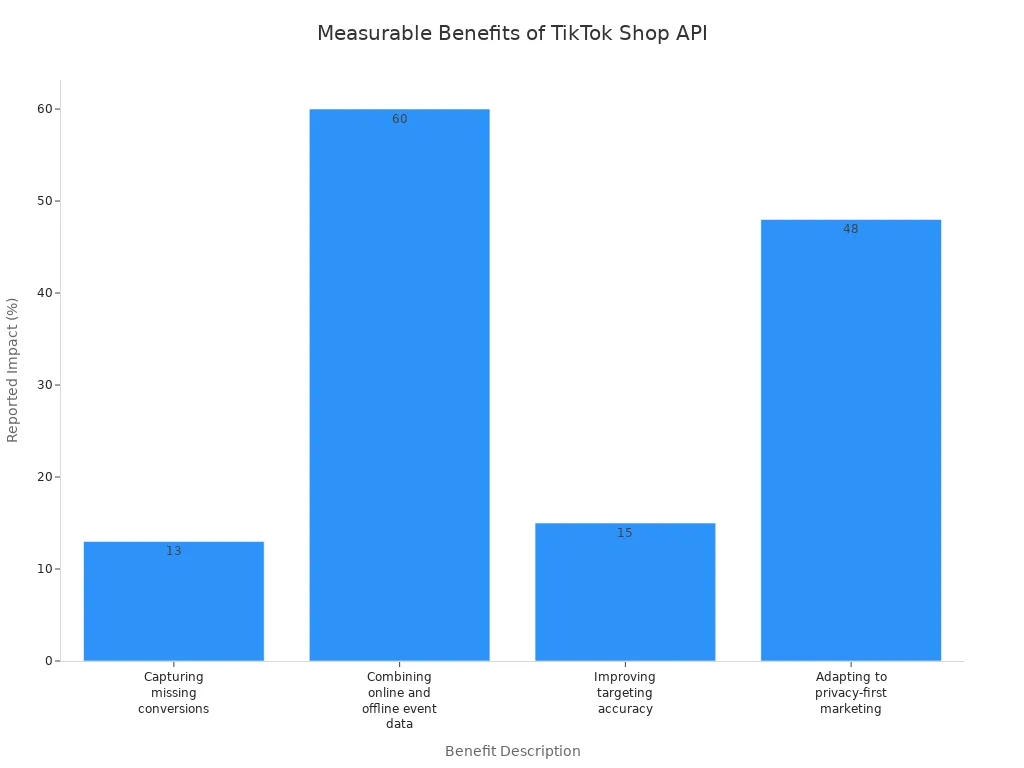
Tip: The tiktok shop api can help you deal with privacy changes and still get strong results for your shop.
Main Endpoints in TikTok Shop API
The tiktok shop api has many endpoints for your shop. You use these endpoints to manage products, orders, inventory, user interactions, and reviews. Each group helps your shop work well and gives you tools to grow on tiktok.
Product Endpoints
Product endpoints help you control your catalog on tiktok shop. You can add, change, or delete products. You can also set prices and update descriptions. These endpoints help your brand look the same everywhere. This makes customers trust you more. You can change your listings for tiktok shop and follow the rules. The tiktok api lets you send product listings to other marketplaces, including tiktok shop. This saves you time and makes catalog management easier.
Centralized product content keeps your brand strong and your shop neat.
Syndication features help you change listings for tiktok shop and get more attention.
Automatic distribution sends your products to tiktok shop and other places, so more people see them.
Product endpoints help you keep your shop fresh and make your products look good on tiktok.
Order Endpoints
Order endpoints help you manage orders from start to finish. You can track orders, handle returns, and check order status. The tiktok shop api gives you tools to manage orders fast and keep customers happy. You get updates right away, so you know when orders ship or when returns happen. The tiktok api makes order management easy and helps you avoid mistakes.
Operation Type | Description |
|---|---|
Tracking Orders | Lets you see where your orders are. |
Processing Returns | Helps you handle returns for your customers. |
Checking Order Status | Lets you check the current status of your orders. |
Order endpoints connect your shop to tiktok, so you always know what is happening with your orders.
Inventory Endpoints
Inventory endpoints help you keep track of your stock on tiktok shop. You can use the tiktok shop api to update inventory, check stock, and plan for sales. The tiktok api gives you updates right away, so you never run out of products. You can use automated tools to sync inventory and stop stock problems. The api helps you guess what products you will need.
Strategy | Description |
|---|---|
Automated Tools | Sync inventory data in real time to avoid stock issues. |
Real-time Updates | Get instant updates on stock levels to stay organized. |
Demand Forecasting | Analyze sales trends to predict what products you need in stock. |
Inventory endpoints help your shop always have the right products for your customers on tiktok.
User Interaction Endpoints
User interaction endpoints let you talk to customers who interact with your shop and videos on tiktok. You can use the tiktok shop api to send messages, answer questions, and follow up after purchases. The tiktok api helps you build good relationships with buyers and make their experience better. You can see how users engage with your products and reply fast to their needs. These endpoints help you turn viewers into loyal customers.
User interaction endpoints help you make your shop more personal and keep customers coming back to tiktok.
Review Endpoints
Review endpoints help you manage feedback from customers on tiktok shop. You can read, reply to, and organize reviews using the tiktok shop api. Reviews are very important for shoppers on tiktok. Many people say reviews are the biggest reason they buy something. Most customers look at the number of reviews before buying. Reviews help shoppers trust your shop and products.
30.5% of tiktok users say reviews matter most when buying.
74.8% of customers check the number of reviews before making a choice.
82.7% say reviews help them decide what to buy on tiktok.
Managing reviews well is important for your reputation. You should reply to both good and bad feedback. A quick and thoughtful response can build trust and turn unhappy customers into loyal ones. Review endpoints help you keep your shop’s reputation strong on tiktok.
Tip: Use review endpoints to reply fast and show customers you care about their experience.
The tiktok shop api gives you many endpoints to manage products, orders, inventory, user interactions, and reviews. These api endpoints help you keep your catalog updated, connect with users, and build trust through reviews. You can use the tiktok api to make your shop better and grow your business on tiktok.
TikTok Shop Details API Documentation
You need to understand how to use the tiktok shop api for your business. The tiktok shop details api documentation gives you the tools to connect your shop with tiktok. You can find the official documentation at TikTok Shop Details API Documentation. This guide helps you learn about each api and how to use it for your shop. You will see how to set up your account, find endpoints, and test your requests.
Endpoint Reference
You can use the endpoint reference to see all the ways you can connect your shop to tiktok. The tiktok shop details api documentation lists every endpoint you need. You will find details for products, orders, inventory, user interactions, and reviews. Each endpoint has a clear path, method, and description. You can use this list to plan your integration and make sure you do not miss any features.
You need to create a TikTok For Business account.
You should sign up as a developer to get full access to the documentation.
The documentation shows you how to use each api and what data you can send or receive.
The endpoint reference helps you solve problems fast. If you see an error, you can check the documentation to find the cause. You can also see what each endpoint expects, so you do not make mistakes in your requests.
Note: Always check the tiktok shop details api documentation for updates. Tiktok sometimes adds new endpoints or changes old ones.
Sample Requests
You can learn faster by looking at sample requests in the tiktok shop details api documentation. These examples show you how to use the tiktok api in real life. You can copy the code and test it with your own shop. Here is a simple example of how to get product data from the tiktok api:
GET /api/products/list
Host: api.tiktok.com
Authorization: Bearer YOUR_ACCESS_TOKEN
This request asks the tiktok api for a list of products in your shop. You need to use your own access token. The documentation shows you what the response will look like. You can also find examples for adding products, updating inventory, and managing orders.
Sample requests help you avoid errors. You can compare your code to the examples in the documentation. If something does not work, you can check the sample to see what you missed.
Try each sample request with your own data.
Use the documentation to see what each field means.
Test your requests before you use them in your real shop.
The tiktok shop details api documentation gives you everything you need to connect your shop to tiktok. You can use the endpoint reference and sample requests to build your integration. You will save time and make fewer mistakes. The documentation also helps you learn how to handle reviews, talk to customers, and update your videos.
Tip: Bookmark the tiktok shop details api documentation. You will use it often as you build and improve your shop.
Key Features of TikTok Shop API
Real-Time Sync
The tiktok shop api helps your business run well. Real-time sync is a big feature that makes orders go faster and stops mistakes. When you connect your business api to tiktok, you get updates right away about orders, inventory, and shipping. Webhooks are important for this. They send alerts to your system when something changes, like a new order or a stock update. You do not need to check for updates all the time. Your business can act fast.
Here is a table that shows how real-time sync helps your business:
Feature | Benefit |
|---|---|
Real-time order synchronization | Minimizes delays in order processing |
Inventory level updates | Ensures accurate stock levels across channels |
Pick list generation | Streamlines warehouse operations |
Shipping label creation | Optimizes carrier selection for faster shipping |
Tracking number updates | Keeps customers informed about their orders |
Customer notification messaging | Enhances customer experience during fulfillment |
Webhooks help keep your shop data new and your customers happy.
Automation Tools
You can save time by using automation tools with the tiktok shop api. These tools let you upload lots of products at once and make your business api easier to use. For example, you can use webhooks to start bulk uploads or updates when you change your product list. Here are some tools that work well with tiktok shop:
TokExpert lets you upload many products from Excel or CSV files. This helps your business add new items fast.
3Dsellers connects to tiktok shop and helps you manage listings on different channels. You can use it to upload many products at once.
Webhooks make these automation tools even better. They send alerts when your videos get new comments or when your shop gets a big order. You can set up your business api to handle these things without doing them by hand.
Security Features
You want your business and your customers to be safe on tiktok shop. The api uses strong security features to protect your data. Webhooks only send info to trusted places, so your business api stays safe. The system uses AES-256 encryption to keep your data safe when stored or sent. You also get role-based access control, multi-factor authentication, and regular checks. These features help you control who can use your shop and business api.
TikTok shop keeps business actions separate and uses two-step checks for extra safety. The company has spent almost $1 billion on tools and staff to protect sellers and shoppers. TikTok also meets ISO 27001 and PCI DSS rules, showing they care about security.
Tip: Always use webhooks with safe endpoints and keep your business api keys secret.
You can trust the tiktok shop api to keep your business, your shop, and your customers safe while you grow on tiktok.
Integration and Authentication

Developer Account Setup
You need a tiktok seller account before you start with api integration. This account lets you connect your shop to the tiktok platform. Follow these steps to set up your developer account and begin getting started with integration:
Go to the tiktok-shop partner page and create a partner account.
Enter your details and finish the sign-up process.
Log in to your tiktok seller account and read the onboarding guide for developers.
Open the App & Service section in your tiktok seller account.
Pick between Custom App and Public App. Most users choose Public App.
Turn on the api and set the redirect URL to the address given in the guide.
Fill in the app details and click Create App.
After you create the app, find your App Key, App Secret, and Service Id on the app details page.
In the Basic Info section, click Manage API.
Turn on the APIs you need, like Shop Authorized Information, Product Basic, and Order Information.
Add your App Key, App Secret, and Service Id to your vault.
You now have a tiktok seller account ready for integration with the api.
Authentication Methods
You must keep your shop and customer data safe during integration. The tiktok api uses OAuth 2.0 for authentication. This method gives you these benefits:
You use access tokens instead of passwords for api integration.
You need user consent before you can access data.
OAuth 2.0 makes your shop more secure.
You should always follow the security steps in the tiktok seller account guide.
API Request Structure
When you send data to the tiktok api, you must use the right structure. This helps your integration work well and keeps your shop running smoothly. Here is a table that shows what you need for each api request:
Field | Data type | Description |
|---|---|---|
Access-Token | string | (Required) Authorized access token. |
Content-Type | string | (Required) multipart/form-data. |
advertiser_id | string | (Required) Advertiser ID. |
file | file | (Required) Data files. Use CSV or TXT only. |
file_signature | string | (Required) The file's MD5 for verification. |
calculate_type | string | (Required) Encryption type. |
You must include all these fields in your api requests. This structure helps you upload product lists, manage orders, and even connect your videos to your shop. If you follow these steps, your tiktok seller account will stay safe and your integration will work well.
Tip: Always check your api request fields before sending them to tiktok. This helps you avoid errors and keeps your shop data correct.
Data Synchronization and Management
Syncing Products
You want your shop to always show the right products. The tiktok api helps you sync products between your store and tiktok shop. You can use automated tools to update product details, prices, and images. Real-time sync keeps your product data fresh. If you sell lots of products, you can use third-party connectors or TikTok for Shopify. These make syncing easier. CSV uploads are good for manual updates. The table below shows popular ways to sync products:
Method | Description |
|---|---|
TikTok for Shopify | Good for small catalogs to keep stock levels correct. |
CSV Uploads | Best for manual syncs when you do not need automation. |
Third-party Connectors | Great for big catalogs that need automatic inventory management. |
You can keep your shop catalog up to date. This helps you avoid selling products that are out of stock. Real-time sync lets you manage products on different platforms. You can react fast when things change.
Managing Orders
You need to process orders quickly and with care. The tiktok shop api lets you track orders and confirm details. You can pick the best shipping options. Use safe packaging and label fragile items to protect them. Always double-check order details before shipping. You can choose FBT, a 3PL partner, or direct fulfillment for shipping. Good order and inventory management helps you avoid delays. It keeps customers happy. Here are some best practices for managing orders:
Use tight, plain packaging and label fragile items.
Check order details before you ship.
Choose the best shipping type for your shop.
Get software to help with inventory and demand planning.
Offer fast shipping to make customers happy.
You can organize sales and get ready for busy times. The api helps you handle lots of orders and keeps your shop running well.
Handling Inventory
You must keep track of inventory so you do not oversell. The tiktok api gives you tools for automatic inventory updates and real-time sync. You can turn on real-time inventory sync in the tiktok shop app settings. Set buffer stock levels to stop selling products you do not have. Decide how your shop handles out-of-stock items. The table below shows ways to manage inventory well:
Strategy | Description |
|---|---|
Automated Inventory Updates | M2E Cloud updates product amounts in your store and tiktok shop after each order or stock change. |
Real-time Inventory Sync | Turn this on in the tiktok shop app settings for correct stock levels. |
Buffer Stock Levels | Set buffer levels to stop overselling and handle out-of-stock items. |
The api connects with your systems and automates inventory management. You can update inventory in real time and meet customer needs during busy times. This helps you manage products, orders, and inventory together. Your shop will be ready for new videos and sales.
Best Practices and Use Cases
Automating Listings
You can make your shop work better by using the TikTok Shop API to automate product listings. This saves you time and helps you avoid mistakes. Here are some smart ways to use automation:
Sync orders right away so you do not miss sales.
Update inventory on all your sales channels without doing it by hand.
Make pick lists for your warehouse team fast.
Create shipping labels and pick carriers with no extra steps.
Send tracking info to customers as soon as their order ships.
Let customers know what is happening with their order at every step.
Plan posts and manage ads without much work.
Tag products in your videos so people can shop in the app.
Use chatbots to answer questions from customers.
Work with influencers and see how well they do using TikTok analytics.
A platform that brings everything together lets you control orders and inventory from one place. This helps you not buy too much stock and keeps your shop ready for new trends. If you turn on real-time sync and use field mapping, you can fix automation problems fast. An e-commerce connector makes this even easier.
Tip: When you automate your listings with the API, you get more time to grow your shop and make fun videos.
Streamlining Fulfillment
You can use the TikTok Shop API to make order fulfillment faster and more correct. Automated product syncing keeps your shop filled with the newest items from your catalog. The API links TikTok orders to your main e-commerce platform, so you can handle everything in one spot. You have a few ways to fulfill orders:
Self-fulfillment means you pack and ship orders yourself.
Fulfilled by TikTok lets TikTok take care of shipping for you.
Third-party logistics providers help with shipping and storage.
When you use the API for fulfillment, you make fewer mistakes and send orders faster. Your customers get their packages on time, which helps them trust your shop.
Improving Customer Experience
The TikTok Shop API gives you tools to make shopping easy and fun for your customers. The table below shows some features that help make things better:
Feature | Description |
|---|---|
In-app Purchasing | Customers can buy products without leaving TikTok, so shopping is quick and simple. |
Livestream Shopping | You can show products and answer questions live, which helps customers decide what to buy. |
Shoppable Videos | Tag products in your videos so users can click and buy right away. |
Influencer Collaborations | Work with influencers to reach more people and build trust with real stories and reviews. |
These features help you connect with your audience and make your shop special. When you use the API to tag products in videos and work with influencers, you reach more buyers and sell more. TikTok analytics lets you see what works best, so you can keep making your shop better.
Note: A better customer experience means more people will buy again and leave good reviews for your shop.
Common Issues and Troubleshooting
When you use the tiktok shop api, you may face some common problems. You can fix most issues if you know what to look for. This section will help you solve the most frequent errors with your shop, api, and endpoints.
Authentication Errors
You may see authentication errors when you try to connect your shop to tiktok. These errors often happen if your login details or api keys are wrong. Always check your credentials before you send a request. If you use OAuth, make sure your access token is still valid. Sometimes, you need to refresh your token or ask users to log in again. If you see a 401 or 403 error, your api request did not pass the security check. You should also check if your app has the right permissions for the endpoints you want to use.
Tip: Keep your api keys safe. Never share them in your code or videos.
Data Sync Problems
You want your shop to show the right products and orders. Sometimes, data does not sync between your store and tiktok. You can follow these steps to fix sync problems:
Double-check your credentials and authentication methods. Make sure your api keys and login details are correct.
Handle authentication errors by refreshing tokens or asking users to log in again.
Validate your request data before you send it. Make sure it matches the api format and type requirements.
Log all api requests, responses, and errors. Good logs help you spot patterns and find problems faster.
Use an exponential backoff strategy for retries if you hit rate limits or server errors.
Stay updated with changes to the tiktok shop api. Adjust your error-handling strategies when the api changes.
Test error scenarios during development. This helps you build strong error handling before you go live.
If you follow these steps, you can keep your shop data fresh and avoid missing sales.
Rate Limits
Tiktok sets limits on how many api requests you can send in a short time. If you send too many requests, you may get a rate limit error. You should slow down your requests and try again after a short wait. Use an exponential backoff method to space out retries. Always check the tiktok shop api documentation for the latest rate limits. If you plan your updates and group your requests, you can avoid hitting these limits. Rate limits help keep the tiktok platform safe and fair for all shops.
Note: If you see many rate limit errors, review your code and make sure you only call the endpoints you need.
You can solve most problems with the tiktok shop api by following these tips. Good troubleshooting helps your shop run smoothly and keeps your customers happy.
Documentation and Support Resources
Official Guides
You can find easy-to-read guides for TikTok Shop API on the main website. These guides help you link your shop to TikTok. You will see simple steps for each API feature. The guides show you how to make an account, use endpoints, and fix problems. You can look at code samples to test your shop connection. The guides explain how to handle products, orders, and inventory. You will learn how to use the API to update your shop and link videos to your products.
Tip: Save the documentation page. You will use it a lot when working with TikTok Shop API.
Here is a short list of what you will find in the official guides:
Details about API endpoints
Steps for authentication
Explanations for error codes
Examples of requests and responses
Community Forums
You can join TikTok developer forums to get help from other shop owners and developers. These forums let you ask questions about the API and share your tips. You can search for answers or post your own questions. Many people share advice about using TikTok Shop and fixing issues. You can also find guides for linking your shop to TikTok and using videos to get more sales.
The table below shows what you can do in the community forums:
Forum Feature | How It Helps You |
|---|---|
Ask Questions | Get answers from other TikTok users |
Share Solutions | Help others with your shop experience |
Find Documentation | Locate guides and API updates |
Learn Best Practices | Improve your TikTok Shop integration |
You can use both the official guides and forums to fix problems and help your shop grow on TikTok.
You can make your online shop better with the TikTok Shop API. This tool lets you control your shop and check orders. You can also talk to customers. The e-commerce features help you change products and handle reviews. You can link videos to your store too. Always read the official guide and follow the rules. Try using the API now to help your shop grow and find more buyers.
FAQ
How do you get started with TikTok Shop API?
You start by creating a seller account. Then, you register as a developer. You set up your app and get your API keys. Follow the official guide for each step.
What data can you manage with the API?
You can manage products, orders, inventory, user messages, and reviews. The API lets you update product details, track orders, and reply to customers.
Why do you need to use OAuth 2.0?
OAuth 2.0 keeps your shop safe. It lets you control who can access your data. You use tokens instead of passwords for better security.
What should you do if you see a rate limit error?
Wait a few minutes before sending more requests.
Check your code to avoid too many calls.
Read the tiktok API documentation for the latest limits.
See Also
The Complete Resource for TikTok Analytics Tools
EchoTik Introduces Innovative U.S. TikTok Shop Pricing Tool
A Thorough Guide to Understanding TikTok Analytics
