How to Track TikTok Ad Performance

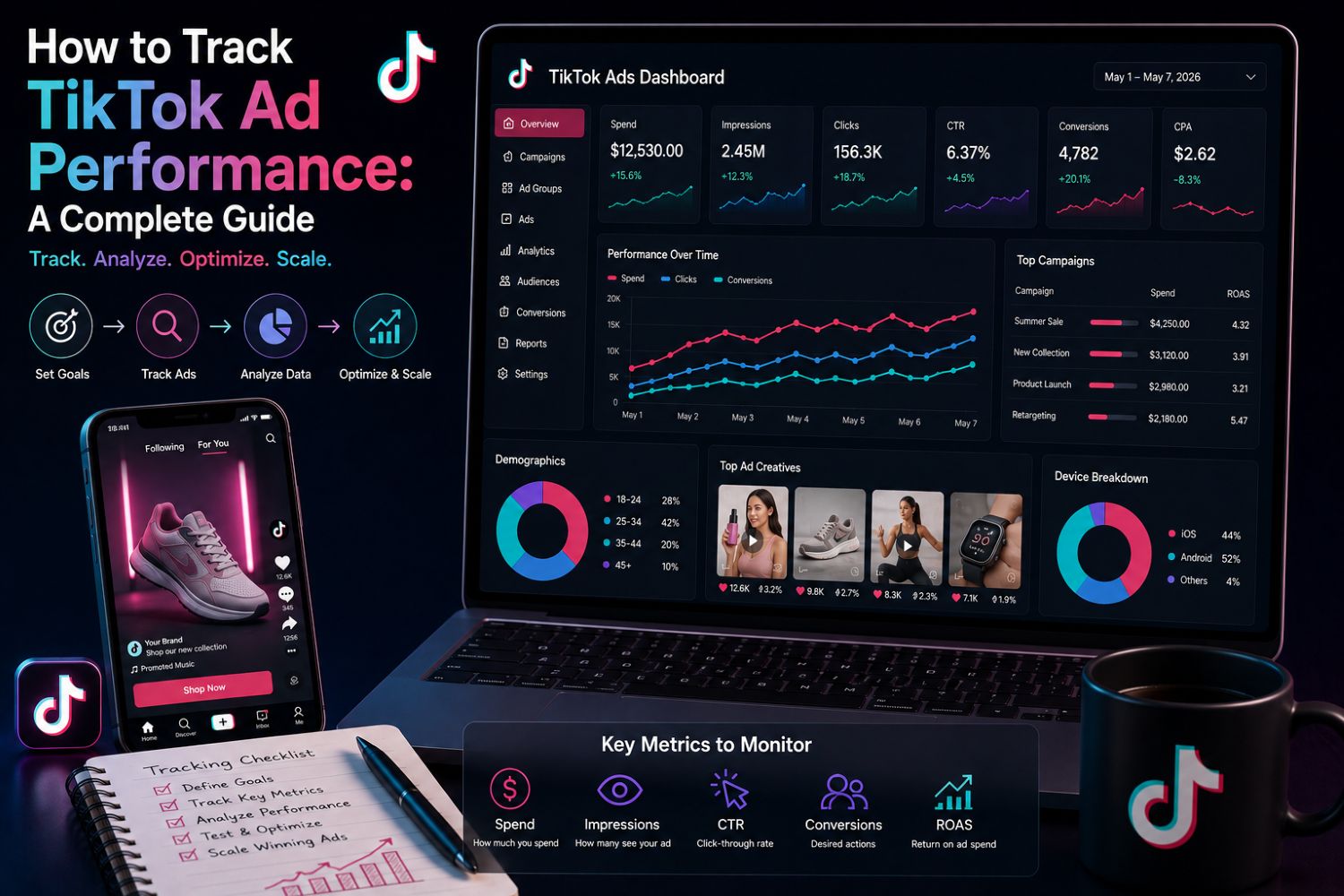
Many TikTok advertisers run ads without checking results. Studies show 50% to 70% fail to use their analytics data well. That means most people waste money on guesswork. Tracking is the only way to know what works.
You need three main steps. First, set up your data sources correctly. Second, learn which metrics matter most. Third, use those insights to improve every ad.
Your TikTok ad analytics will show hidden patterns. You can spot winning creatives fast. You can move spending toward high-performing audiences. This data matters. Your campaign performance stays hidden without it.
Master TikTok Ads Analytics to boost your return on investment. Start with the right ad setup. Then watch your ad results get better. Your ad strategy needs real numbers. Your ad budget deserves smarter choices. Focus on useful metrics, not vanity numbers.
Key Takeaways
Use both TikTok Pixel and Events API to track conversions accurately.
Pay attention to conversion metrics such as ROAS and CPA, instead of likes or views.
Break down your data by audience and creative to find your best performers.
A/B test your hooks, CTAs, and landing pages to find out which ones improve results.
Include view-through conversions to catch purchases that happen later.
Where TikTok Ad Analytics Data Comes From
Your TikTok ad analytics journey starts with knowing where the numbers live. TikTok Ads Manager gives you two main views: the Dashboard for a quick summary and the Campaigns tab for detailed breakdowns. The Dashboard shows high-level performance across all your active campaigns. The Campaigns tab lets you drill into individual ad groups, creatives, and placements. Both views pull data from two sources: TikTok's platform itself and your tracking setup.
TikTok Ads Manager Dashboard
The Dashboard is your command center for watching ad performance. You'll see delivery metrics like impressions, reach, and frequency, plus engagement numbers such as likes, comments, and shares. Click metrics show CTR and CPC, while conversion metrics reveal actions taken after clicking. Revenue metrics like ROAS and total purchase value finish the picture.
Successful advertisers focus on three metric layers. The primary business metric answers "Did this work?"—usually Complete Payment ROAS or Total Purchase Value. Performance context metrics explain why that number moved, including cost per conversion, reach, and engagement rate. Supporting detail metrics, available on demand, cover video completion rates and frequency data.
TikTok Pixel and Events API
The TikTok Pixel tracks user actions on your website after they view or click your ad. This browser-based tracking has serious limits. The pixel alone misses 20-40% of conversions due to cookie restrictions and ad blockers. Apple's ATT opt-out rates average 50-65% globally, making most iOS users invisible to pixel tracking.
The Events API fixes these problems by sending conversion data straight from your server to TikTok. This server-side method bypasses all browser restrictions. TikTok's internal data shows advertisers using Events API with the browser pixel achieve Event Match Quality scores 40-60% higher than those using the pixel alone.
TikTok recommends using both client-side and server-side tracking to get the best results. This dual approach cuts signal loss, leading to more efficient outcomes.
Common setup mistakes ruin conversion tracking accuracy. Duplicate pixel installations inflate conversion counts. Wrong event names weaken optimization. Missing parameters like value or currency cause inaccurate ROAS. Firing purchase events on button clicks instead of success pages creates false positives. Without a shared event_id, running both pixel and Events API double-counts conversions.
Proper setup of your TikTok performance data sources decides everything that follows. Take time to check event parameters and test your setup before scaling any campaign.
Key TikTok Metrics for Campaign Performance
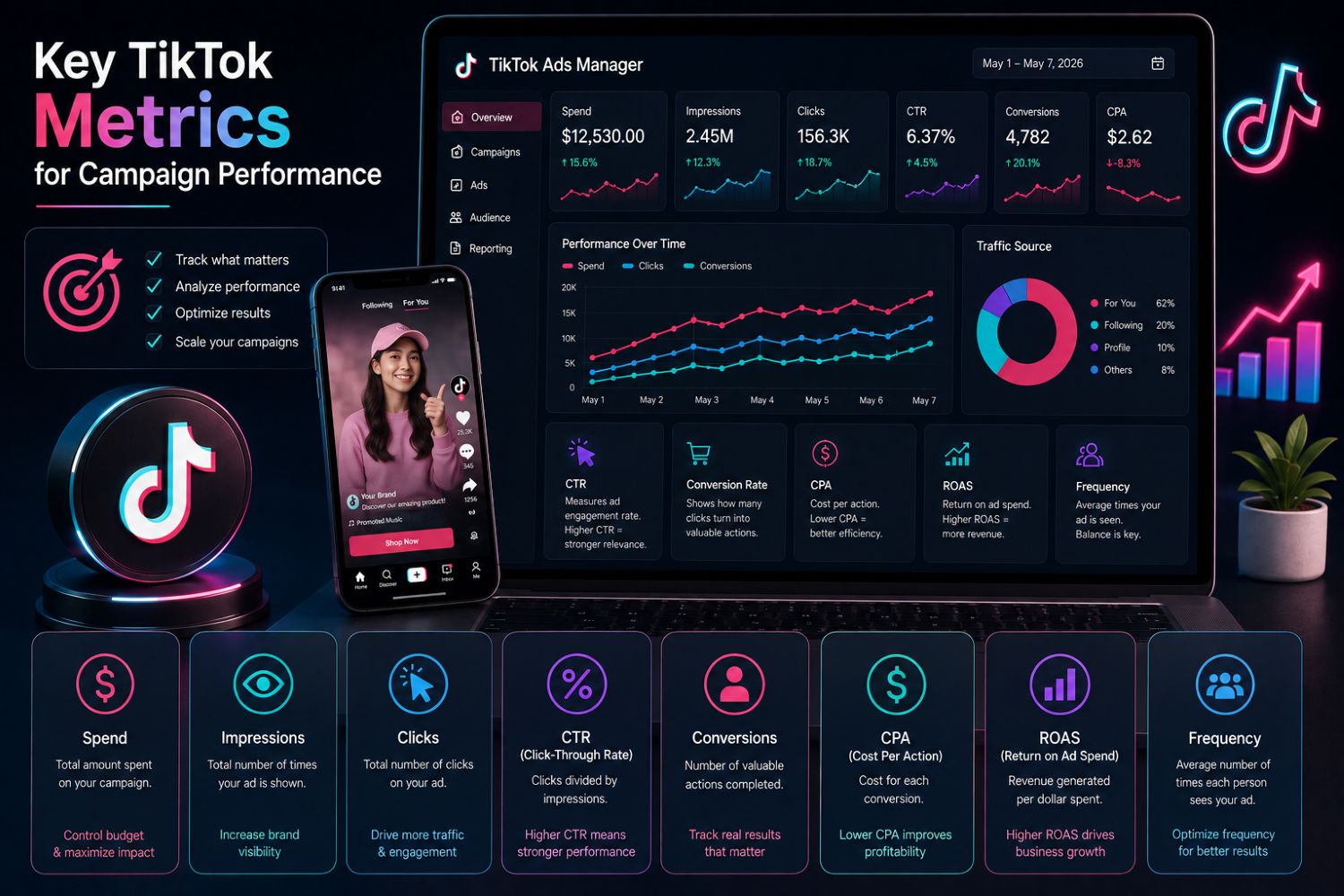
You need to know which numbers really matter. Many advertisers get lost in the data. Your focus should split into two groups. Delivery and engagement metrics show reach and interest. Conversion and revenue metrics prove profitability.
Delivery and Engagement Metrics
Delivery metrics tell you how many people see your ad. Impressions count every time your ad loads on a screen. Reach measures unique users who saw it. Frequency shows the average views per person. A high frequency often signals creative fatigue. Your ad performance drops when users see your ad too many times.
Click-through rate (CTR) measures how many viewers click after seeing your ad. You calculate it as clicks divided by impressions. A strong CTR shows your hook works. Engagement rate tracks likes, comments, and shares relative to views or impressions. These video engagement metrics help you gauge audience engagement with your creative.
Hook Rate is a key metric for measuring initial viewer retention. Hold Rate tracks how far viewers watch through the video. These two TikTok metrics matter more than likes for most campaigns. If your Hook Rate is low, change your first frame. If your Hold Rate falls off sharply, your content loses attention.
Your campaign performance depends on choosing the right primary metric. For awareness campaigns, prioritize reach, impressions, and frequency. For consideration, focus on CTR and engagement rate. For conversion campaigns, shift your attention to conversion metrics.
Conversion and Revenue Metrics
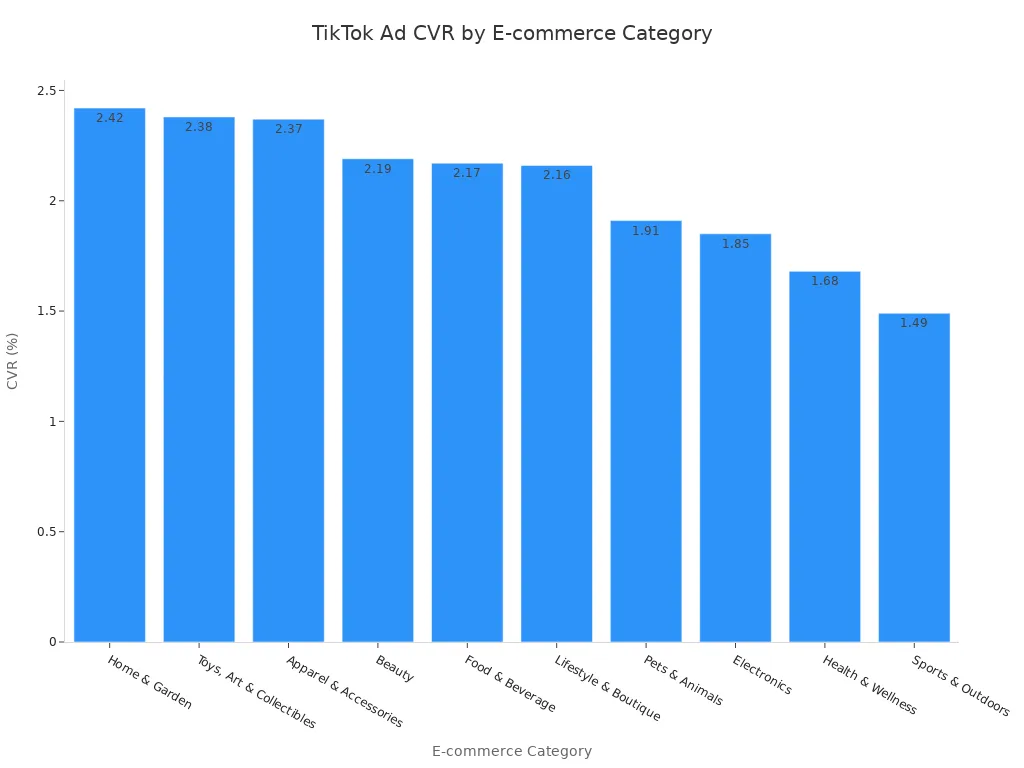
Conversion metrics connect your ad spend to actual business results. Conversion rate (CVR) shows the percentage of clicks that result in a purchase or signup. Lebesgue's platform data reports an average TikTok ads conversion rate of 1.92% for e-commerce campaigns. This aligns closely with the broader industry average of approximately 2%.
A good TikTok conversion rate is 2% to 3%, with above 3% considered strong and below 1.5% indicating that the landing page or offer needs improvement.
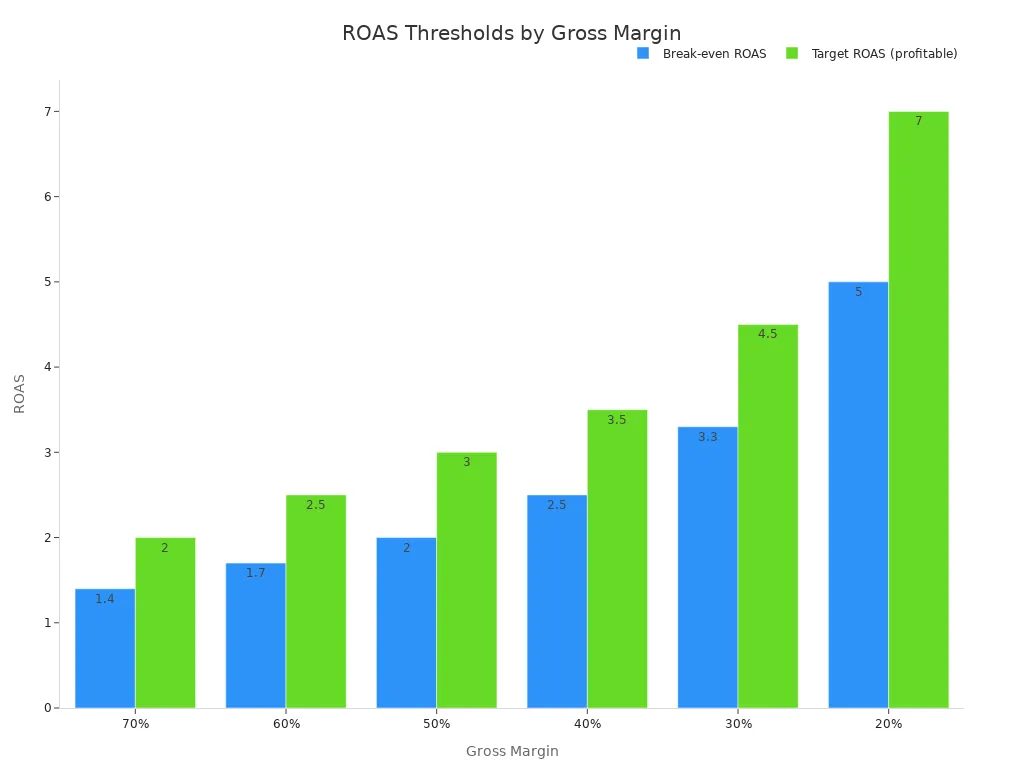
Your revenue metrics tell the real story. Return on ad spend (ROAS) divides revenue by ad spend. For beauty and skincare campaigns on TikTok Shop, a good ROAS depends on your profit margins. Great performance reaches higher multiples. Elite campaigns achieve even higher returns.
Your gross margin changes what ROAS you need. A business with a higher margin can be profitable with a lower ROAS, while a lower margin business needs a higher ROAS.
Cost per purchase (CPA) is another essential metric. It shows how much you spend to acquire one customer. A lower CPA combined with a high ROAS indicates a healthy campaign. Tracking these TikTok metrics consistently helps you scale what works. Every conversion starts with a strong hook and solid targeting.
Clear KPI selection simplifies A/B testing. Your tiktok analytics should tie every metric to a specific business goal. Use tiktok kpis like CVR and ROAS as your north stars. These tiktok ad analytics tools help you spot trends fast. Your tiktok ads analytics system should focus on conversion events rather than vanity numbers. Strong tiktok ad analytics requires understanding which ad performance metrics matter most. Good tiktok ads analytics tracks conversions across the full funnel. These tiktok metrics guide you toward profitable decisions. Track conversions at every stage of your funnel. Measure conversions from each creative variant. Your best ad performance comes from constant testing. Strong tiktok ad analytics reveals hidden revenue opportunities. Focus on meaningful revenue growth.
Analyzing TikTok Ads Analytics
Raw numbers tell you little. You need to dig deeper. The real value comes from breaking down your data into meaningful pieces. You can analyze manually or use automated tools. Both approaches work, but they serve different needs.
Segmenting Data by Audience and Creative
Start by splitting your data by audience. Age and gender matter more than most advertisers realize. The cost per conversion can vary significantly between different audience segments. These differences change your entire strategy.
One of the biggest mistakes in Performance Marketing is assuming your product is for everyone. It isn't. And the moment you try to sell to everyone, your messaging becomes bland, your CPC rises, and your conversions drop. Audience segmentation isn't a checkbox — it's strategy.
You should build custom audiences from existing customer data. Then create lookalike audiences to reach similar new users. Apply interest-based targeting to connect with valuable customers. Leverage TikTok's behavioral targeting options for further refinement. Use several unique audiences per campaign. Pair each audience with multiple unique creatives. This structure reveals which segments respond best.
Creative segmentation works the same way. Track each video variant separately. Compare hooks, visuals, and calls-to-action. Your tiktok ads analytics will show clear winners. Shift your budget toward those winning combinations.
Using A/B Testing to Compare Variables
A/B testing gives you clean answers. Change one variable at a time. Test different hooks in the first three seconds. Try different calls-to-action. Experiment with landing pages. Keep everything else constant.
Set up your tests properly. Run two versions of the same ad with one key difference. Let both versions gather enough data. TikTok needs sufficient impressions to declare a winner. Check your tiktok ad analytics after each test. Look for statistically significant differences in conversion rates.
Manual analysis works for small accounts. You export CSV files from TikTok Ads Manager. You clean the data in spreadsheets. You join it with other marketing data. This process takes several hours per week per analyst. That time adds up quickly.
Automated reporting tools change the game. They pull your tiktok metrics automatically. They combine data from multiple channels. They save analysts significant time every week. One client used automated calculations to scan Amazon sales data for the word "Reddit." The system summed ad spend and sales automatically. It determined they spent a certain amount on Reddit ads and measured the direct revenue. That task would have required sorting through many campaigns manually.
Better yet, gather your TikTok analytics alongside other marketing channels into one place using automated reporting tools. You can instantly analyze your performance, spot top ad campaigns, and gauge your ad spend and ROI — at a glance.
Automated tiktok reporting gives you real-time visibility. You spot trends immediately. You react faster to underperforming ads. You scale winners without delay. This speed translates directly into better ad performance.
Your tiktok ad analytics should drive every decision. Segment your data by audience and creative. Test variables systematically. Use automated tiktok reporting when your account grows. These practices turn raw numbers into actionable strategy. Your campaign performance improves with each iteration. Your audience insights sharpen over time. Your metrics become clearer. Your ad spend works harder. Turning tiktok ad analytics data into decisions separates successful advertisers from the rest.
Optimizing Ads with Tracking TikTok Performance
Adjusting Bids, Budgets, and Targeting
Your TikTok performance data shows clear patterns. You can see which audiences convert. Your campaign data tells you where to focus. Your ads show which audiences perform best. Move your budget toward those winners. Spend less on groups that underperform.
Refining your targeting based on analytics changes your cost per acquisition a lot. Here is how CPA changes as you narrow your audience:
Prospecting: Lookalike plus interest and behavioral targeting cuts CPA significantly versus broad interest targeting alone.
Warm retargeting: Video completers, live stream viewers, and profile engagers see significantly lower CPA than prospecting.
Hot retargeting: Shop visitors and add-to-cart abandoners see substantial CPA reduction compared to prospecting.
Post-purchase retention: Past purchasers from 30-60 days ago produce significantly lower CPA.
Creator audience overlap: Delivers much lower CPA than standard prospecting.
Adding behavioral layers: Including 7-day purchase intent signals on top of lookalike cuts CPA further.
A brand spending a certain amount per month saw their CPA drop significantly. This came from advanced audience layering. The same spend generated extra monthly revenue. Your ad performance depends on matching your budget to the right audience. Let your TikTok ad analytics guide every dollar. Your targeting decisions should follow your data. Your tracking system reveals which segments work best. Your ad performance improves with each refinement. Your analytics help you spot new opportunities.
Refining Creatives and Landing Pages
Your creative is the engine of your ad. Your landing page is the destination. Your TikTok ads analytics shows which creative elements drive results. Your metrics reveal the winning hooks, CTAs, and visuals. Your campaign metrics guide your next steps. Your ad metrics show what works. Your conversion rate matters for every campaign. Your content optimization should focus on hooks.
Focus on these four areas:
The hook (first 1-3 seconds): TikTok's data shows the first three seconds decide watch versus scroll. Your ad hook is the most important element.
Pacing and edit style: Fast-cut edits with trending audio perform differently than slower narrative videos. Your ad creative needs the right pacing.
Social proof placement: Test whether testimonials appear in the first five seconds, middle, or final CTA section. Placement produces measurable differences in results.
Call to action format: Action-oriented CTAs like "Shop Now" or "Get Yours" consistently beat passive options. Specificity reduces friction.
Your landing page speed matters just as much. A delay in load time can cut your conversions.
Your tracking system measures both creative and landing page performance. Your conversion events data reveals the best performers. Your performance improves with each test. Your revenue increases with each iteration. Your revenue grows as you scale winners. Your conversions multiply as you refine your approach. Your conversions increase with better targeting. Your conversions grow with improved creatives. Your ad budget follows your best results. Your ad strategy depends on your data.
Common Pitfalls in TikTok Ad Analytics
Ignoring View-Through Conversions
Many advertisers only count conversions from clicks. This mistake hides a big part of your ad's real impact. TikTok users often watch your video, leave, and then come back later to buy. If you ignore view-through conversions, your tracking system misses these delayed actions.
Attribution Type | Trigger Condition | Customer Journey Role |
|---|---|---|
Click-through (CTA) | User clicks the ad | Direct response: user clicks and is tracked from click to conversion |
Engaged View-through (EVTA) | User watches the ad without clicking | Intermediate: captures delayed action from high-attention content without an immediate tap |
View-through (VTA) | User sees the ad without any interaction | Passive influence: credits conversions from users who saw the ad but did not engage |
The way you choose your attribution window changes how you count these conversions. A short window, like one day, shows fewer conversions but cuts down noise from other channels. A long window, like a longer period, catches delayed decisions but may give TikTok too much credit for sales driven by other channels. This trade-off matters because each attribution type shows a different stage of the customer's decision process. You need the full picture to measure real ad performance.
Misinterpreting Vanity Metrics
Likes, shares, and follower counts look nice. They do not pay your bills. These vanity metrics have little to do with revenue or profit. You cannot make business decisions based on them.
Vanity metrics are numbers that look good on paper, but you can't make business decisions based on them. While some of these metrics can show your brand health or how popular your service is, they have little impact on product growth, sales, or conversions. In contrast, actionable metrics are data you can use to improve tasks you can repeat.
Vanity Metric (TikTok Focus)
Actionable Metric (TikTok Focus)
Video views (views only)
Completion rate, engagement, CTA clicks
Impressions (impressions only)
Click-through rate (CTR), conversions
Social media followers (total followers)
Engagement rate, share of voice
Pageviews (pageviews only)
Scroll depth, time on site, goal completions
Your cost per click (CPC) matters more than most numbers. A higher CPC means fewer chances to turn a customer into a buyer and make money. Stop asking "How many likes did we get?" Start asking "How many qualified leads did this campaign generate, and what was the cost per acquisition?" This change in tracking focus changes everything. Your conversion data helps you spend smarter. Your revenue grows when you measure what matters. Your ad strategy gets better with each useful insight. Your campaign performance depends on honest numbers.
First, you set up your data sources. You learned which numbers matter. You found out how to study and improve your ads. Your TikTok ad analytics shows what works. Focus on the numbers that bring real results. Success comes from testing and improving all the time. This week, start with one metric, like CPA or ROAS. Pair it with one way to study your data, like looking at each creative separately. Improve one ad at a time. Test each ad version against another. Let your ad data tell you what to do next. Use these lessons for every new ad campaign. Track smarter, spend better, and see your ad performance get better.
FAQ
How long should I wait before judging a new campaign?
Wait at least several days before you change anything. TikTok needs time to leave the learning phase and find your audience. Early numbers often look unstable. Let the algorithm do its job before you stop the campaign.
What attribution window should I use?
Begin with a 7-day click and 1-day view window. This mix catches delayed conversions without giving TikTok too much credit. You can change it later based on how long your sales take. Longer windows fit expensive items. Shorter windows work for quick buys.
Can I track TikTok ads without the Pixel?
Yes, but you lose accuracy. Ads Manager shows basic delivery numbers like impressions and clicks without the Pixel. You miss conversion data, ROAS, and audience insights. Put in the Pixel and Events API for full tracking. Your optimization depends on this data.
Should I use third-party analytics tools?
Third-party tools help when you handle multiple channels or big budgets. They automate reports and save hours each week. Start with TikTok Ads Manager if you run one or two campaigns. Add third-party analytics tools when your account grows.
See Also
The Complete Guide To Mastering TikTok Analytics
Ways To Access TikTok Analytics For Your Account
The Best Tools For TikTok Analytics: A Full Guide
