How to use TikTok business API

You can use tiktok business api by doing a few easy things. First, sign up as a developer on tiktok. Next, make your tiktok For Business account. Then, link your app to tiktok. Finish the authorization step and start using different API endpoints. Businesses get many good things from using tiktok business api. Here are some of the main benefits:
Benefit | Description |
|---|---|
Get good data from tiktok with fewer mistakes. | |
Enhanced privacy control | Handle privacy better with deals between platforms and creators. |
Exclusive metrics | Find out about views, impressions, and audience info from tiktok. |
Frequent data refresh | Update creator data every day or even faster. |
Always read tiktok’s official documentation and use the SDK to make integration easier.
Key Takeaways
Sign up as a developer. Make a TikTok For Business account. This lets you use the API and its tools.
Use OAuth 2.0 for safe login. Keep your access tokens private. This helps protect your data.
Use TikTok's API endpoints for campaign management. You can also target audiences and track how ads do. This helps you make your ads better.
Automate tasks with TikTok's API. This saves time and helps you manage ads and content better.
Check TikTok's official documentation often. Look for updates and tips. This helps you follow rules and use the API well.
Get Started with TikTok Business API

Register as a Developer
You have to sign up as a developer on the TikTok for Developers portal. This lets you use special tools to build your app. Here is a simple list of steps you need to follow:
Make a TikTok For Business account.
Sign up as a developer.
Make a developer app.
Get authorization.
Get authentication.
You must finish each step before you use tiktok business api. Many developers find this part hard. You might need a working app example and sometimes wait for approval. TikTok changes its API often, so you should watch for updates.
Tip: Always look at the official TikTok documentation for new rules and updates.
Create a TikTok For Business Account
A TikTok For Business account lets you use ads and campaign tools. You need this account to link your app and handle your data. Setting up the account is simple. You type in your business info and check your email. When you finish, you can go to the next step.
Connect Your Application
Connecting your app to TikTok lets you work with the platform. Here are the main steps:
Sign up as a developer on the TikTok for Developers portal.
Send your app for review to get access to the API.
Use the Authorization URL to log in and allow permissions.
Run a command to get your access token.
Check the API documentation to make API calls.
You should use the TikTok Business API SDK to make things easier. Add the SDK to your project, set up your login info, and follow the OAuth 2.0 steps. Here is a sample code block for adding the SDK:
<dependency>
  <groupId>com.tiktok.business</groupId>
  <artifactId>tiktok-business-api-sdk</artifactId>
  <version>1.0.0</version>
</dependency>
You can find more help in the TikTok Business API documentation. The documentation talks about login kits, share kits, posting content, moving data, display, research, and commercial content APIs. These guides help you use tiktok business api and grow your business.
Authorization and Access
Use OAuth 2.0
You need to use OAuth 2.0 to connect your app to tiktok. This process helps you keep your data safe and lets you control who can use your app. You start by going to the Authorizations page on tiktok. Here is how you complete the OAuth 2.0 flow:
Click + Create Authorization in the top right corner.
Search for tiktok business and select it.
Click Next.
Set up a new Authorization.
Click Next again.
Enter your tiktok account credentials on the login page.
Follow the instructions to grant access.
Click Authorize to finish the connection.
You must follow each step to make sure your app can use the tiktok business api. This flow helps you get an access token for your app.
Get Access Tokens
After you finish the OAuth 2.0 steps, you get an access token from tiktok. You use this access token to make requests to the tiktok business api. You should keep your access token safe and never share it with others. You need to refresh your access token before it expires. Store your refresh token in a secure place. Log all activity with your access token to track changes. Always use HTTPS when you send data to tiktok.
Tip: Never store your access token in plain text files or public places.
Secure API Credentials
You must protect your tiktok API credentials to keep your business safe. Use strong passwords with letters, numbers, and symbols. Turn on two-factor authentication for your tiktok account. Only use trusted apps with tiktok. Watch out for phishing scams and do not click on strange links. Limit access to your tiktok account and remove unused apps.
Security Practice | Benefit |
|---|---|
Use HTTPS | Keeps data safe during transfer |
Rotate access tokens | Reduces risk of unauthorized access |
Follow privacy laws | Protects user rights and builds trust |
Use official APIs | Ensures legal and reliable data access |
You should always follow these steps to keep your tiktok business api secure.
Use TikTok Business API Endpoints
When you use tiktok business api, you get many tools. These tools help your business grow. You can manage campaigns and pick your audience. You can track how your ads do. You can post content and show ads. Each endpoint lets you control your marketing on TikTok. Here is how you use these endpoints step by step.
Campaign Management
You can set up and run ad campaigns with the commercial content api. This helps you organize ads and reach your goals. You must give some important details when you make a campaign. These details help TikTok track your ads and see results.
Description | |
|---|---|
TikTok App ID | Unique code for your TikTok app. You need it to track and manage campaigns. |
Click URL | This URL tracks clicks on your campaign. |
Impression URL | This URL tracks how many times people see your campaign. |
You can also use endpoints to get content info and set up webhooks. These tools help you watch your assets and get updates fast.
Endpoint | Description |
|---|---|
GET /content | Gets info about videos, audio, and images. This helps you check your content and see how it does. |
POST /webhooks | Sets up webhooks for quick alerts when users interact. This helps you connect with customers. |
The commercial content api lets you set up campaigns and use custom audiences. You can find lookalike audiences too. You can link many ad account IDs to one business account. This makes it easy to manage all your ads together.
Audience Targeting
You can use tiktok business api to reach the right people. The commercial content api gives you many ways to pick your audience. You can choose who sees your ads by different things.
Demographics: Age, gender, location, language, spending power
Audience targeting: Customer files, engagement, app activity, website traffic, shop activity, lead generation, business account
Interest and behavior targeting: Interests, buying plans, actions, hashtag activity
Device targeting: Device type, system, connection, price range, carrier
Smart targeting: Changes targeting based on how ads do
Broad targeting: Fewer filters for more choices
You can check old segments and update customer lists. These features help you keep your audience data new and correct.
Endpoint | Description |
|---|---|
Verify existing segments | Checks if your audience groups work well. |
Add or update customer lists | Updates your customer list to match what you send from Amperity. |
Map advertising account IDs | Lets you link many ad account IDs to one business account. |
Performance Tracking
It is easy to track your campaign results with tiktok business api. The commercial content api gives you key numbers. You can see how your ads do and make changes to get better results.
ID | Type | Name | Description | Report |
|---|---|---|---|---|
1 | Metric | clicks | Campaign Performance | |
2 | Metric | spend | Total money spent on your ad. | Campaign Performance |
3 | Metric | impressions | Number of times your ad is shown. | Campaign Performance |
You can get these numbers with the right endpoint. This info helps you know what works and what needs fixing.
Tip: Check your numbers often. Small changes can help your campaign do better.
Content Posting API
You can post videos and other content to TikTok with the commercial content api. This helps you share your message with lots of people. Here is an easy way to upload and post videos:
Apply for the Marketing API.
Build your app.
Ask for Video Publish Scope.
Send your app for review.
Add API calls.
Use your app to post content.
The commercial content api lets you upload videos, images, and audio. You can also get info about your content. This helps you keep your content ready for your ads.
{
  "video_id": "123456789",
  "status": "uploaded",
  "message": "Video uploaded successfully"
}
Display API
The display API helps you show your ads to the right people. You can use tiktok business api to control how and where your ads show up. The commercial content api supports many ad types and places. You can test different ways to show ads and see what works best.
You can also use the GET /content endpoint to get info about your display assets. This helps you check your images and videos before they go live.
Note: Always read the TikTok API documentation for the newest info on endpoints and settings. The documentation gives you examples and tips for every feature.
Integrate and Automate with TikTok API

Make API Requests
You can start by making API requests to tiktok using the SDK. The SDK helps you connect your app to tiktok and makes the process easier. Always use OAuth 2.0 for authentication. This keeps your data safe. When you build your request, include your access token and the right permissions. Organize your campaigns in a clear way so you can track them. Use real-time data from tiktok to make quick changes to your ads. If you want to connect tiktok with other tools, you can use custom APIs, website builder plugins, or third-party integrations. Many businesses use platforms like Zapier to link tiktok with other apps for better automation.
Tip: Always check for the latest tiktok API version. Update your integration when tiktok releases new features.
Handle Responses and Errors
When you send a request to tiktok, you get a response. The response tells you if your request worked. If you see an error, read the error message. Common errors include wrong tokens, missing permissions, or rate limits. You should add retry logic to your app. This helps if tiktok limits your requests. Always log errors so you can fix problems fast. Use HTTPS to keep your data safe when talking to tiktok.
{
  "code": 401,
  "message": "Invalid access token"
}
Note: Make sure your app follows tiktok’s ad policies to avoid disapproved ads.
Example Workflows
You can automate many tasks with tiktok. Here are some simple workflows:
Set up automation in tiktok Ads Manager. Go to the 'Assets' tab and use ‘Automated Rules’. Create a rule to pause ads that do not perform well.
Use Respond.io to connect tiktok as a channel. Build workflows to send messages and follow up with leads.
Link tiktok to other apps with Zapier. Collect leads and sync customer data without coding.
These workflows help you save time and reduce mistakes. You can use tiktok’s advanced targeting and A/B testing features to improve your results.
Best Practices for TikTok Business API
Data Security
You need to keep your data safe when using tiktok. Tiktok has a strong security system. This system checks who you are and uses special codes. You should turn on two-factor authentication for your account. Tiktok looks for strange things and uses tools to find threats. The company does regular security checks to protect your data. Using these features helps stop people from breaking into your account.
Turn on two-factor authentication for more safety.
Look for alerts about weird activity.
Trust tiktok’s tools that find threats.
Check your account after each security check.
Tiktok follows privacy laws like GDPR and CCPA. You must ask users before you collect their data. Always share privacy info and let users say no. If you break these rules, you might get big fines. Most business accounts use tiktok’s privacy controls to stay safe.
Optimize Campaigns
You can make your tiktok ads better by using smart ideas. The table below shows some top ways to help your campaigns:
Strategy | Description |
|---|---|
Advanced Targeting | Use Custom and Lookalike Audiences to reach the right users. |
Creative Optimization | Test and improve your ads for tiktok’s mobile formats. |
Bidding Strategies | Try different bidding methods like Lowest cost or Value-based bidding. |
Performance Measurement | Use tiktok Pixel and Offline Conversions to track your ad results. |
Try these ideas to get better results from your tiktok ads. Always test new things and check your numbers often.
Troubleshooting
You may have problems when you use the tiktok API. You can fix most issues by doing these steps:
Fix API errors as soon as you see them.
Make sure you follow tiktok’s rules.
Check your business info for mistakes.
Set the right permissions for your ad account.
Link your analytics tools to tiktok.
You should also watch your account and check your budget before starting a campaign. Always get your creative content approved first. If you remember these steps, you can fix most problems fast.
Tip: Read tiktok’s API documentation often. Tiktok changes its features and rules, so staying updated helps you avoid problems.
You can help your business grow with the tiktok Business API. First, sign up and connect your app. Follow the best steps to stay safe. Make real content and run ads for the right people. Watch your results and change your ads fast if needed.
Use tiktok to send ads automatically. This saves time and helps you reach more people.
Pick the best platform to make your tiktok shop bigger.
Choose your audience and make your ads better with tiktok’s live data.
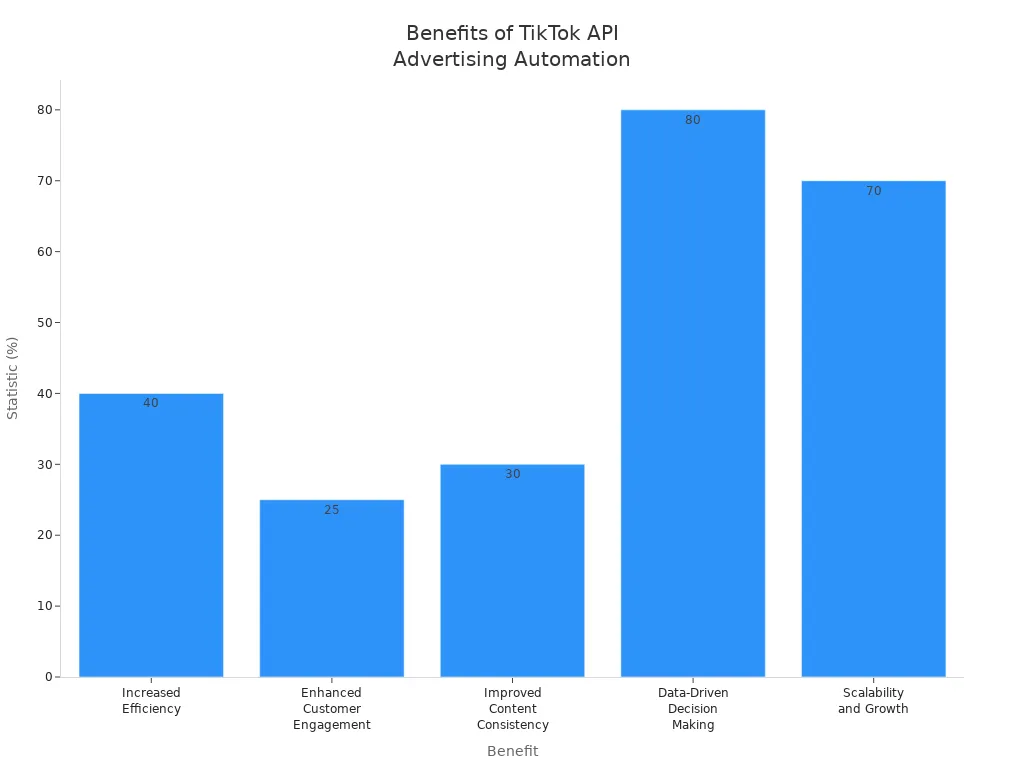
Benefit | Statistic |
|---|---|
Increased Efficiency | Automating tasks saves up to 40% of time spent on manual content creation |
Enhanced Customer Engagement | Brands see a 25% increase in engagement using tiktok’s API |
Improved Content Consistency | Consistent branding boosts recognition by 30% |
Data-Driven Decision Making | 80% of businesses make better decisions with tiktok analytics |
Scalability and Growth | 70% of tiktok users live outside the US |
Tip: Use tiktok’s SDK and read the guides. This helps you set up everything easily and keeps your business working well.
FAQ
How do you start using the tiktok business API?
You sign up as a developer and create a tiktok For Business account. You connect your app and follow the steps for authorization. You use the SDK to make integration easier.
Can you query ad data with the tiktok API?
Yes, you can query ad data using the commercial content API. You get access to metrics like clicks, impressions, and spend. This helps you track your campaign performance.
What is the best way to fetch public advertiser data on tiktok?
You use the display API to fetch public advertiser data. This lets you see information about ads, videos, and images. You check the documentation for endpoint details.
Is it safe to use the tiktok business API?
You keep your data safe by using HTTPS and strong passwords. You turn on two-factor authentication. You follow privacy laws and use official APIs for secure access.
What should you do if you get an error from the tiktok API?
You read the error message and check your access token. You fix missing permissions or rate limits. You log errors and retry requests if needed.
See Also
Understanding TikTok Analytics For Better Content Strategy
A Guide To Accessing TikTok Analytics Effectively
Essential Tools For Analyzing Your TikTok Performance
