TikTok Shop Audit Checklist: Find Sales Leaks With Data

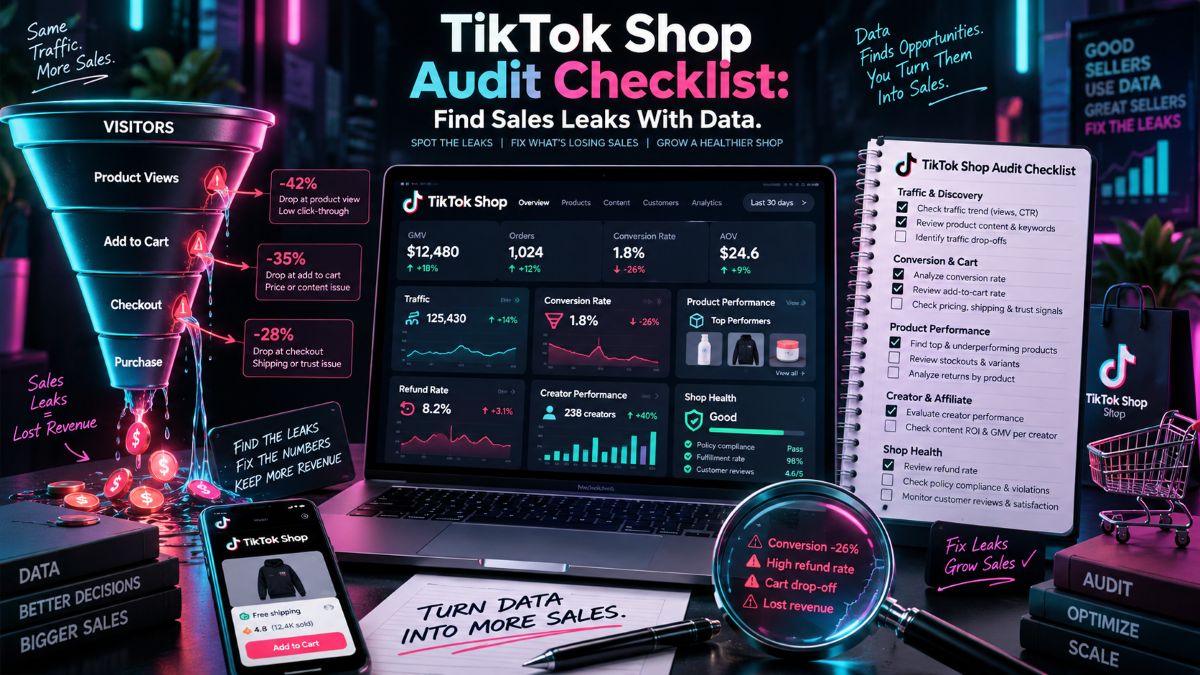
A TikTok Shop audit is not about pulling every number from Seller Center into a spreadsheet.
It is about finding the point where a sale stops moving.
Maybe people are no longer seeing your product. Maybe they still see it, but fewer people click. Or maybe clicks look fine and buyers leave once they hit the product page.
Those are different problems. Treating them like the same problem is how sellers waste a week changing prices, chasing creators, and running discounts that do not fix anything.
Start with one product or one small group of products. Do not audit your entire catalog on day one. The goal is to find the biggest leak first.
Start With the Sales Drop, Not the Dashboard
Pull the last seven days and compare them with the seven days before that. Keep the country, currency, order status, and product selection the same.
You are looking for the first metric that moved.
If product impressions are down, the problem is probably traffic, content volume, search visibility, creator activity, or demand in the category.
If impressions are stable but product clicks are down, look at the video hook, product image, title, price, and offer. Something is getting seen but no longer feels worth opening.
If clicks and product-page visits are steady while orders fall, buyers are finding the item. They are just not convinced enough to buy it.
That usually points to reviews, shipping, stock, price, unclear product details, or a listing that promises more than the actual item delivers.
Here is a simple way to read the numbers:
What changed | What I would investigate |
|---|---|
Impressions and clicks both fell | Creator activity, content output, search rank, category demand |
Impressions held, clicks fell | Cover image, product title, price, video angle |
Clicks held, orders fell | Reviews, shipping, stock, listing quality, buyer trust |
Orders held, GMV fell | Lower selling price, heavier discounts, fewer bundles |
GMV held, profit fell | Commission, ad spend, shipping cost, refunds |
Do not jump straight to “TikTok stopped pushing my products.” Sometimes that is true. More often, the data points somewhere more specific.
Look Closely at the Products Carrying the Shop
Most shops are not carried evenly by every SKU.
One product may drive most of the revenue. Another might bring in traffic but almost no profit. A third may have decent GMV and quietly create a return problem that eats away at the margin.
Look at your top products one by one. Check their sales trend, product-page visits, conversion rate, average selling price, refund reasons, and stock position.
A product with a sharp drop in views may need fresh content or a stronger offer. A product with good traffic but poor conversion usually needs a listing fix before it needs more traffic.
Pay attention to variants, too. It is surprisingly common for the best-selling size, color, or bundle to go out of stock while the product page still looks available. Customers click in, find the option they want is gone, and leave.
For wider market context, use TikTok Shop data to compare product movement, shops, creators, and pricing around your category. This is especially useful when you cannot tell whether the problem is your store or the market itself.
Follow the Traffic Back to Its Source
Not all TikTok Shop traffic behaves the same way.
A creator video can send a lot of casual shoppers who like the content but do not plan to buy. Search traffic is often smaller, but those shoppers may already know what they want. LIVE traffic can convert well when the host handles objections in real time, but it can fall off fast when the offer changes or the host stops going live.
Break your traffic into the sources that matter for your shop:
Seller-posted shoppable videos
Affiliate creator videos
LIVE sessions
Shop Tab and search
Paid campaigns
Repeat customers
Then ask a practical question: which source changed first?
If affiliate content is down, do not assume your product has a conversion issue. You may simply have fewer creators posting. Check the number of active creators, recent posts, and whether one large creator previously carried a big share of sales.
If views are still there but clicks are soft, watch the actual videos. A video can be entertaining without making the product feel necessary. Sometimes the product appears too late. Sometimes the creator never shows the size, texture, setup, or real use case that makes someone buy.
For a closer look at the path from discovery to checkout, see our TikTok Shop conversion funnel guide.
Check the Product Page Like a Skeptical Buyer
Open the listing on a phone, not just from the seller view on desktop.
Ask yourself what a buyer can understand in the first few seconds. Can they tell what the product is, what comes in the box, what size it is, and why it is priced the way it is?
A lot of conversion problems come from details sellers have stopped noticing:
The first image is outdated.
The best product benefit is buried halfway down the description.
Reviews mention a size issue that the listing never addresses.
The price looks higher than a competitor’s without explaining why.
Shipping time is vague.
The video promotes a bundle that is no longer available.
This is where a small edit can matter more than a new campaign.
If the same buyer question keeps showing up in reviews, customer messages, or LIVE comments, answer it directly on the product page. Do not make people search for basic information before they can feel comfortable placing an order.
Creators Can Bring Sales — and They Can Create Problems
When sales fall, sellers often respond by recruiting more affiliates. That can work, but only if you know what the current creator content is doing.
Look at the creators who drove orders recently. Not just views. Not just likes. Look at product clicks, orders, GMV, refund activity, and the type of content they posted.
A creator may get strong engagement because their audience enjoys the video. That does not automatically make them a good fit for your product.
You also need to watch for content that creates the wrong expectation. If creators overstate results, skip product limitations, or show a version buyers are not receiving, sales may rise briefly while refunds and negative reviews show up later.
That is not a creator problem alone. It is a shop problem once those orders hit your account.
Keep notes on which creators produce buyers who stay satisfied after delivery. Those are the partnerships worth protecting.
See What Changed Outside Your Shop
A sales decline is not always caused by something you changed.
A competitor may have launched a cheaper bundle. A large creator may have started pushing a similar item. A category can cool down after a trend peaks. Seasonal buying behavior can move faster on TikTok than many sellers expect.
You do not need to monitor every competitor every day. Pick a short list of products you lose sales to most often and check them when your numbers move.
Look for real changes:
Did their price fall?
Did they add a coupon or free shipping?
Are new creators posting about the item?
Did they update the main image?
Are they selling a bundle you do not offer?
Did their reviews grow quickly?
This is not about copying every move. It is about understanding whether buyers now have a clearer or cheaper alternative.
Do Not Ignore the Operational Side
Sometimes the product, traffic, and creators are fine. The shop is losing sales because the buying experience got worse.
Check for delayed fulfillment, canceled orders, low-stock variants, shipping complaints, new negative reviews, return patterns, or changes to your Shop Performance Score.
These problems do not always show up as one dramatic number. They build quietly. A few late shipments can lead to bad reviews. Bad reviews make new buyers hesitate. Lower conversion makes your product less attractive to creators, who can choose another item to promote.
If one SKU has a refund spike, read the reasons instead of just looking at the rate. “Not as described” means something different from “damaged in transit.” One points to the listing or creator content. The other may point to packaging or fulfillment.
What I Would Fix First
After you review the numbers, you will probably find several things that could be improved. Do not change all of them at once.
Start with the issue closest to the sale.
If traffic disappeared, fix traffic first. Review creator activity, recent video output, search visibility, and competitive changes.
If traffic stayed healthy but conversion dropped, work on the listing, offer, reviews, stock, or shipping before buying more traffic.
If orders remain stable but profit looks worse, review discounts, commissions, ad cost, shipping charges, and return costs. A product can still look successful on a GMV chart while making very little money.
Make one meaningful change, then give it enough time to produce usable data. You want to know what worked, not just feel busy.
Use Tools for the Right Question
Seller Center should be your first stop for your own orders, product performance, refunds, fulfillment, and traffic.
Market and competitor research answers a different question: what is changing outside your own account?
If you need to compare native reporting with competitor, creator, and market research, review our guide to the best TikTok analytics tools.
A useful audit ends with a clear decision. Pause an underperforming product. Refresh a weak listing. Re-engage proven creators. Fix a shipping issue. Test a better bundle.
The numbers matter because they tell you where to put your next move.
