How to Become a TikTok Shop Seller in 2025

You can become a Shop tiktok seller in 2025 by signing up through the TikTok Seller Center, even if you have zero followers. Both individuals and businesses can join, and the steps are clear. You only need to meet the eligibility, register, verify your identity, set up your shop, and add your products. Creative videos and TikTok’s built-in features help you attract buyers fast. Take a look at these numbers to see why so many people succeed on TikTok Shop:
Metric Description | Numerical Value |
|---|---|
Users discovering products on TikTok | |
Users making purchases after seeing products in videos | Over 60% |
Sales increase reported by TikTok Shop sellers in SE Asia (2023) | 300% increase |
Monthly active TikTok users in Europe | Over 150 million |
TikTok Shop makes selling easy and fun for everyone.
Key Takeaways
Anyone can become a TikTok Shop seller in 2025, whether an individual or a business, with no follower minimum required.
Prepare your documents like ID and proof of address or business registration before registering to speed up approval.
Set up your Seller Center account, link your bank, and complete verification to start selling quickly and safely.
Create a catchy shop profile, add clear product listings with photos and videos, and follow TikTok’s rules to build trust and boost sales.
Use TikTok’s creative tools, live shopping, and affiliate marketing to reach more buyers and grow your shop effectively.
Eligibility
Who Can Apply
You can become a Shop tiktok seller whether you are an individual or a business. TikTok welcomes all kinds of sellers, so you do not need a certain number of followers to start. If you run a company, you can use your business details. If you are just starting out as a creator, you can use your personal information. TikTok also supports official shop creators, marketing creators, and affiliate creators. Each type has its own requirements.
Here’s a quick look at how the eligibility rules compare:
Applicant Type | Verification Requirements | Follower Thresholds | Additional Notes |
|---|---|---|---|
Business | Company registration, tax details, business bank account, official identity documents | N/A | Must verify business existence and provide official documents |
Official Shop Creator | Linked to seller account | No minimum followers | Can promote products from official shop but no access to Affiliate Marketplace |
Marketing Creator | Linked to seller account | Minimum 5,000 followers | Access to Affiliate Product Marketplace |
Affiliate Creator | Individual account, must apply to join program | Minimum 5,000 followers | Acts as affiliate marketer, earns commission on sales |
TikTok wants everyone to feel welcome. The company values your skills and unique background. You can apply even if you have a disability, are pregnant, or have religious needs. TikTok offers help during the application process to make sure everyone has a fair chance.
Required Documents
You need to prepare some documents before you sign up. The exact papers depend on whether you are an individual or a business.
For individuals:
Government-issued ID (like a passport or driver’s license)
Proof of address (such as a utility bill or bank statement)
For businesses:
Company registration certificate
Tax identification number
Business bank account details
Official ID for the business owner
Tip: Double-check your documents before uploading. Clear and valid documents help speed up your approval.
Getting these documents ready makes your Shop tiktok seller journey much smoother. Once you have them, you can move on to registration without delays.
Shop TikTok Seller Registration
Getting started as a Shop tiktok seller is easier than you might think. TikTok designed the Seller Center to guide you step by step. You can set up your shop in just a few minutes if you have your documents ready. Let’s walk through the main steps together.
Create Seller Center Account
First, you need to create your Seller Center account. Go to the TikTok Seller Center website. You will see a button to sign up. Click it and choose whether you want to register as an individual or a business. This choice decides which documents you need to upload later.
Here’s what you do next:
Enter your email address or phone number.
Set a strong password.
Choose your country or region.
Select your business type (individual or business).
Agree to TikTok’s terms and conditions.
Tip: Use an email address you check often. TikTok will send important updates and verification steps there.
After you fill in your details, TikTok will send you a code to verify your email or phone. Enter the code to finish creating your account.
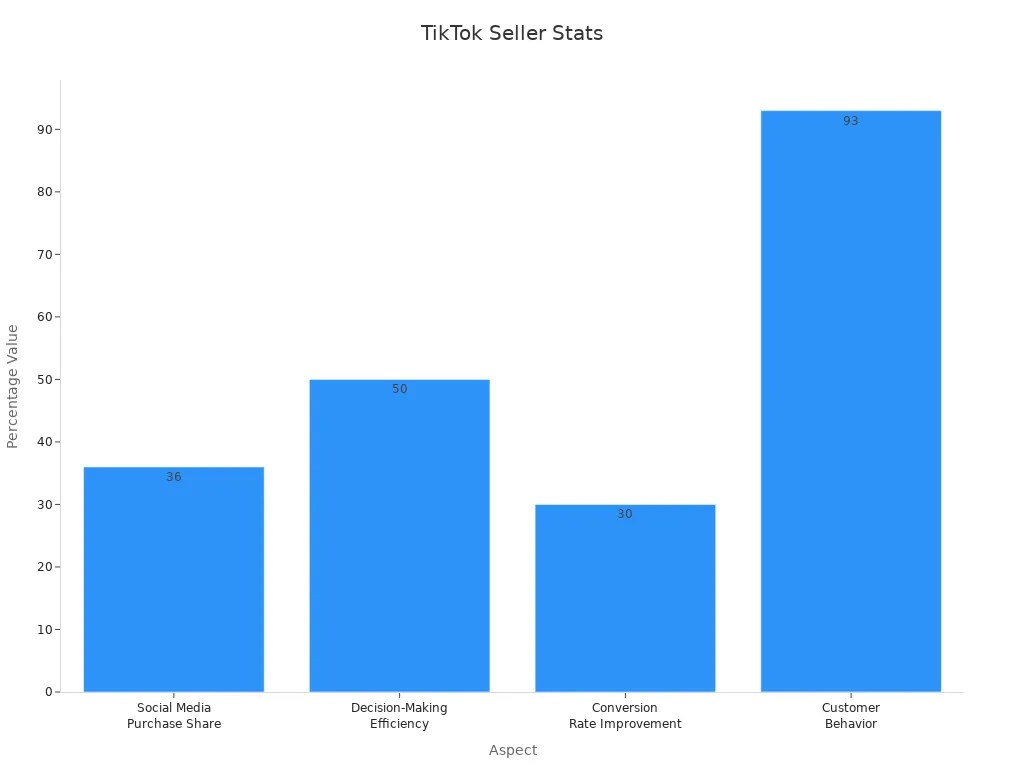
You join a huge community when you register. Over 15 million merchants worldwide use TikTok Seller Center, with 500,000 in the U.S. alone. Many sellers say the platform helps them make decisions faster and spend less time on data entry.
Aspect | Supporting Statistic or Step |
|---|---|
Merchant Base | Over 15 million merchants worldwide, including 500,000 in the U.S. |
Social Media Purchase Share | 36% of all social media purchases happen on TikTok |
Decision-Making Efficiency | Businesses using TikTok Seller Center make decisions 50% faster |
Data Entry Time | Significant reduction in hours spent on data entry |
Conversion Rate Improvement | Product listing optimization can increase conversion rates by up to 30% |
Customer Behavior | 93% of shoppers check product reviews before purchasing |
Verification Process Steps | 1. Log in to Seller Center |
Payment Setup Steps | 1. Access Payment Settings |
Link Bank Account
Next, you need to link your bank account. This step lets you receive payments from your sales. Go to the Payment Settings section in your Seller Center dashboard.
Follow these steps:
Click “Add Bank Account.”
Enter your bank account number and the name on the account.
Add your bank’s name and branch information.
Double-check your details for accuracy.
TikTok may ask for a bank statement or a screenshot from your online banking app. This helps confirm that the account belongs to you. Make sure the name on your bank account matches the name you used to register. If you are a business, use your business bank account. If you are an individual, use your personal account.
Note: TikTok will send a small test deposit to your account. Check your bank for this deposit and enter the amount in Seller Center to confirm your account.
Complete Verification
Now you are ready for the final step—verification. TikTok wants to keep the platform safe for everyone, so they check your identity and business details.
Here’s how the verification process works:
Log in to your Seller Center account.
Upload your government-issued ID (for individuals) or business license and owner’s ID (for businesses).
Submit your documents for review.
Wait for TikTok to check your information. This usually takes a few hours to a couple of days.
You will get a notification when your account is verified.
If TikTok needs more information, they will send you a message. Respond quickly to avoid delays. Once you pass verification, you can start listing products and selling right away.
Many Shop tiktok seller users say the process is smooth and fast. Businesses using TikTok Seller Center report making decisions 50% faster and spending less time on paperwork. You can focus on growing your shop instead of getting stuck in long approval steps.
Pro Tip: Keep your documents handy and check your email often during this stage. Quick responses help you get verified faster.
Shop Setup
Customize Shop Profile
Now that you have your account ready, it’s time to make your shop stand out. Your shop profile is the first thing buyers see, so you want it to look great. Start by choosing a catchy shop name. Pick something easy to remember and related to what you sell. Next, upload a clear logo or profile picture. This helps people trust your shop.
Write a short description about your shop. Tell buyers what makes your products special. You can use emojis to add some fun and personality. For example:
🛍️ Welcome to Trendy Finds! We bring you the coolest gadgets and gifts. Fast shipping and friendly service every time!
Here’s a quick checklist for your shop profile:
Shop name
Logo or profile picture
Shop description
Contact email or phone number
A good profile builds trust and helps you get more sales as a Shop tiktok seller.
Add Address and Payment
You also need to set up your shop’s address and payment details. Go to your Seller Center dashboard and find the “Shop Settings” section. Enter your business or shipping address. Make sure it’s correct so you don’t miss any deliveries.
After that, add your payment information. Double-check your bank account details. TikTok uses this info to send you your earnings. If you ever need to update your address or payment, you can do it right from your dashboard.
Tip: Always keep your address and payment info up to date. This helps you avoid problems with orders or payouts.
A complete setup means you’re ready to start listing products and making sales!
Product Listing

Add Products
You can add products to your TikTok Shop in just a few steps. Start by logging into your Seller Center. Click “Add Product” and fill in the details. You can upload one product at a time or use bulk upload to add up to 1,000 products. This makes it easy to manage your inventory, especially if you have a lot to sell.
When you add a product, make sure to:
Write a clear title (25-200 characters) with key details.
Choose the right category so buyers can find your item.
Set an honest price. Avoid overpricing or adding high shipping fees. Most successful products cost between $10 and $30 because buyers like quick, easy purchases.
Use product variations and bundles to give shoppers more choices.
High-quality photos and videos help your products stand out. Try to upload at least five images from different angles and a short video showing the product in use. Real-life photos and videos build trust and boost sales.
Compliance Rules
TikTok Shop has rules to keep buyers safe and happy. You need to follow these rules to avoid problems:
Keep your Order Defect Rate (ODR) low by shipping on time and describing products accurately.
Watch your Customer Satisfaction Score (CSAT). Good service and fast replies help keep this score high.
Follow return and refund policies that match TikTok’s guidelines and local laws.
Make sure your prices do not go over TikTok’s limits. Double-check for typos or mistakes, especially if you use bulk uploads.
Some products, like jewelry or kids’ items, need extra documents. Always check the rules for your product type before listing.
Listing Best Practices
Want your products to get noticed? Here are some tips:
Use clear, keyword-rich descriptions so buyers can find your items.
Show your products in real-life situations with great photos and videos.
Track your sales, clicks, and customer feedback. Adjust your listings based on what works best.
Try A/B testing different titles, images, or prices to see what gets more sales.
Join trending challenges or use popular hashtags to reach more people.
Work with influencers or encourage buyers to share their own videos using your products.
Tip: Focus on products with steady demand, not just viral trends. Reliable suppliers and fast shipping keep your customers happy and coming back.
Promotion and Management
Content Creation
You want your shop to stand out on TikTok. Start by making creative videos that show your products in action. Try using short clips, live streams, or even fun challenges. When you tell a story or show real people using your items, viewers feel more connected. High-quality content can boost your sales and bring in new customers fast.
Here’s a look at how different brands use content to drive results:
Brand/Example | Content Strategy | Engagement/Sales Impact |
|---|---|---|
Brand A - Apparel | LIVE Shopping event, exclusive deals, engaging host | |
Brand B - Tech | Short videos, catchy visuals, trending hashtags | 20% higher click-through, 15% more conversions |
Brand C - Beauty | Influencer collabs, product tagging, special promotions | 35% more engagement, 28% more sales |
You can use TikTok’s analytics dashboard to see what works best. Try different ideas and watch your numbers grow.
Use TikTok Features
TikTok gives you powerful tools to promote your shop. Here are some features you should try:
TikTok Live Shopping lets you pin products, show details, and answer questions in real time.
Over half of TikTok users have bought something during a live stream.
Shoppable videos help you track clicks, sales, and average order value.
AR try-on features let buyers see products on themselves, which builds trust.
AI-powered recommendations show your products to the right people.
Easy payment options make checkout simple and fast.
When you use these features, you make shopping fun and easy for your followers.
Affiliate Marketing
You can team up with creators to reach more buyers. TikTok’s affiliate program helps you connect with people who love sharing products. Research shows that affiliate marketing on TikTok boosts digital product sales. Creators use honest reviews, unboxing videos, and live streams to build trust. They also use TikTok’s product tagging to make shopping seamless.
Many marketers now use TikTok for affiliate campaigns. The best results come from creative content, good commission rates, and tracking your data. This approach helps you grow your brand and increase sales.
Order Management
Managing orders well keeps your customers happy. TikTok Shop gives you detailed sales reports, so you can spot trends and adjust your strategy. You can see which products sell best and when people buy the most. Real-time analytics help you make smart decisions.
Track reply rates and customer messages to improve service.
Watch your order volume and average order value to spot growth.
Use tools like Shoplus for competitor analysis and extra insights.
Stay on top of your numbers. When you do, you can fix problems early and keep your shop running smoothly.
Seller vs Affiliate
Key Differences
You might wonder if you should become a TikTok Shop seller or an affiliate. Both options let you earn money, but they work in different ways. Here’s a quick look at how they compare:
Aspect | TikTok Shop Seller | TikTok Shop Affiliate (Creator) |
|---|---|---|
Follower Requirement | None | |
Verification Time | About 24 hours | 1–3 days |
Earnings | Keep most profits after expenses | Earn 10%–20% commission (varies by niche) |
Commission Rates | N/A | Beauty: 10%–20%, Fashion: 5%–15%, Electronics: 3%–8% |
Responsibilities | Handle inventory, shipping, marketing | Focus on content creation, no inventory |
Business Info Needed | Detailed (tax ID, address, phone) | Not required |
As a seller, you run your own shop. You manage products, set prices, and ship orders. You keep most of the profits, but you also take on more work and risk. As an affiliate, you create videos and promote other people’s products. You earn a commission for each sale, and you don’t need to worry about inventory or shipping.
Tip: If you love making videos and want less risk, affiliate marketing might fit you best. If you want full control and bigger profits, selling your own products could be the way to go.
Pros and Cons
Let’s break down the main pros and cons for each path:
TikTok Shop Seller Pros:
Reach over a billion users worldwide.
Sell directly inside the app with easy checkout.
Go viral fast with trending videos.
Great for small businesses and new brands.
Use live shopping and product tags to boost sales.
TikTok Shop Seller Cons:
Lots of competition from other sellers.
Need to make fresh content often.
Pay fees and commissions (about 5%).
Only available in certain countries.
TikTok Affiliate Pros:
Get high engagement with just a few videos.
Make simple videos—no fancy editing needed.
Build your brand and grow your audience.
Tap into unlimited organic traffic.
TikTok Affiliate Cons:
Some viewers just want to watch, not buy.
TikTok’s future in some countries is uncertain.
No direct links in videos—need to use landing pages.
You can choose the path that matches your skills and goals. Some people even do both to maximize their earnings!
You can start your journey as a TikTok Shop seller in just a few steps. Gather your documents, register, and set up your shop profile. Both individuals and businesses can join with ease. Creative videos and TikTok’s features help you reach more buyers and boost sales.
TikTok Shop blends fun and shopping, attracting Gen Z and Millennials.
Small businesses scale fast with smart content and product placements.
By 2025, 86% of U.S. marketers will use influencer marketing, with brands spending $9.3 billion.
Jump in now and turn your ideas into real growth. TikTok Shop gives you the tools to succeed!
FAQ
How long does TikTok Shop seller verification take?
Most sellers get verified in 24 to 48 hours. Sometimes, TikTok may ask for extra documents. If you reply quickly, you can speed up the process.
Can you sell digital products on TikTok Shop?
You can only sell physical products right now. TikTok does not allow digital downloads or services in the Shop. Always check the latest rules for updates.
What fees do you pay as a TikTok Shop seller?
TikTok charges a commission on each sale, usually around 5%. You might also pay small fees for payment processing. Always review the fee schedule in your Seller Center.
Do you need a business license to sell on TikTok Shop?
If you sign up as a business, you need a business license. If you register as an individual, you only need a government-issued ID and proof of address.
Can you manage your TikTok Shop from your phone?
Absolutely! You can use the TikTok Seller app to add products, track orders, and reply to customers. Managing your shop on the go is easy and fast. 📱
See Also
Simple Guide To Register And Launch Your TikTok Shop
Effective Strategies For Setting Prices On TikTok Shop
Step By Step Order Management Tips For TikTok Sellers
