How to find winning TikTok ads

The 3-second rule on TikTok isn't just a fad—it's the secret to spotting ads that win. But if you're wondering how to find winning TikTok ads on a consistent basis, the answer isn't guesswork. It's a blend of tracking key metrics like impressions and engagement rates, leveraging TikTok Ads Manager's built-in tools, and applying proven creative frameworks like the Creative Codes.
This guide breaks down exactly how to find winning TikTok ads by defining what success looks like for your specific campaign. You'll learn to interpret your ad performance data, build a clear picture of your target audience, and refine your targeting strategy for maximum relevance. Smart targeting ensures your content reaches the right viewers—not just the most viewers. Every step here is practical and data-driven, so you can apply these tactics immediately. With this ad intelligence in hand, you'll know how to find winning TikTok ads before you launch, and you'll start your next campaign with real confidence.
Key Takeaways
Track impressions, popularity, and CTR to see how well your ad is doing.
Use TikTok Ads Manager to get live data and useful insights.
Understand how the auction works: your bid, quality score, and engagement all play a part.
Use Spark Ads when you want social proof, and In-Feed Ads when you want full creative control.
Run test ads for at least seven days. After that, grow the best ones by 20% each day.
How to Find Winning TikTok Ads: Metrics and Tools

Key Metrics: Impressions, Popularity, and CTR
To find winning ads, track three core metrics. Each one reveals something different about your ad's performance.
Impressions measure how many times your ad appears on someone's screen. This number shows your reach and visibility. It counts every display, whether the user interacts or not.
An ad impression is the display of an advertisement to an internet user. In the context of TikTok advertising, this occurs when a TikTok video ad is shown to a user, aligning with the general principle that an impression is counted each time the ad is rendered on the user's screen.
High impressions mean the platform serves your ad to many people. But impressions alone don't tell you if people care about your content. You need to pair this metric with engagement data.
Popularity includes likes, comments, and shares. These signals show emotional resonance. When users engage with your ad, they tell TikTok's algorithm that your content matters. High popularity with low conversions often means your ad entertains but doesn't drive action. You need both elements working together.
CTR measures how many people clicked your ad after seeing it. This metric reveals relevance. A good link CTR for TikTok ads falls between 0.49% and 0.73% depending on industry.
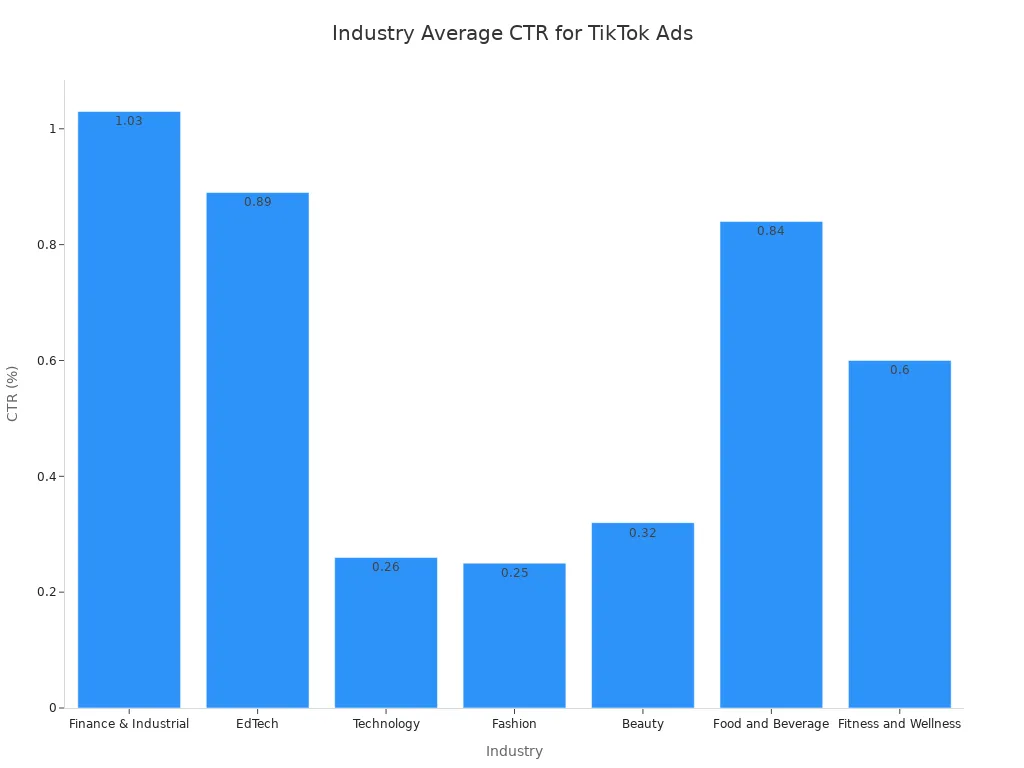
Different industries see different results:
Industry | Average CTR |
|---|---|
Finance & Industrial | 1.03% |
EdTech | 0.89% |
Technology | 0.26% |
Fashion | 0.25% |
Beauty | 0.32% |
Food and Beverage | 0.84% |
Fitness and Wellness | 0.6% |
Finance and EdTech ads tend to perform better on CTR. Fashion and Beauty ads often need stronger hooks to drive clicks. Use these benchmarks to set realistic goals for your own campaigns. Your targeting strategy also affects CTR significantly.
Using TikTok Ads Manager for Insights
TikTok Ads Manager gives you real-time data on all these metrics. You don't need to guess how your ads perform. The platform shows you exactly what works.
Agencies can quickly identify top-performing creatives, audience segments, and actual purchases, optimize in real time, and clearly show clients how each TikTok Ads campaign drives business results.
The dashboard provides several real-time views:
Real-time Result by Ad Group: Shows impressions, clicks, and conversions instantly. You can spot winning ads fast.
Real-time CVR by Ad Group: Measures conversion rate in real time. This helps you adjust ad spend based on actual performance.
Real-time Cost Per Result by Ad Group: Displays average cost per result split by ad group.
Real-time Cost Per Result by Ad: Shows cost per result broken down by individual ad.
The main dashboard organizes metrics into clear categories:
Category | Key Metrics | Purpose / Insight |
|---|---|---|
Reach & Visibility | Impressions, Reach, Frequency, Spend | High impressions with low CTR means weak creative |
Engagement | Likes, Comments, Shares, Engagement Rate | Measures emotional resonance and hook effectiveness |
Retention & Watch | Average Watch Time, Video Completion Rate | Evaluates script pacing and storytelling |
Click & Traffic | CTR, CPC, CPM | Determines traffic-driving efficiency |
Conversion | Conversion Rate, Cost Per Conversion, ROAS | Measures ultimate campaign success |
Revenue & Efficiency | Total Revenue, ROI, CPA | Guides budget allocation |
For beginners, Basic mode simplifies setup to a streamlined process: goal, audience, budget, and ad creation. This makes TikTok advertising accessible even if you're new to the platform. You can start testing video ads within minutes.
You can also use third-party tools to supplement your data. These tools help you discover trending ads and analyze competitor strategies:
Tool | Core Strength | Pricing | Key Limitation |
|---|---|---|---|
Trendtrack | Links store health to ad performance; includes EU/UK spend data | $59/month | Focused on Shopify ecosystem |
MagicBrief | Creative deconstruction and AI summaries of winning hooks | Contact sales | Not self-serve; better for larger teams |
Copyfy | One-click Shopify import; revenue filters | Not specified | Requires Shopify integration |
Dropispy | Massive raw ad database; direct ad-to-store linking | ~$29/month | Simpler UI; fewer AI features |
PowerAdSpy | Multi-platform coverage; country-specific filters | $69–$399/month | Requires budget to analyze data |
AdSpy | Deep historical Facebook/Instagram data | $149/month | No TikTok or Google coverage |
SocialAdScout | Exact targeting details; full landing page downloads | $199–$299/month | Higher cost; volume caps |
These tools give you extra layers of ad intelligence. Combine them with TikTok Ads Manager for a complete picture of your campaign performance. Good audience targeting starts with solid data from these sources.
TikTok Ads Auction and Costs
How the Auction Works: Bid and Quality Score
TikTok uses an auction system to pick which ads show on a user's For You Page. When someone scrolls, their device sends a fast ad slot request. TikTok then filters all active ads that match the user's demographics, interests, and behaviors. Only ads within budget stay in the running.
For each eligible ad, TikTok calculates a total value score. This score multiplies three things: your bid amount, the estimated action rate, and an ad quality score. The estimated action rate comes from machine learning. It predicts how likely a user will do what you want, based on past engagement, ad relevance, and video completion rates. High predicted rates can win auctions even with lower bids.
Ad quality matters just as much. TikTok looks at engagement metrics like likes, shares, and comments. It also tracks negative feedback such as skips, hides, and reports. High-quality, native-feeling ads get better placement at lower costs.
The ad with the highest total value score wins the auction. The winner pays a price just above the second-highest score, not their maximum bid. This system keeps costs fair and rewards engaging content.
Cost Drivers: Audience and Timing
Several factors affect your cost per thousand impressions (CPM) on TikTok. Your targeting choices play a big role.
Targeting Type | CPC Range | CPM Range |
|---|---|---|
Broad | $0.17 – $0.30 | $3 – $4 |
Narrow | $0.80 – $1.00 | $6 – $7 |
Broad targeting lowers costs because more users see your ads. Narrow targeting raises costs but improves relevance. Your campaign objective also affects pricing. Awareness campaigns have lower CPM. Conversion-focused campaigns cost more.
Timing matters too. Peak usage times like evenings and weekends improve engagement. Running ads during these windows can reduce CPM by up to 20% compared to running all day. Seasonal trends also drive costs. Holiday periods and sales events spike competition and raise CPM.
Starting with broad targeting and then narrowing based on data is recommended to optimize costs, as broad targeting tends to lower CPC and CPM while narrow targeting increases them.
Your ad format affects pricing as well. In-Feed Ads have lower CPM. TopView Ads and Branded Hashtag Challenges cost more. Industry competition also plays a part. High-demand sectors like fashion, tech, and beauty experience higher CPMs.
Start with a low bid and scale based on return on ad spend. Monitor your results daily. Adjust your strategy as you learn what works for your specific audience.
Choosing TikTok Ads Formats for Success
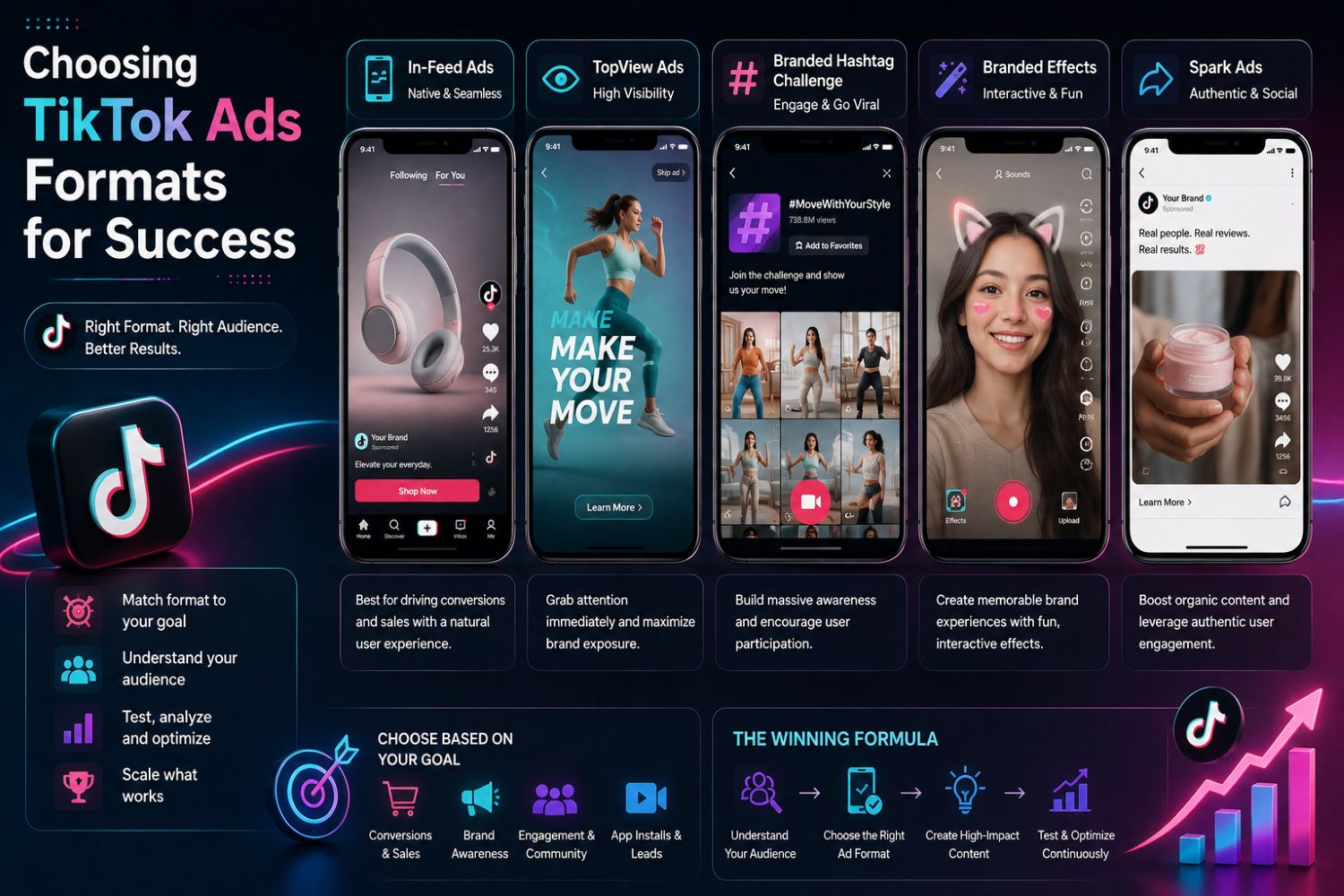
Spark Ads vs. In-Feed Ads
Picking the right ad format sets up your whole campaign. Two main choices are Spark Ads and In-Feed Ads. Each one works for a different goal.
Spark Ads boost organic posts from creator accounts. You need a code from the creator to run them. This format keeps all engagement on the original post. Views, likes, and comments grow over time. That builds a long-term social asset. Research from TikTok For Business shows Spark Ads can drive higher video completion rates and view-through rates compared to standard In-Feed Ads. This engagement shows social proof, which builds trust and leads to sales.
In-Feed Ads give you full control. You upload videos directly to TikTok Ads Manager, set your goal, and start. These ads show up on the For You page with a native feel and include a call-to-action. You can test different hooks fast without waiting for creator approval.
Feature | In-Feed Ads | Spark Ads |
|---|---|---|
Posting source | Brand-owned account | Creator's organic account |
Call-to-action | Yes (e.g., 'shop now') | Not explicitly mentioned |
Content origin | Brand's own content | Creator's organic post boosted by brand |
Key benefit | Full creative control | Creator trust and higher engagement |
Best practice | Test hooks and iterate | Let creators create naturally |
Use Spark Ads when you want social proof. Use In-Feed Ads when you need to test many creative angles. Your audience targeting works with both formats.
Video Shopping Ads and Other Formats
Video Shopping Ads connect directly to your product catalog. You upload SKU-level product data into TikTok Shop. The ads pull from this catalog automatically. Product cards stay linked to current stock and prices. When users tap a product tag, they see a product detail page or in-app checkout. This format works great for product discovery and direct sales.
Carousel Ads let you show multiple products in one placement. Users swipe through images, building curiosity step by step. This format works well for ecommerce brands with many products. You can set up slides as a short story: need, fix, next step. End with a one-tap form for quotes, demos, or bookings.
Branded Hashtag Challenges ask users to create videos with your specific hashtag. These ads appear at the top of the Discovery page. They drive viral participation and huge awareness. They often generate strong returns on ad spend. This format works best for food, fashion, and lifestyle brands targeting younger audiences.
Your campaign goal decides which format fits. Awareness goals work best with Branded Hashtag Challenges. Conversion goals work best with Video Shopping Ads. Test one format at a time. Check your performance against your benchmarks. Then scale what works.
Step-by-Step Setup and Optimization for TikTok Advertising
Setting Up TikTok Ads Manager and Pixel
Your path to finding winning TikTok ads starts with the right tracking setup. Without good data, you can't make smart choices about your ads. The setup is straightforward and helps you for every future campaign.
First, make your TikTok Ads Manager account. Go to the Events Manager section and create your TikTok Pixel. This code tracks what users do on your website. Follow these steps to install it the right way:
Create your pixel in TikTok Ads Manager Events Manager.
Copy and put the base code in the
<head>section of every page.Turn on first-party cookies for better accuracy.
Set up Standard Web Events like ViewContent, AddToCart, and Purchase.
Check your work with TikTok Pixel Helper Chrome extension or Test Events tool.
For Shopify stores, install the TikTok app from the Shopify App Store. The pixel installs on its own after you connect your account. Google Tag Manager users can put the pixel through the Partner Platform section. Other platforms like WooCommerce and Magento have similar built-in options.
After installation, set up your conversion events. The Purchase event matters most for ecommerce brands. Use the Test Events feature in Events Manager to make sure the CompletePayment event works correctly. Do a real test purchase instead of just opening a page. This makes sure the event carries the right value and currency details.
TikTok Pixel Helper shows what happens in your browser. Events Manager shows what TikTok actually got and processed. These tools do different jobs. Check both when fixing your tracking.
Signal Color | Meaning | Action Required |
|---|---|---|
Green (checkmark) | Event fired perfectly with all required information | No action needed |
Yellow (triangle) | Event fired but missing recommended parameters | Fix warnings to improve data quality |
Red (X) | Critical error in event firing | Investigate and fix immediately |
Testing, Scaling, and Killing Ads
With tracking confirmed, make your test campaign. Build several ad versions inside one ad group. Each version should test a different hook, visual style, or call-to-action. This setup lets you compare results fairly.
Per TikTok's Business Help Center, a set of Creative Codes define every high-performing ad on the platform. They're not suggestions. They're the framework.
Build Brand Love by Thinking TikTok-First – Use native features like text overlays and voiceovers. Many viewers say TikTok-first ads grab their attention.
Use Trends as Storytelling Templates – Tap into community trends. Many users enjoy brand participation in trends or challenges.
Follow Production Principles for High-Quality Creative – Shoot vertically, use high-resolution footage, and refresh creatives to avoid fatigue.
Structure Your Videos to Hook Viewers and Inspire Action – Use a hook early, show your product on screen, and close with a clear CTA.
Stimulate Attention with Editing Techniques – Use transitions, music, and fast scene changes to capture attention early.
Turn Up the Volume with the Right Soundtrack – Many users say sound is essential.
Apply these codes when making your test versions. Each ad should follow several of these codes to be a strong contender.
Run your ads for a sufficient period. Conversion campaigns need enough conversion events before results are reliable. Reach and traffic campaigns need longer because they rely on non-conversion metrics. Don't scale on thin data.
Campaign Objective | Minimum Duration | Recommended Sweet Spot |
|---|---|---|
Conversion / Product Sales | A sufficient period | An optimal period |
Reach / Traffic | A longer period | N/A |
General (any objective) | A sufficient period | A full evaluation window |
After the test period, look at CTR and CPA for each version. Kill ads with low CTR after a sufficient number of impressions. Scale winners gradually until CPA rises above your target. This careful approach to TikTok ad targeting stops wasted spend and builds a steady system for finding winning TikTok ads. Your audience targeting gets better with each round, and your overall TikTok advertising strategy becomes sharper with every campaign you run.
Finding winning TikTok ads is a clear process. You define success using metrics, understand the auction, choose the right format, and optimize with TikTok Ads Manager and Creative Codes. This method makes TikTok advertising less like guessing and more like a repeatable system.
Start small. Launch a campaign with a few ad versions. Measure results for a few days. Then make changes based on your data. Your targeting gets better with each round, and your audience insights grow sharper.
The algorithm rewards testing, so don't be afraid to fail—be afraid not to try. Download a checklist for tracking metrics and a template for testing Creative Codes. Apply these tools to your next TikTok ads campaign and watch your advertising performance improve.
FAQ
How much budget do I need to start testing TikTok ads?
Start with a reasonable daily budget for your test campaign. This amount gives you enough data within a week to spot trends. You can run several ad variations with this budget. Scale up only after you see consistent results.
How long before I know if my ads are working?
Most campaigns show clear signals within a week. Conversion campaigns need enough conversion events before you can trust the data. Traffic campaigns need longer. Don't judge performance before these minimums.
Should I use Spark Ads or In-Feed Ads first?
Test In-Feed Ads first if you want full control over creative. Use Spark Ads when you have creator partnerships ready. Many brands run both simultaneously to compare performance. Your campaign goal should guide this choice.
How often should I refresh my ad creatives?
Refresh your creatives periodically. Ad fatigue sets in when viewers see the same content repeatedly. Watch your CTR closely—a steady decline signals fatigue. Prepare new variations before performance drops.
Can I find winning TikTok ads without using TikTok Ads Manager?
You can spot trends manually, but Ads Manager gives you the data you need. Real-time metrics show exactly what works. Third-party tools like MagicBrief or Trendtrack add extra insights. Combine these sources for the best ad intelligence.
See Also
How To Easily Get Your TikTok Analytics Data
A Simple Guide To Find TikTok Trending Products
Effective Methods To Obtain Detailed TikTok Analytics Reports
Top Tips For Beginners In TikTok Product Selection
EchoTik: Three Strategies To Find TikTok E-Commerce Accounts
