The Most Powerful TikTok Seller Analytics Features You Can Use

TikTok seller analytics let you use strong tools. You can see real-time shop analytics and track your sales. You can check ad spend for each SKU. You can look at engagement metrics and learn about customer behavior. You can also see how you do on other platforms. These tools help you find trends and increase your TikTok sales. They help you stay ahead in the TikTok marketplace.
Do you want to beat your TikTok competitors? Use TikTok seller analytics to make better choices. TikTok gives rewards to sellers who use data. TikTok analytics help you grow. TikTok can make your shop do better.
Key Takeaways
Use TikTok seller analytics to watch your sales and money. This helps you see which videos make people buy things. You can then make your content plan better.
Check engagement metrics every week. This lets you change your content for what people like. It helps you do better overall.
Use real-time analytics to decide fast. Change prices, add more products, or update promotions using the latest sales data.
Essential TikTok Seller Analytics Features

Sales and Revenue Tracking
You want to see how your shop is doing. TikTok seller analytics show sales and revenue clearly. You can find out which videos help people buy things. You can check how many viewers turn into buyers. You can measure the total value of what you sell. These features help you notice patterns and learn what works best.
Metric | Description |
|---|---|
Sales by Video | Shows which videos made people buy |
Conversion Rate per Video | Checks how well each video works |
GMV (Gross Merchandise Value) | Adds up sales value for each creator |
Product Performance Metrics | Looks at how each product is doing |
Traffic Source Breakdown | Finds out where visitors come from |
You can also track profile visits and bio link clicks. You can see how much money comes from TikTok. These features let you see how your posts and sales connect. Using TikTok shop analytics gives you ideas to help your shop grow faster.
Tip: Check your sales and engagement rates every week. This helps you spot patterns and make your plan better.
SKU-Level Ad Spend Attribution
If you want to get more from your ads, SKU-level ad spend attribution is important. TikTok seller analytics link ad spending to each product. You can see which SKUs do well and which need less money. This feature helps you focus on products that make more profit. You can stop spending on items that do not sell.
A brand made their campaign ROAS four times higher in two months. They used SKU-level attribution and focused on top SKUs. They stopped spending on products that did not do well. You can do this too with TikTok shop analytics features.
Mechanism | Benefit |
|---|---|
Connects views to orders for accurate tracking | |
Server-to-server postbacks | Sends order details from TikTok to your server for exact GMV |
Lift testing | Checks if changes really help by using experiments |
You get ideas about which products give the best return. This feature helps you make smarter plans and earn more money.
Real-Time Shop Analytics
You need to act fast in the TikTok marketplace. Real-time shop analytics let you watch sales and performance as they happen. You can change prices, restock products, and fix promotions right away. TikTok seller analytics give you the data to make quick choices.
Benefit | Explanation |
|---|---|
Lets you change content and promotions using real-time data | |
Sales tracking in real time | Helps you react to changes, adjust prices, and restock quickly |
TikTok sellers use systems that handle data instantly. You can spot trends, guess demand, and manage inventory with predictive analytics. Watching social media buzz helps you find new trends early. These features make your shop quick and ready for changes.
Engagement and Content Metrics
Engagement is very important for TikTok success. TikTok seller analytics let you track views, clicks, saves, and purchases. You can see how well your content connects with your audience. These features help you improve your content plan and boost sales.
Metric | Description | Good Performance | Excellent Performance |
|---|---|---|---|
Views-to-Click Rate | Shows how many viewers click product links | 2-3% | 4-5%+ |
Checks how many clicks turn into sales | 8-12% | 15%+ | |
Save Rate | Counts users saving videos for later | 3-5% of total views | N/A |
You can also track engagement rate, visibility, reach, and audience behavior. TikTok shop analytics let you check metrics every week, study retention, and remove content that does not work. Using these features keeps your content fresh and interesting.
Note: Always look at engagement metrics to make posts fit your audience.
Customer Behavior Insights
Knowing your customers is very important. TikTok seller analytics show you regional preferences, likes, follows, and comments. You can make your content and ads fit what your audience likes. Brands using geo-targeting get more engagement and better ROI.
User Data Point | |
|---|---|
Video Engagement | Make ad content based on popular themes. |
Follows and Likes | Target ads that match followed trends or liked content. |
Comment Analysis | Use sentiment analysis to see brand feelings and change messaging. |
You can group customers, make targeted marketing plans, and send coupons to bring buyers back. These features help you get more repeat purchases and build loyal customer groups.
Cross-Platform Performance Views
You want to see how your TikTok campaigns do on all channels. Cross-platform performance views are strong features in TikTok seller analytics. You can match your main message, change creatives, and test plans across platforms. These features let you track attribution and connect TikTok results with customer actions everywhere.
Strategy Component | Description |
|---|---|
Core Message Alignment | Makes your message clear and strong everywhere |
Creative Adaptation | Helps engagement by fitting each platform |
Focused Testing | Finds the best strategies |
Systemization | Helps you grow and manage creative fatigue |
Using TikTok with Google Ads and Meta Ads gives you a full view. You can see which platform gives the best return on ad spend. These features make your analysis easier and help you make smarter choices.
Callout: Use TikTok shop analytics with UTM tracking and API integration to make cross-platform analysis simple.
You get full insights, save time, and build a winning plan with these features.
How Features Help TikTok Sellers
Identifying Top Products
TikTok analytics helps you find your best products fast. You can track things like engagement and conversions for each item. This shows you which products get the most attention. You can check views, clicks, and sales to see what sells well. If you see a product getting popular, you can change your price or content. This can help you sell more. Checking your shop’s performance often helps you stay ahead and improve.
Track how each product is doing.
Look at audience insights and engagement.
Change your content plan if you see new trends.
Optimizing Ad Spend and ROI
TikTok analytics gives you clear data about your ads. You can see which ads help you sell more. You can also see which ads need to be better. The dashboard shows video views, likes, shares, comments, and watch time. You can use this to find your best ads and spend more on them. This helps you get more money back from your ads. You can test new ideas and see what works best.
Tip: Use AI-powered weekly plans and UTM tracking to watch ad spend and get better results.
Understanding Customer Preferences
TikTok analytics helps you learn about your audience. Start by looking at your top videos for views and engagement. Check when your audience is most active. Change your posting times to match. Use demographic data to pick your target audience. Try different types of content and see what people like. This helps you grow your audience and sell more.
Find your best content.
Post at the best times.
Pick your target audience.
Try new ideas.
Track how your campaigns do.
Boosting Engagement and Sales
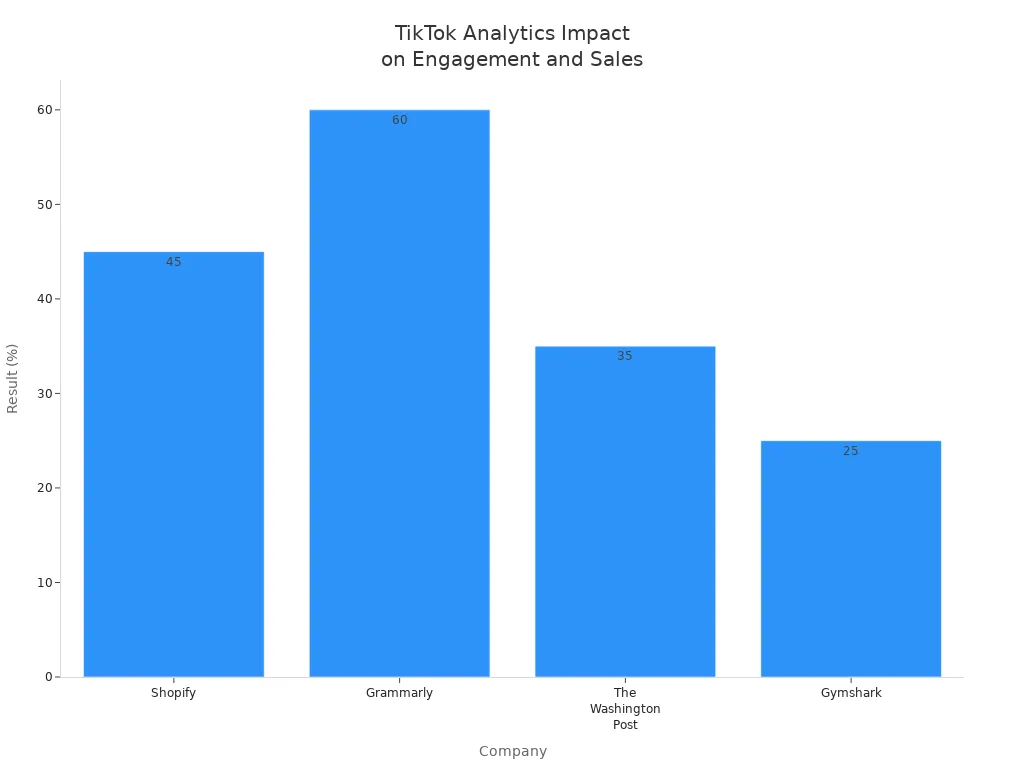
TikTok analytics helps you get more engagement and sales. You can track real-time engagement and sales numbers. Companies like Shopify and Gymshark use these tools to do better. You can split your audience into groups and test new ideas. TikTok Pixel helps you track conversions. Real-time dashboards let you see results and change your plan fast.
Company | Strategy Used | Result |
|---|---|---|
Shopify | TikTok Pixel + Lookalike Audiences | 45% more SMB signups |
Grammarly | UGC Campaigns + Real-Time Monitoring | 60% more engagement |
The Washington Post | Audience Segmentation Analytics | 35% more video completions |
Gymshark | Cross-Channel Attribution | 25% better ROAS |
Outperforming Competitors
You can use TikTok analytics to beat your competitors. Start by finding top products early with filters. Watch what your competitors do and change your plan if needed. Track ad trends and see which products are getting popular. Use analytics to make your shop stand out. With good data, you can build a strong plan and get more sales.
Note: Use market intelligence and special offers to keep your shop ahead in the TikTok marketplace.
Top TikTok Analytics Tools

TikTok Shop Analytics Dashboard
The TikTok Shop Analytics Dashboard is a good place to begin. This tool shows how your shop is doing. You can see profit analytics, market intelligence, and sales data. You can handle many stores in one spot. The fee calculator helps you plan your margins before selling more products. Here’s what you get:
Feature | Description |
|---|---|
Profit Analytics | Tracks fees, refunds, and payouts so you know your real profit margins. |
Market Intelligence | Shows market trends and competitor performance to help you make smart decisions. |
Basic Sales Data | Lets you check sales metrics and see how your products perform. |
Multi-store Dashboard | Combines data from all your stores for easy management. |
Fee Calculator | Models margin scenarios for better financial planning. |
Third-Party Tools Overview
You may want more features from your TikTok analytics tools. Third-party tools give extra options and deeper insights. Here are some popular choices:
Keyhole tracks past trends and audience insights.
Rival IQ gives hashtag analytics and social media checks.
Quintly lets you build custom reports and analyze TikTok fast.
Dash Social uses AI to plan content and boost engagement.
Hootsuite puts TikTok data in one place with strong analytics and reports.
Dashboardly focuses on profit analytics with trusted tracking.
Kalodata looks at market intelligence and competitor benchmarks.
FastMoss uses AI to track trends and viral content in real time.
These TikTok analytics tools help you learn about your shop’s performance and find new ways to grow.
Comparing Analytics Tools
You want to pick the TikTok analytics tools that work best for you. TikTok’s built-in analytics tools are free and give accurate audience data. You can track both organic and paid performance. The interface splits between Studio and Ads Manager, so you need to adjust. Built-in tools do not have competitive analysis or advanced hashtag tracking. You only see your own data.
Third-party TikTok analytics tools let you watch public profiles, compare growth, and track hashtags or sounds. You can find influencers and manage campaigns. These tools have more features and help you compare your performance with others.
Feature | TikTok Built-in Analytics | Third-Party Tools |
|---|---|---|
Data Accuracy | High (first-party) | High (with extra benchmarking) |
Usability | Fragmented interface | Unified dashboard |
Competitive Data | Limited | Extensive |
Pricing | Free | Paid (varies by tool) |
Tip: Try different TikTok analytics tools to see which works best for your shop. You can use both built-in and third-party tools for a full view of your performance.
Choosing the Right Analytics Features
Assessing Shop Needs
If you want your shop to grow on TikTok, you need to pick good analytics features. Begin by checking your sales and revenue numbers. Watch how your numbers go up or down over time. Find out which products sell the most. Look at engagement metrics to see how people react to your posts. Check click-through rates to see how many people click your links. Use TikTok’s analytics tools to look at performance data. Figure out what is working well and what needs to get better.
Sales and revenue tracking helps you find your best products.
Engagement metrics show if your content connects with people.
Detailed analytics help you see what works and what does not.
Prioritizing Key Features
Each shop is unique. You should pick analytics features that fit your shop size and product type. Some tools track product, influencer, live broadcast, and short video data. You can check up to 500 days of history. Intelligent product selection helps you find popular items quickly. Talent collaboration lets you work with experts. Competitive product analysis helps you learn about partners and ad cycles.
Feature | Description |
|---|---|
Ecological Depth Coverage | Tracks product, influencer, live broadcast, and short video data with deep historical review. |
Intelligent Product Selection | Finds trending products in real time. |
Talent Collaboration | Connects you with experts for content empowerment. |
Competitive Product Analysis | Analyzes partners and ad life cycles. |
Getting Started with TikTok Analytics
Are you ready to use TikTok analytics? Log in to the Seller Center. Find the Analytics Dashboard on the sidebar. Pick your date range and metrics. Export reports for more analysis. Track profit for each order. Check payouts to make sure your numbers are correct. Link ad spend with shop revenue. Watch refunds and chargebacks every week. Combine inventory data with profit metrics. Automate reporting to save time.
Tip: Begin with simple steps. Use TikTok analytics to track sales and engagement first. Add more features as your shop gets bigger.
You can help your shop grow with TikTok seller analytics. Watching numbers like impressions, clicks, and conversion rates lets you find patterns. You can fix problems quickly when you see them.
Metric | Purpose |
|---|---|
Impressions | Shows how many people see your product |
Conversion rate | Tells you how well your sales are doing |
Shipping speed | Checks if deliveries are fast and good |
Keep your shop ahead by checking your analytics often. Try out new tools and features to see what works. Using data helps you make better choices and keeps your shop strong.
Make videos that fit what viewers like.
Change your content to keep people interested.
Look at the best styles and learn from them.
Selling with data gives you a smart edge and helps you come up with new ideas.
FAQ
How do you access TikTok seller analytics?
You log in to the Seller Center. Click the Analytics Dashboard. Pick your metrics and date range. Export reports if you want more details.
Can you track ad spend for each product?
Yes! TikTok analytics let you see ad spend by SKU. You can check which products perform best and adjust your budget.
What is the best way to use engagement metrics?
Check your views, clicks, and saves every week. Change your content if you see low numbers. Try new ideas to boost engagement.
See Also
Discover The Best Tools For TikTok Analytics Today
Top Free Tools For Analyzing TikTok Performance
Comprehensive Guide To Utilizing TikTok Analytics Tools
