3 Easy Steps to Use EchoTik Free TikTok Money Calculator


You upload videos, see your views grow, and ask what that attention is worth. The echotik free tiktok money calculator answers that question fast. There is no signup and no waiting—just a quick estimate of what you might earn. The old Creator Fund closed in December 2023 and was replaced by the Creativity Program and TikTok Pulse, so guessing your revenue no longer works. This guide shows you three easy steps. You will see how the calculator turns your numbers into a clear picture of what you can earn. Sellers can also link the results to their shop profit and keep track of every dollar.
Step 1: Access the Calculator

Locating the EchoTik Free TikTok Money Calculator
You do not need an account to get started. The echotik free tiktok money calculator lives right on the EchoTik website, and it opens for anyone who visits. No email, no password, no credit card. That means you can check your earning potential in the time it takes to drink a cup of coffee.
Here is where to find it:
Direct link: https://echotik.live/tools/tiktok-money-calculator
Site navigation: Home > Tools > TikTok Money Calculator
Bookmark that page if you plan to check your numbers often. Creators who track their growth tend to revisit the tool every few weeks. Sellers running a shop can pair it with a free tiktok shop profit calculator to see the full money picture.
Simple Mode vs. Advanced Mode
The tool gives you two ways to work. Simple Mode asks for one thing: your TikTok username. Type it in, hit the button, and you get an instant read on your potential earnings. This path suits you if you want a fast answer without digging through analytics.
Advanced Mode takes more effort but pays you back with detail. You manually enter your own data, so the calculator builds a sharper estimate. Use this mode when you already know your stats and want a closer look at where your money comes from.
Both modes run on the same engine. The difference comes down to how much you feed it. Simple Mode trades precision for speed. Advanced Mode trades speed for precision. Pick the one that matches what you need today.
Step 2: Enter Your TikTok Data

Key Inputs for the Calculator
Simple Mode needs just your username. Advanced Mode asks for more. Here is what the calculator may request:
Follower count
Average views per video
Engagement rate
Content niche
Posting frequency
Total likes and comments
Audience location
These numbers shape your estimate. Your niche matters a lot. Sports teams and colleges see engagement rates of 7–10%, while finance and B2B accounts sit at 1–2%. Beauty and fashion brands land at 2–4%. The overall TikTok average runs about 4–5%.
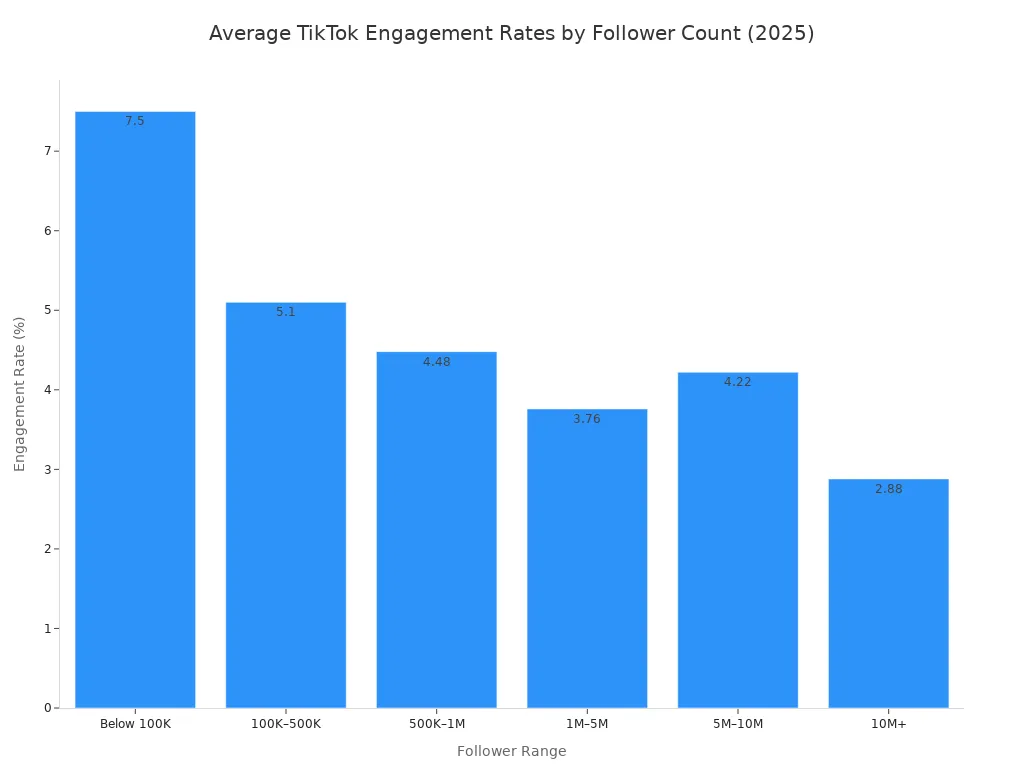
Follower count changes things too. Smaller accounts often earn higher engagement. Nano-influencers with 1,000 to 10,000 followers hit an average engagement rate of 10.3% in 2024, per the Influencer Marketing Hub 2025 Benchmark Report. That drops as you grow:
Follower Range | TikTok Engagement Rate (2025) |
|---|---|
Below 100K | 7.50% |
100K–500K | 5.10% |
500K–1M | 4.48% |
1M–5M | 3.76% |
5M–10M | 4.22% |
10M+ | 2.88% |
Advanced Mode also asks for RPM, CPM, and qualified-view percentage. RPM varies by program. The legacy Creator Fund paid $0.02–$0.04 per 1,000 views. Creator Rewards for long-form content pays $0.40–$1.00 per 1,000 views. High-retention niche creators can see $2.50–$6.00 per 1,000 views. CPM shifts by niche too — gaming sits at $0.04–$0.07, fashion at $0.03–$0.06, and dance trends at $0.01–$0.03.
Finding Your Data with TikTok Shop Analytics
You can pull most of these figures straight from the TikTok app. Open your profile, tap the menu, and select Analytics. There you will find follower count, total likes, video views, and engagement rate. Check your audience location tab for where your viewers live.
Sellers get a deeper view through TikTok Shop Analytics. This dashboard tracks GMV, orders, average order value, and settled revenue. It also reports video CTR, GPM, and conversion rate. Those metrics show which content drives sales and which products move.
TikTok Shop Analytics also breaks down affiliate creator performance. You can see GMV, orders, and items sold per creator. That helps you spot who drives real revenue versus who just adds volume.
For a full profit picture, pair the calculator with a TikTok Shop Profit Tracker. When calculating TikTok Shop profit, you need sales and cost data together. Track refund rate, ad spend, and affiliate commissions. Add estimated costs like COGS and shipping fees. Only then does your net margin become clear. A shop can grow GMV while margin shrinks — the tracker catches that. Review these numbers monthly. Your profitability depends on watching costs as closely as revenue figures.
Step 3: Review and Apply Your Estimate
Understanding Your Profit Calculator Results
Your result is a monthly earnings range, not one set number. That range breaks into four streams: brand deals, Creator Rewards or ad revenue, subscriptions, and TikTok Shop. Each stream shows its own payout, so you can see where your profit really comes from.
These ranges come from real data, not guesses. The tool uses publicly reported industry CPM figures, TikTok's Creator Rewards disclosures, and real creator earnings. Sources are checked against each other, not copied from one place. Accounts with similar follower counts can earn 3–5x differently by niche, so one flat number hides the real spread.
This tool gives realistic range forecasts based on TikTok's monetization benchmarks. Actual earnings still depend on brand deals, audience location, and how hard you chase every income stream.
Treat your result as a planning range, not a guaranteed payout. Several things change your actual earnings:
The type of content you make
When you post
Who your followers are
How much your audience engages
Your range shifts as those inputs change. Check the tool again every few weeks.
Using Estimates for Brand Deals and TikTok Shop Profit Tracker
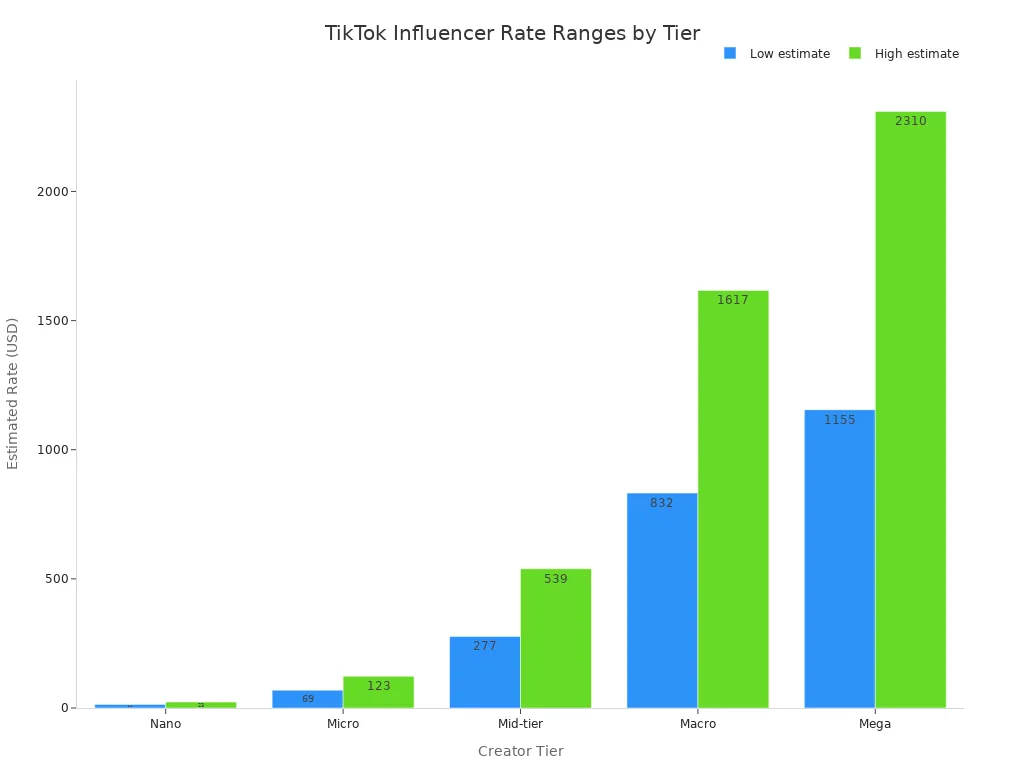
Your brand deal pricing starts with these figures. Brands often quote by follower tier. Nano creators under 10K followers earn $5–$60 per sponsored post. Micro creators at 10K–100K bring in $60–$250. Mid-tier accounts at 100K–500K charge $200–$1,000. Macro creators at 500K–1M ask $400–$5,000. Mega accounts with 1M+ reach $750–$20,000+. Treat these as rough ranges, not fixed rates.
Engagement rate often matters more than follower count. A creator with 50K followers at 8% engagement out-earns an 80K account at 1.5%. Brands pay more for connected audiences that convert. Quote rates off average views too. TikTok pushes content beyond followers, so a creator averaging 100,000 views can charge more than a larger account with spotty reach.
Usage rights change your price. Organic usage adds 10–20% to your base rate. Paid ad licensing adds 40–60%. Whitelisting or Spark Ads add around 50%. A full perpetual buyout can add 150% or more. Finance creators can charge up to 40% above lifestyle rates.
Sellers should pair this with a tiktok shop profit tracker. The tool projects content earnings, but your shop profit depends on your costs. Track refund rate, ad spend, affiliate commissions, COGS, and shipping costs. Your net margin per product shows what you actually keep. That margin tells you which products deserve promotion. Many shops grow sales while their margin shrinks. That tracker catches the gap early. Review your net margin monthly, because profitability depends on watching costs as closely as you watch revenue. Small changes in costs move your margin quickly.
Shop owners often forget that side. A profitable shop reacts fast when trends turn. Pair the shop profit picture with content earnings.
The core of profit tracking is simple: know your numbers before you negotiate. The echotik free tiktok money calculator hands you absolute revenue figures for your content. The profit tracker hands you actual profit after every cost. Two tools, one complete picture. Use both to set goals, price sponsorships, and decide where to grow. Profit tracking also reveals which videos earn the most. A falling margin cancels out gains fast, so keep both reports side by side.
Getting your earnings estimate takes three easy steps. Open the echotik free tiktok money calculator, enter your data, and review the results. That is it. The calculator gives you a real benchmark for setting goals, pricing sponsorships, and planning your next move.
Use it to guide your revenue strategy. Sellers can pair it with a profit tracker to watch shop profit after costs. Profit tracking keeps your numbers honest. So try the tool today. Take control of your profit and your shop growth.
FAQ
Is the EchoTik TikTok money calculator really free?
Yes, it costs nothing at all. You do not have to sign up, give an email, or pay any money. Just go to the site and begin using it. The profit calculator gives you quick estimates with no hidden fees.
How accurate are the earnings estimates?
The tool uses real industry data, like reported CPM figures and TikTok's Creator Rewards disclosures. Your result is a range, not one set number. What you actually earn depends on your niche, where your audience lives, and how many income streams you chase.
Can I use this calculator if I run a TikTok Shop?
Absolutely. The calculator estimates what your content earns. For your shop, you also need to watch costs like refunds, ad spend, and affiliate commissions. A profit tracker helps you see your true margin after every expense. Use both tools together for a complete picture.
What is the difference between the calculator and a profit tracker?
The calculator projects what your content might earn. A profit tracker shows what you really keep after expenses. Sellers need both. One handles revenue estimates, and the other handles profit tracking. Together, they show your full financial health.
Do I need TikTok Shop Analytics to use Advanced Mode?
No, but it helps. TikTok Shop Analytics gives you sales data, conversion rates, and affiliate performance. You can also find follower count and engagement rate in the TikTok app under Analytics. The more data you enter, the sharper your estimate becomes.
