TikTok Shop API e-commerce platform integration

You can connect with tiktok shop in 2025 by following easy steps. First, sign up as a seller and get your API credentials. Then, set up authentication and add webhooks for real-time updates. Testing in a sandbox helps make sure everything works well. Many businesses say automation and real-time sync save time and lower mistakes after they connect with tiktok shop.
Description | Business Advantage | |
|---|---|---|
Automation of product updates and order processing | The API makes price changes, order updates, and stock tracking automatic across channels. | Saves time, cuts down on manual work, and lowers errors. |
Real-time synchronization | Products, orders, and inventory update right away on all platforms. | Keeps data the same everywhere and stops mistakes. |
Integration with eCommerce platforms | Connects TikTok Shop with Shopify, WooCommerce, and more using SDKs and APIs. | Lets you manage products, orders, and customers in one place. |
Marketing automation and analytics | Gives reports on user actions, video results, and AI-powered tips. | Helps you make fast choices and improve marketing plans. |
Enhanced customer engagement | Supports influencer marketing, chatbots, and custom messages. | Makes customer service better and increases sales. |
Secure data handling and compliance | Regional data controls keep data private and safe. | Builds user trust and follows rules. |
You can read more in the Tiktok shop api documentation. Using tiktok shop API helps you run your store well and keep your data current.
Key Takeaways
Linking your store to TikTok Shop API helps update products, orders, and inventory by itself. This saves time and stops mistakes.
Set up authentication and webhooks with care. This lets you get updates right away and keeps your data the same on all platforms.
Test your integration in a sandbox first. This helps you find and fix problems before you go live.
You can connect by yourself, use third-party connectors, or get help from experts. Choose what fits your skills and needs.
Keep your API version current. Use support resources to stop common problems and keep things running well.
Integration Overview

Why Integrate with TikTok Shop
Connecting your business to tiktok shop helps you grow. You can sell items in videos, live streams, and shop pages. Buyers can shop inside the tiktok app. This makes shopping quick and simple. You reach more people and get more sales because there are fewer steps.
Buyers can shop while watching videos without leaving the app.
Working with creators and fans helps build trust and gets more people interested.
You see all your sales and content data together for better insights.
Your prices and stock update right away on every channel.
Live shopping events and expert demos make people want to buy fast.
Teaming up with micro-influencers often brings more sales for less money.
Tiktok shop fits how Gen Z likes to shop, so they buy during viral trends.
You can also get more sales when you use tiktok shop. Real-time inventory keeps you from making mistakes or missing sales. Order management helps you ship fast and keeps customers happy. Built-in analytics help you make smart choices for your shop. Small sellers can start selling fast and add more products. Fun videos and influencer trends get more people to buy. Automation saves time and money, so you can focus on growing your business.
Supported Platforms
You have lots of choices to connect tiktok shop with shopify or other platforms. API2Cart lets you link tiktok shop with over 40 shopping carts and marketplaces. You can easily manage products, orders, and customer info. Patchworks helps you connect tiktok shop with shopify, Veeqo, Odoo, Klaviyo, Hubspot, CommerceTools, and Shipbob. This makes order and data sync automatic between tiktok shop and these platforms.
Channable also lets you connect tiktok shop for marketplaces in Europe and the US. You can automate product listings and keep orders updated right away. This makes it easy to manage everything from your eCommerce platform. These tools help you keep products and orders current, reach more buyers, and grow your business.
Getting Started
Register Account
First, you need a TikTok Seller Account. This account lets you use the TikTok Shop API. You can connect it to your online store. Fill out a form in Sellercloud to get approved faster. Before starting, install the TikTok 202309 OpenApi Website Cart Plugin. Put this plugin on your server. You do not need to sign in to TikTok for approval. You do everything from Sellercloud. TikTok lets you have five shops for each Tax ID Number. Remember this if you want to run many stores.
You also need a developer account in the partner portal. After you check your email, agree to the TikTok Developer Terms. Then, make your app details like name and icon. Send your app for review with all needed info. TikTok will approve your app. You get a Client Key after approval. This key lets you use the API. You can link your shop and catalog to your TikTok For Business account.
Access TikTok Shop API Documentation
Start by reading the TikTok Shop API documentation. This guide shows how to use the API. It helps you set up your partner portal and manage products. The documentation explains how to list products on TikTok Shop. It helps you keep your data updated. You find step-by-step guides, code examples, and tips. The documentation also teaches you to handle orders, inventory, and customer data safely.
Tip: Save the partner portal and documentation page. Check for updates often. New features and changes come out regularly.
Prepare Your Store
Make sure your store is ready before you connect. You need a web store that works with the API. Shopify and WooCommerce are good choices. Set up your TikTok for Business account. Learn how to use the partner portal. Match your payment methods and currencies with TikTok. Manage your inventory well. TikTok Shop does not track your stock. Make sure your order process works smoothly. Learn TikTok’s rules for selling. Decide if you want to connect by yourself, use a third-party tool, or hire an expert.
Integration Steps
Authentication Setup
You must set up authentication before using the tiktok shop api. First, make your app in the TikTok Developer Portal. When you finish, you get OAuth 2.0 credentials like your App ID and app secret. These let your store connect to the api safely.
Next, you need to ask for the right api permissions. Go to 'Manage API' in the portal. Pick the permissions that fit what you want to do. For example, choose product or order permissions if you need them. Only the main TikTok Shop account can give these permissions. Sub-accounts cannot do this.
Follow the TikTok Shop authorization steps. Pick the shop or shops you want to link. The permissions you give will only work for those shops and regions. This makes sure your app can reach the right shop data. If you do not have the correct api permissions, your app will not work with the tiktok shop api.
Tip: Always check your permissions before making api calls. If you miss permissions, you might get errors later.
Step-by-step authentication process:
Make your app in the TikTok Developer Portal.
Get your OAuth 2.0 credentials (App ID and app secret).
Go to 'Manage API' and ask for the needed api permissions.
Use the main TikTok Shop account to approve your app.
Pick the shop(s) and region for approval.
Finish the approval steps to turn on api access.
Configure Webhooks
Webhooks help your store get real-time updates from the tiktok shop api. You can track things like new orders, customer actions, or inventory changes. To set up webhooks, you need to run a local server. Many people use NodeJS for this. Start your server on a port, like 3000.
Use a tool like ngrok to make your local server open to the internet. Start a tunnel with a command like ngrok http 3000. Ngrok gives you a public URL. Put this URL in the TikTok Developer Portal under the Webhooks part of your app.
After you add the webhook, test it to make sure TikTok can send messages to your server. Keep your webhook safe by turning on verification with your Client Secret. Ngrok helps you check and fix incoming requests. You can also replay webhook requests to test your order flow without making new events.
Note: Webhooks let you automate tasks and keep your data updated. You can track many types of events with the tiktok shop api.
Here are some common event sources and examples:
Event Source | Description | Example Event Types |
|---|---|---|
WEB | Events from websites | Add to Cart, Purchase, Complete Registration, Click Button, Search |
APP | Events from mobile apps | Install the App, Launch the App, In-app AD Click, Complete the Tutorial |
OFFLINE | Offline actions | Loan is Approved, Loan is Disbursed |
CRM | CRM events | Generate a Lead, Submit Form |
You can also make custom events for your business needs. For example, you might want to track when a customer leaves a cart or when a new order starts a shipment. Real-time updates help you automate reminders, sync inventory, and improve your order flow.
Steps to configure webhooks:
Run a local webhook server (for example, NodeJS on port 3000).
Use ngrok to make a secure tunnel (
ngrok http 3000).Add the ngrok URL in the TikTok Developer Portal under Webhooks.
Test the webhook to see if TikTok can send messages.
Turn on verification using your Client Secret.
Use ngrok's tools to check and fix webhook requests.
Replay webhook requests to test your setup.
Manage your webhook subscriptions and send your app for review if needed.
Test in Sandbox
Before you go live, you should use the sandbox to test api calls. The sandbox lets you try the tiktok shop api without changing your real shop data. You can test product uploads, order management, and webhook events in a safe place.
Start by linking your store to the sandbox. Use your OAuth credentials and api permissions like you would in real use. Send test requests to the api and check the answers. Make sure your webhooks get the right events. Try different things, like new orders, inventory updates, or customer actions.
Tip: Use the testing api to act out real events. This helps you find and fix problems before you launch.
Testing in the sandbox helps you spot mistakes early. You can see how your setup handles real-time updates. If you find problems, change your code and test again. When everything works, you can move to the live setup with confidence.
Checklist for sandbox testing:
Link your store to the sandbox using your OAuth credentials.
Ask for the same api permissions as in real use.
Test product uploads, order management, and webhooks.
Act out events like new orders or cart abandonment.
Check that your order flow works as it should.
Fix any mistakes and test again until you are ready to go live.
Integration Methods
Manual Integration
Manual integration lets you control how your store connects. You work with the tiktok shop API yourself. You set up authentication and watch rate limits. You build your own data pipelines. This way, you choose how products, orders, and inventory sync. You need to know coding to set up and fix things. Manual integration is good if you want more choices or need special features.
Manual integration is hard for most people. You must fix server problems and missing data. You need to keep up with API changes. You also have to watch costs and extra work. This helps you avoid data silos.
You control how your data moves.
You can make custom features for your shop.
You must fix tech problems and keep things updated.
Third-Party Connectors
Third-party connectors help you link your store easily. These tools sync data and cut down on manual work. You do not need to code or hire a developer. Connectors handle updates, privacy, and refresh data. They help stop errors and keep products and orders current. Many connectors work with Shopify, WooCommerce, and BigQuery.
Here are some popular connectors for tiktok shop:
Category | Examples of Popular Connectors |
|---|---|
Order and Inventory Management Systems | Fabric, Cin7 Orderhive, Skubana, BrightPearl, SOS Inventory, Order Desk, Finale Inventory, Veeqo, Inventory Planner, Salesforce OMS |
Warehouse Management Systems | ShipStation, Manhattan WMS, ShipHero, ShipBob, Extensiv WMS, Deposco, Veeqo, Logiwa WMS, Peoplevox, Mintsoft |
Listings | Feedonomics, Rithum, SellerActive |
Data Lakes | Snowflake, Amazon S3 |
Point of Sale | Lightspeed, Square, Shopify POS |
You save time with easy setups.
You get updates when tiktok changes its API.
You can connect to analytics for better reports.
Third-party connectors help you grow your shop fast. You can make choices quicker and avoid mistakes from manual entry.
Hire Experts
If you want easy setup but cannot code, hire experts. Professionals know how to connect your store with tiktok shop. They set up products, orders, and inventory sync. Experts handle authentication, webhooks, and testing. You get advice and avoid common mistakes. Hiring experts saves time and helps you launch your shop fast.
You get help with setup and fixing problems.
You avoid tech mistakes and downtime.
You can grow your shop while experts manage the connection.
Best Practices and Troubleshooting
API Versioning
You must watch api versioning when you connect your store. Every api update can change how things work. If you use an old api version, your store may not sync. You could lose features too. Always check for new api releases and read the notes. Test updates in a sandbox before using them live. This helps you avoid trouble and keeps your tiktok shop working well.
Challenge | Cause | Solution |
|---|---|---|
Versioning Issues | Outdated API versions | Check for API updates and read release notes often |
Use APIs that work with older versions to avoid problems | ||
Test API updates in sandbox before going live |
Tip: Set a reminder to look at tiktok api docs each month. This keeps your connection current.
Common Issues
You might see some common problems with tiktok shop api integration. One problem is order status not syncing between your store and tiktok. This can happen if your app settings are wrong or the api fails. Sometimes, filling orders in Shopify does not update tiktok shop fast. Check your app permissions and update to the newest version. Try testing with one order to find where syncing stops. If you get error code 105005, your api access scope may be missing or your business type is wrong. Make sure you set the right permissions in the tiktok partner dashboard.
Bugs or old app versions can stop syncing.
Wrong setup or workflows may block updates.
Different order status between platforms can confuse you.
If you cannot fix it, contact tiktok shop support and share your issue details.
Support Resources
You have many ways to get help with tiktok shop api problems. Connector apps can sync catalogs and manage orders to cut mistakes. Some tools have templates and checks to keep product feeds correct. You can use the tiktok help center for guides and tips. Managed services can set up and test your feeds for you. Video webinars and walkthroughs show how to fix common issues. You can ask for a free feed check to find hidden problems that hurt sales.
Use onboarding help for easy setup.
Watch YouTube videos for step-by-step help.
Ask experts for help if you need advanced fixes.
Keep your docs clear and log all api activity. This helps you track changes and fix problems faster.
TikTok Shop API Documentation

Where to Find Guides
You can find guides for tiktok shop api documentation in many places. The main place is the partner portal. This portal gives you steps to set up your store and connect your app. You see examples for uploading products, managing orders, and setting up webhooks. The partner portal has a search tool. You can type questions and get answers quickly.
Many guides show how to use tiktok shop api documentation for different platforms. You learn to link Shopify, WooCommerce, or custom stores. The partner portal has video tutorials and code samples. You can copy code blocks and try them in your store. If you want to see how webhooks work, you find sample payloads and test cases in the documentation.
Tip: Bookmark the partner portal and tiktok shop api documentation pages. This helps you find answers fast when you need help.
Here is a simple example of an API call from the documentation:
{
  "shop_id": "123456",
  "product_id": "987654",
  "action": "update_stock"
}
Staying Updated
You need to keep up with tiktok shop api documentation. The partner portal shares news about new features and changes. You should check the release notes every month. The portal sends alerts when tiktok updates the API or adds new permissions. You can see a changelog that lists bug fixes and improvements.
You can join the partner portal community to ask questions and share tips. Other sellers post answers for common problems. You get email updates from the partner portal when big changes happen. You should test new features in the sandbox before using them in your real store.
Resource | How It Helps You |
|---|---|
Partner Portal | Gives guides and updates |
Documentation | Shows API examples |
Community Forum | Shares tips and solutions |
Release Notes | Lists new features |
Note: Always check the partner portal before making changes. This helps you avoid mistakes and keeps your store working well.
You can help your shop do better by using TikTok Shop API. This lets your shop show real-time stock, easy checkout, and strong analytics.
TikTok Shop makes shopping fun and links online and store shopping.
You get one place for finding items, adding to cart, and paying.
Connecting the API helps orders be right and cuts mistakes.
Automation tools like Celigo make your shop run smoother.
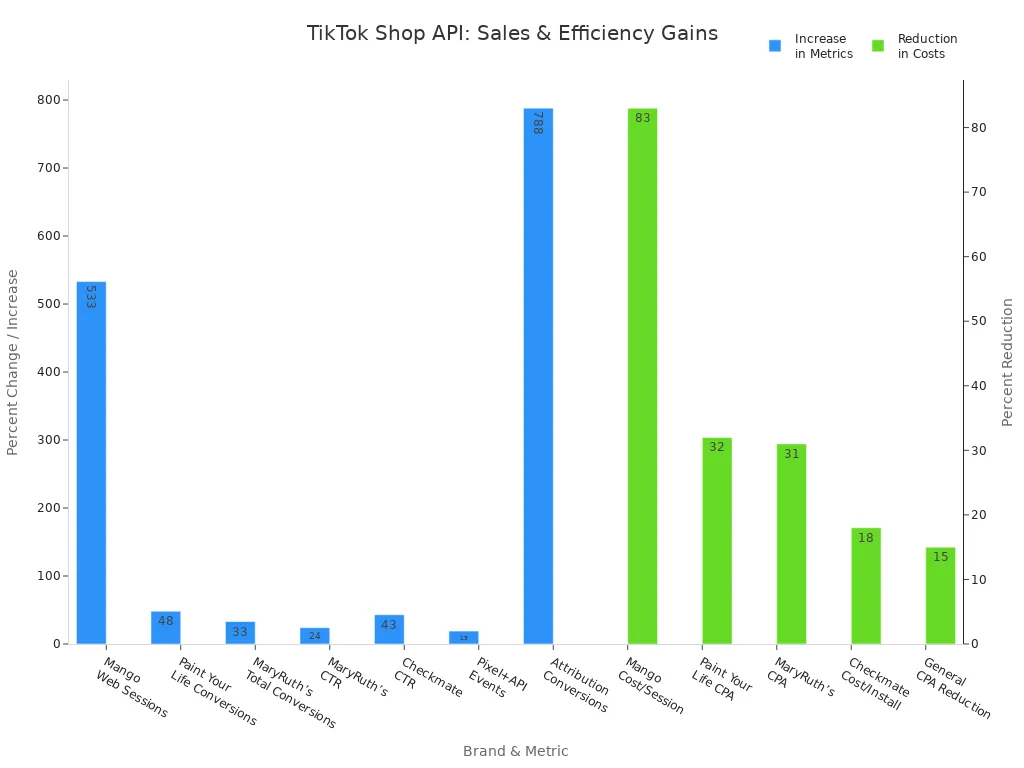
Look at the TikTok Shop API documentation and choose the best way to connect for your shop size. Many brands get more sales, spend less money, and work better after using the API.
FAQ
How do you get TikTok Shop API credentials?
You need to sign up for a TikTok Seller Account. Then, make an app in the TikTok Developer Portal. TikTok will give you OAuth credentials like App ID and secret. You use these details to connect your store.
Can you use TikTok Shop API with Shopify or WooCommerce?
Yes, you can connect TikTok Shop API with Shopify or WooCommerce. Many third-party connectors help you link your store. You can manage products, orders, and inventory from one dashboard.
Tip: Make sure your connector works with the newest TikTok Shop API version.
What should you do if orders do not sync?
First, check your API permissions in the TikTok Partner Portal. Make sure your app uses the latest version. Try testing with just one order. If syncing still does not work, contact TikTok Shop support for help.
Is it safe to use TikTok Shop API for your store?
TikTok Shop API uses secure authentication and data controls. This keeps customer data private. You also follow privacy rules for your area. Always update your app and watch for security alerts.
Security Feature | How It Protects You |
|---|---|
OAuth 2.0 | Keeps your login safe |
Webhook Verification | Blocks fake requests |
Data Compliance | Follows privacy laws |
See Also
Simple Guide To Starting Your Business On TikTok Shop
Effective Ways To Handle Orders Within TikTok Shop
EchoTik Introduces U.S. Pricing Tool For TikTok Shop Sellers
