TikTok Shop API


The TikTok shop API lets you link your store to TikTok. This makes it simple to handle your products and sales. You can check sales, change inventory, and see updates right away. Many small businesses use the API to work faster and sell more.
Metric | Impact Example |
|---|---|
Cost Per Acquisition (CPA) | Went down from $25 to $18, showing ads work better |
Incremental Sales Lift | Sales went up from $1,000 to $1,300 each day during campaigns |
Conversion Lift | More people bought after seeing TikTok ads |
You can see how the API helps you save time, spend less money, and find more buyers.
Key Takeaways
The TikTok Shop API links your store to TikTok. It helps you handle products, orders, and sales all together.
You can use the API to do jobs like updating stock and tracking orders. It also sends shipping updates for you. This saves time and helps you make fewer mistakes.
Many big online store platforms like Shopify and WooCommerce work with the TikTok Shop API. You can set it up easily, even if you do not know how to code.
The API has good analytics tools. These tools help you see sales trends and learn about your customers. They also help you make better marketing plans.
If you follow TikTok’s rules and test your setup well, you can avoid problems. This helps your shop work well all the time.
What Is TikTok Shop API

Simple Definition
You can think of the TikTok shop API as a special tool that connects your online store to TikTok. This tool helps you manage your products, track orders, and promote items directly on TikTok. You do not need to be a tech expert to understand the basics. The API lets you use TikTok’s huge audience to show your products in videos and reach more buyers.
Tip: The TikTok shop API makes it easier for you to update your inventory and handle sales without switching between different apps.
Here are the main things you can do with the TikTok shop API:
Promote your products through TikTok videos.
Manage orders and keep track of sales.
Connect your store to TikTok for smooth updates.
Register your business and verify your account to get started.
Choose between public apps for everyone or custom apps for your own shop.
Request permissions to use different features.
Test your setup before you start selling.
You get a simple way to control your shop and reach new customers.
Who Can Use It
You can use the TikTok shop API if you own a TikTok Shop main account. Sub-accounts do not have access to this tool. Most sellers in the United States can use the API, but you need to follow TikTok’s rules for authorization. You must log in with your main account, select your region, and pick the shop you want to connect.
Here is a quick checklist for who can use the TikTok shop API:
Requirement | Details |
|---|---|
Main TikTok Shop Account | Only main accounts can authorize access |
Supported Regions | United States shops are supported |
Authorization Flow | Log in, select region, and confirm shop |
App Registration | |
Secure Data | Use HTTPS and manage tokens safely |
You must set up your app and get special codes called credentials.
You need to follow TikTok’s steps to connect your shop and keep your data safe.
The API has limits on how much data you can use, so you need to plan your queries.
Note: If you want to combine TikTok shop API data with other social networks, you can do that for better marketing.
Many new users ask about trending data, influencer vetting, and how much information they can get. TikTok’s official documentation answers these questions and helps you follow best practices.
How TikTok Shop API Works
Connecting Your Store
You can link your online store to TikTok shop API by doing a few easy steps. This helps you show your products and run your shop right from TikTok. Here is what you need to do:
Make a developer account on the TikTok developers portal. You must check your email and set a password.
Agree to the TikTok Developer Terms and Conditions.
Click the "My Apps" tab and make a new app. Fill in your app info and add an icon.
Send your app for review. You need to give details like your app name, category, download URL, description, website, Bundle ID, and PKG name.
Wait for TikTok to say yes to your app. When they do, you get a Client Key.
Use the API to make and link your store and product catalog to your TikTok Business Center account.
Tip: Use strong passwords and keep your account safe when you set things up.
Data and Functions
When you use TikTok shop API, you can send lots of data between your store and TikTok. This helps you keep your shop fresh and handle orders without trouble.
Examples of Data Exchanged | |
|---|---|
Product Data | Sales numbers, price changes, product details, reviews |
Influencer Data | Follower numbers, engagement rates, performance stats |
Live Stream Data | Viewer counts, interaction rates, sales conversions |
Shop Dynamics | Traffic sources, conversion rates, shop results |
Order & Inventory | Customer info, order details, payment status, shipment tracking |
Refunds & Exchanges | Refund records, exchange info |
You can use the API for many key shop jobs:
Bring in product catalogs and set up TikTok Shop feeds.
Match orders and change inventory right away.
Automate product work and use AI tools to make your listings better.
Watch sales, run deals, and answer customer messages from one place.
Note: TikTok uses safe payment gateways and trusted couriers to keep your transactions safe. Always follow TikTok’s rules and keep your business info current for safe selling.
TikTok Shop API Features
Product Management
You can use the TikTok shop API to manage products. You add new items and change details in one place. You can update prices and upload product pictures easily. The API lets you write descriptions and organize your catalog. You do not need to use many apps to keep your shop current. When you change something, it shows up on TikTok fast. This helps your listings stay fresh and correct for buyers.
Order and Inventory
The TikTok shop API helps you handle orders and inventory with less stress. You can track every order from when someone buys to when it ships. Here is how sellers use the system:
Orders from TikTok Shop go into your order tool, like Sellercloud.
You manage shipping and tracking all in one spot. If you ship outside the tool, you can add tracking by hand.
The system sends tracking updates to TikTok, so buyers see order status right away.
You can turn on settings to let your tool check for shipping changes and update tracking by itself.
Inventory and price changes upload to TikTok Shop when you set the right options.
The API matches order status, including canceled orders and refunds, based on payment type.
If you use Fulfilled by TikTok, the platform stores and ships items, and marks orders done when shipped.
You can set up choices to automate order downloads and tracking uploads.
The system makes a pending reserve during the order hold time to stop overselling.
You can manage products with different versions and set up your warehouse for correct inventory updates.
Tip: Automating these steps saves time and helps you avoid mistakes with stock or order tracking.
Analytics
The TikTok shop API gives you strong analytics tools. These tools help you see your sales, customer actions, and how products do. The platform has built-in analytics in Seller Center, so you can check sales trends, product stats, and customer engagement. You can also use other tools for deeper insights and tracking across channels.
Analytics Tool / Feature Category | Description / Key Features |
|---|---|
Native TikTok Shop Analytics | Sales performance, product analysis, customer behavior, content engagement, follower insights, live shopping analytics. |
M2E TikTok Shop Analytics | Marketplace dashboard, product insights, profit tracking, customer analytics, sales overview, engagement. |
Hootsuite | Social media management, content scheduling, analytics, reporting, team collaboration. |
Rival IQ | Competitive analysis, engagement metrics, social listening, customizable reports. |
Emplifi | Performance tracking, audience insights, campaign effectiveness, cross-platform analytics. |
Brand24 | Brand mentions, hashtag performance, sentiment analysis, influencer identification. |
Exolyt | TikTok account monitoring, hashtag and sound analysis, influencer campaign tracking. |
Pentos | Account performance, competitor analysis, campaign tracking, data export. |
Socialinsider | Video views, engagement rates, follower growth, audience demographics. |
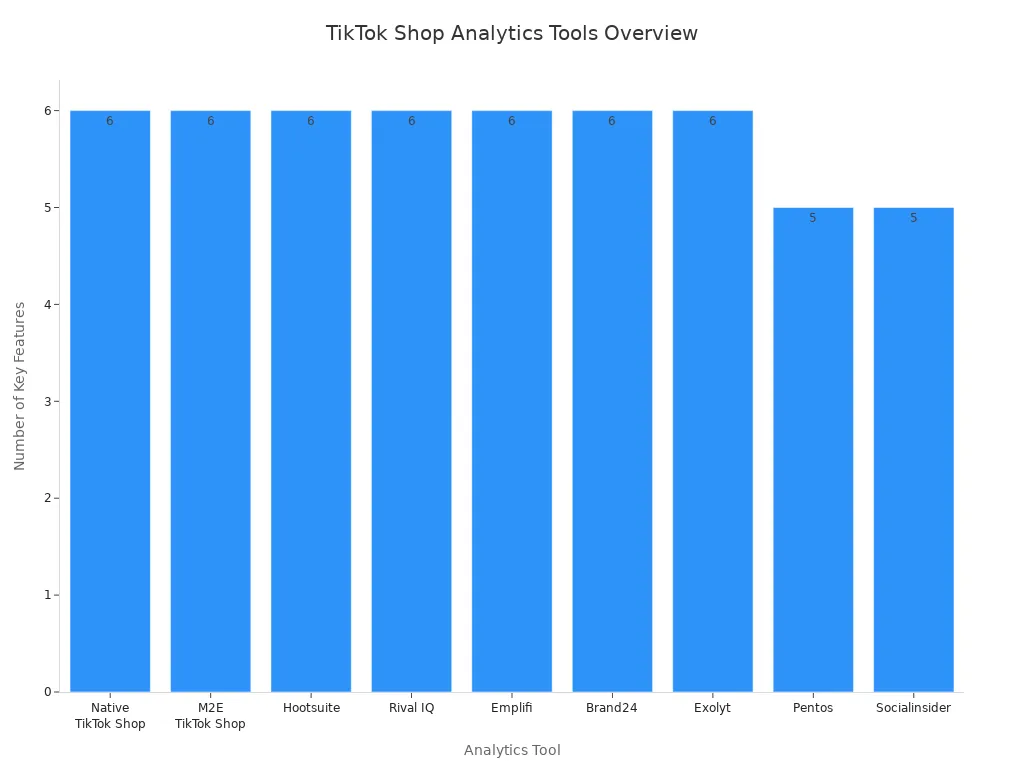
You can use these analytics to find trends, improve marketing, and make better choices for your shop.
Using TikTok Shop API
Getting Started
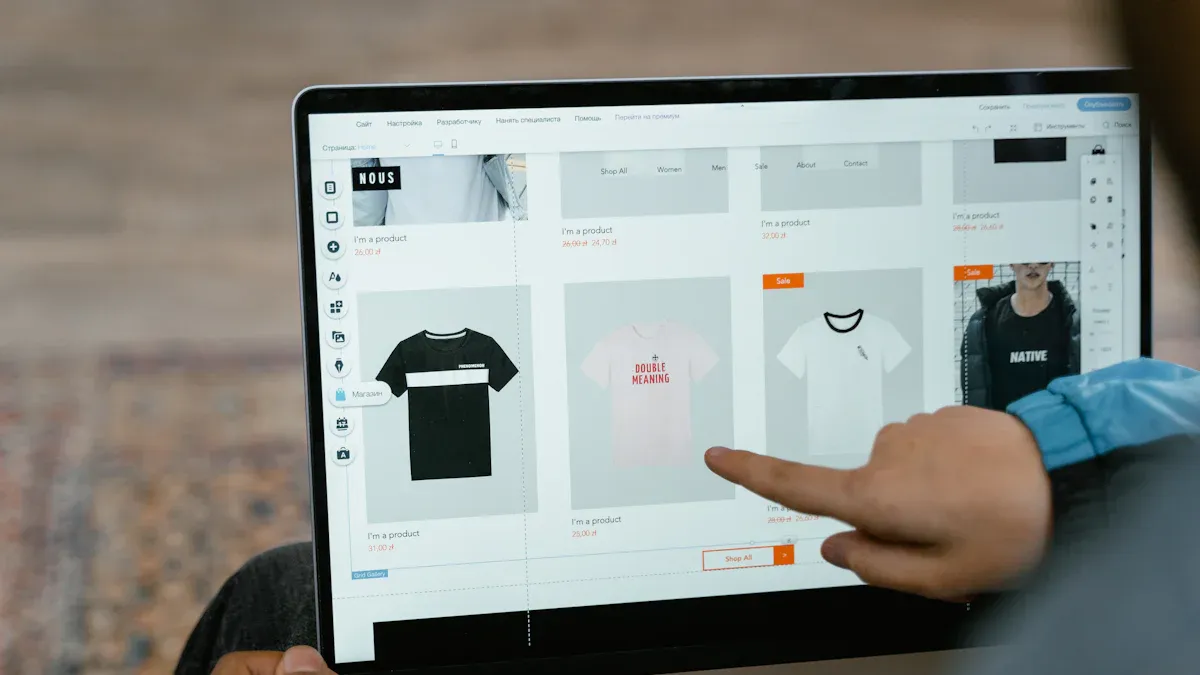
You do not need to be a tech expert to use the TikTok shop API. TikTok makes it easy for regular sellers to get started. First, you need a TikTok Shop Partner account. This account lets you use the developer portal and follow the onboarding steps. TikTok gives you clear instructions for each part, so you will not get confused.
A lot of sellers use the plug-and-play model. With this model, you do not have to write any code or hire someone to help. TikTok helps you with setup, adding products, and sending orders right in the app. You can add items, set up shipping, and handle payments by following simple steps. If you use dropshipping sites like Zendrop or Spocket, you can connect your product list and manage orders without needing special tech skills.
Tip: Have your business info and bank details ready before you begin. This will help you finish setting up faster.
Integration Steps
You can link your store to TikTok Shop by following some easy steps. Here is a simple guide:
Sign up as a developer on the TikTok Shop portal. Make your TikTok Shop Partner account and finish the onboarding steps.
Make your app. Pick Custom App or Public App. Get your App Key, App Secret, and Service Id.
Turn on the APIs you need, like Shop Authorized Information, Product Basic, and Order Information.
Set up a test seller account. Add your business and store info, finish ID checks, and wait for approval.
Change your TikTok Shop profile. Add products one by one or upload many at once.
Set up shipping choices, prices, and how you will send orders.
Link your bank account and add tax info for payments.
Set up app login. Sign in with your main TikTok Shop account, pick your data source, name your login, choose your region and shops, set how long you want access, and approve the link.
Use the API to handle products, orders, shipping, and inventory. Send safe POST requests for each job.
Use SDKs or other tools to make things easier. These tools help you manage tokens and get updates right away.
Test your setup in a sandbox. Watch your API use, fix errors, and keep your codes safe.
You can also follow some tips to keep your shop working well:
Sign up for official updates and read new release notes.
Test your setup in a sandbox before you go live.
Check how fast the API works and watch for errors.
Use retry steps and fix errors for API jobs.
Keep your app codes safe with encryption.
Refresh your access tokens and fix login errors.
Write down all API answers and errors.
Use SDKs or other tools to make fewer mistakes.
Watch for API limits and slow down if needed.
Note: Many sellers use easy tools like Zendrop and Spocket. These let you move your product list to TikTok Shop with just a few clicks. You can handle orders and shipping without learning to code.
Supported Platforms
You can use the TikTok shop API with many popular e-commerce platforms. This makes it simple to run your shop, no matter where you sell. Here are some main platforms you can use:
Shopify
Shopify Plus
WooCommerce
Adobe Commerce (Magento)
BigCommerce
Salesforce Commerce Cloud
Generic (API)
Others
If you use Shopify or WooCommerce, you can find plugins or built-in tools to help you connect your shop to TikTok Shop. These tools show you what to do and help you sync products, track orders, and manage inventory. BigCommerce and Magento also let you connect directly, so your shop stays updated all the time.
Tip: Pick a platform that fits your business best. For the easiest setup, look for platforms with built-in TikTok Shop support or simple plugins.
The TikTok shop API lets you automate product work, order handling, and shipping updates. This saves you time and helps you avoid mistakes. Many sellers say using these platforms and tools makes selling on TikTok easy and less stressful.
Benefits and Challenges
Time-Saving
Connecting your store to TikTok saves you lots of time. You can manage products, orders, and inventory all in one place. You do not need to use many apps or update each sales channel by hand. When you sync your store, changes show up right away. This means you spend less time on small jobs and more time growing your business.
Many sellers say TikTok helps them find new customers quickly. The platform has a big audience and uses smart tools to show your products to people who want to buy. You can focus on marketing and building your brand while TikTok handles the busy work.
Automation
Automation makes your daily work much easier. You can set up your store to do many jobs for you. Here are some things you can automate:
Sync orders in real time so you never miss a sale.
Update inventory on all your sales channels.
Make pick lists for your warehouse team.
Create shipping labels and pick carriers.
Send tracking numbers to your customers.
Notify customers at every step of the order.
Tag products and turn on in-app shopping.
Use chatbots and send custom messages to buyers.
Work with influencers and track how well they do.
Automation helps you make fewer mistakes and saves time. Your team can spend more time on creative work and helping customers. As your sales grow, automation helps you keep up without feeling stressed.
Common Issues
You might have some problems when you start using the platform. Here is a table of common problems and ways to fix them:
Common Technical Issues | Recommended Solutions |
|---|---|
Bulk mapping errors during product sync | Do not sync your whole catalog at once. Fix errors by hand if needed. |
Product approval failures | Make sure your product data matches TikTok’s categories and rules before syncing. |
API rate limiting and timeout errors | Try again and slow down your requests if you see errors. |
SKU conflicts from non-unique identifiers | Use special codes like GTINs or custom SKUs instead of product names. |
Sync failures due to cached product data | Clear your cache and check if your products are visible. |
Ghost products (SKUs not appearing) | Turn products off and on again to force a clean sync. |
Integration headaches from unresolved errors | Try automatic retries, then check by hand, and contact support if you need help. |
High error rates during syncing | Set rules to pause syncing or undo changes if you see too many errors. |
Tip: Check your integration stats often and keep your product data current. If you have trouble, use community forums or ask support for help.
You can make your business bigger by using tools that help you with products, orders, and marketing all in one spot. Many sellers have fewer mistakes and sell faster because of things like real-time inventory, simple returns, and built-in marketing.
Feature | Business Impact for Sellers |
|---|---|
Inventory Management | Cuts down on mistakes and stops missed sales |
Order Management | Makes sure orders get sent out on time |
Reporting & Analytics | Helps you choose what is best for your shop |
Low Entry Barrier | Lets small sellers start selling easily |
Sellers get help from a big group of buyers and pay less in fees.
You can use fun videos and follow influencer trends to sell more.
Built-in analytics and automation help you save time and money.
Think about what your business needs and ask for help if you need it. You have the right tools to do well and find more customers.
FAQ
How do you get access to the TikTok Shop API?
You need a TikTok Shop main account. Sign up as a developer in the TikTok Shop portal. Register your app and follow the steps to connect your store. TikTok will guide you through each step.
Can you use the TikTok Shop API without coding skills?
Yes! Many platforms like Shopify and WooCommerce offer plugins. These tools let you connect your store without writing code. You can manage products and orders using simple menus.
What should you do if your products do not sync?
Check your product data for errors. Make sure your product names, categories, and images match TikTok’s rules. Try syncing again. If you still have trouble, contact TikTok support for help.
Is the TikTok Shop API safe for your business?
TikTok uses secure connections and trusted payment systems. You should keep your login details private. Always use strong passwords and update them often.
Which e-commerce platforms work with the TikTok Shop API?
Platform | Supported |
|---|---|
Shopify | ✅ |
WooCommerce | ✅ |
Magento | ✅ |
BigCommerce | ✅ |
You can use these platforms to connect your store and manage your TikTok Shop easily.
See Also
Effective Order Management Strategies For TikTok Shop Sellers
EchoTik Introduces U.S. Pricing Calculator With Advanced Features
EchoTik Assists Sellers After TikTok Shop Indonesia Closure
Top TikTok Analytics Tools To Boost Your Marketing Insights
EchoTik.Live Enhances Seller Success With TikTok Data Analytics
